• Hello MLAers! We've re-enabled auto-approval for accounts. If you are still waiting on account approval, please check this thread for more information.

iMac G3 Rev A-D FSB bus overclock

indibil

6502
Hello, I am writing to you because the information on the Internet is getting lost. Many years ago I overclocked the FSB on one of these iMacs from 66MHz to 83MHz, but I don't have the documentation and I can't find anything on the Internet.

Does anyone remember how to do it? Any photos and positions? The position of 2 resistors was changed, but I don't know what the method was.

Thanks.
 
Hello, I am writing to you because the information on the Internet is getting lost. Many years ago I overclocked the FSB on one of these iMacs from 66MHz to 83MHz, but I don't have the documentation and I can't find anything on the Internet.

Does anyone remember how to do it? Any photos and positions? The position of 2 resistors was changed, but I don't know what the method was.

Thanks.

@Daniël may be able to help here.
 
Hello, I am writing to you because the information on the Internet is getting lost. Many years ago I overclocked the FSB on one of these iMacs from 66MHz to 83MHz, but I don't have the documentation and I can't find anything on the Internet.

Does anyone remember how to do it? Any photos and positions? The position of 2 resistors was changed, but I don't know what the method was.

Thanks.
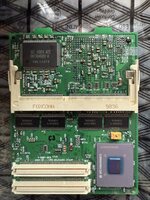
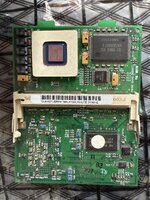
What CPU do you have?
 
Hello
I have 233MHz OC at 300MHz
So you know if you send the bus up you'll have to back down the CPU multiplier?

The XPC106 Rated at 66MHz rarely does 83MHz without very quickly overheating, that is if the iMac will boot at all, my Beige won't. I'll see if I can check my spear iMac CPU card and see if I can see the resisters to set for the Bus speed for you, the XPC106 in mounted on the CPU card.
 
Now if @herd would only stick a 7410 on here for me?
I don't think you can just stick a 7410 on there, because the cache chips aren't compatible. I forget the specifics, but it's something like... these are 3.3V and the 7410 uses 2.5V chips. Yes you could bring the chips over, but you'd have to find a way to isolate them from the 3V3 supply and you might need to install a voltage regulator/buck converter. It gets complicated.

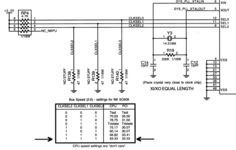
Now, as for the original question, I did look up the iMac schematics. The following is relevant:

Screenshot 2025-02-09 at 18.35.54.png
If I'm interpreting this right, a 47R resistor needs to be fitted at R140, to set the 83MHz bus speed.
 
I don't think you can just stick a 7410 on there, because the cache chips aren't compatible. I forget the specifics, but it's something like... these are 3.3V and the 7410 uses 2.5V chips. Yes you could bring the chips over, but you'd have to find a way to isolate them from the 3V3 supply and you might need to install a voltage regulator/buck converter. It gets complicated.

Now, as for the original question, I did look up the iMac schematics. The following is relevant:

View attachment 83224
If I'm interpreting this right, a 47R resistor needs to be fitted at R140, to set the 83MHz bus speed.
Thanks I did not realize the Cache ran at a different voltage, I guess I better bid on the Sonnet 450 OCed to 500 tonight, but there are 3 bids and 23 watchers, so I bet I'll get out priced.

Not paying that much for an OC'ed part, I don't care how rare they are.

But we'll know what it sells for and that's a good method of price discovery for anyone thinking of making 7400/7410 ZIF upgrades out of the old G3 ZIFs.
 
I don't think you can just stick a 7410 on there, because the cache chips aren't compatible. I forget the specifics, but it's something like... these are 3.3V and the 7410 uses 2.5V chips. Yes you could bring the chips over, but you'd have to find a way to isolate them from the 3V3 supply and you might need to install a voltage regulator/buck converter. It gets complicated.

Now, as for the original question, I did look up the iMac schematics. The following is relevant:

View attachment 83224
If I'm interpreting this right, a 47R resistor needs to be fitted at R140, to set the 83MHz bus speed.
My Beige seems stable at 70MHz Bus and 35 PCI, what would I need to move to get that on my spare iMac card?

I'll risk than I can do 280MHz on the CPU Rev B iMac.
 
My Beige seems stable at 70MHz Bus and 35 PCI, what would I need to move to get that on my spare iMac card?

I'll risk than I can do 280MHz on the CPU Rev B iMac.
I think I need to remove R138+R139 and place one on R140?

Anyone spot R139?

I don't see it, R140 is on the XPC106 side, and R138 is on the MPC750 side.
 
thanks for the information. Then I must add R140 to reach 83MHz. I can't locate R139.

About 15 years ago I already did this FSB overclock and it was stable at 83MHz, with PC100 RAM.
 
I'm thinking it's going to be on the main logic board. If three of us don't see it, that's likely where it is.

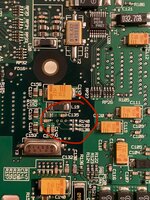
IMG_2511.jpeg
I just so happen to have a Rev. A iMac G3 logic board sitting around. Well, here they are - on the underside, directly below the IMI SC clock generator chip. I think the schematics definitely refer to these pads rather than the ones on the daughtercard. The odd thing is that they are all unpopulated, which according to the schematics means it is set to test mode. I think there’s a reasonable chance populating all three sets of pads would still set the 83MHz bus option.

@indibil do you remember when you did the mod previously if it was on the daughtercard or on the logic board? There may be more than one way to do this, I guess.
 
Well, I don't remember, I only keep this link that doesn't work and a note that I should move two "0ohm" resistors.

bus overclock

Good find, those three resistors on the motherboard, although they should not be in use, because for 66MHz there should be 2 resistors there. The schematic indicates "no stuff".... My memory tells me that I did it on the processor board, but I could be wrong.
 
Last edited:
Well, I don't remember, I only keep this link that doesn't work and a note that I should move two "0ohm" resistors.

bus overclock
Fortunately, this web page is archived:


“To change the bus to 83Mhz, simply move resistor R24 to location R23, and then resistor R12 to location R13.”

Good find, those three resistors on the motherboard, although they should not be in use, because for 66MHz there should be 2 resistors there. The schematic indicates "no stuff".... My memory tells me that I did it on the processor board, but I could be wrong.
This is quite interesting. I guess it’s another way to set the bus/PCI clocks, obviously redundant as the MPC106 has its own internal multiplier.
 
“To change the bus to 83Mhz, simply move resistor R24 to location R23, and then resistor R12 to location R13.”

This is how I did it on my card that received a 100MHz XPC106.
Sadly, I haven't found a way to get it to 100MHz, it might simply be impossible without further hardware modifications.
 
7400/7410 ZIF upgrades out of the old G3 ZIFs.
You'll face he same 3.3V vs 1.8V/2.5V cache chip problem there. All of the cheap slow G3 ZIF modules will have 3.3V cache installed and will likely be hardwired to supply 3.3V with no easy way to change that to a lower voltage. So you're left with sticking on 7400s unless you use a 400MHz+ G3 ZIF module as a base as those are likely to have 2.5V cache installed so you could go for the 7410 on those.
 
unless you use a 400MHz+ G3 ZIF module
So no MPC750 based ZIF is going to work without some means of lowing the voltage to the L2, or just removing it?

Would some type of imposer board fixed to the L2 memory SM that supplies the correct voltage to the new L2 Memory on top of the imposer work?
 
So no MPC750 based ZIF is going to work without some means of lowing the voltage to the L2, or just removing it?

Would some type of imposer board fixed to the L2 memory SM that supplies the correct voltage to the new L2 Memory on top of the imposer work?

The compounding issue is that the L2 supply voltage also goes to 13 pins of the 750/7400/7410, which will be much more difficult to disconnect and reconnect to a different, interposed voltage rail.
Mainly because there won't be a separate, isolated voltage rail to the L2 voltage pins of the cache ICs and CPU, as they're presumably just connected straight to the 3.3V rail of entire CPU card.

So while not impossible with both a CPU and cache IC interposer that supplies both with a 2.5V or thereabouts voltage rail, it's a very complex way of doing things.
And if you're going to interpose CPUs, you might as well try to develop an interposer for a G4 that has integrated cache.
 
Back
Top