• Hello MLAers! We've re-enabled auto-approval for accounts. If you are still waiting on account approval, please check this thread for more information.

IIsi video distortion before and after recap

elemenoh

6502
Both before and after recap, this IISI shows video distortion. The same monitor and adapter on another IISI works okay. The board hasn't been fully washed yet, but it was pretty clean to begin with and I scrubbed it down with IPA pretty well during the recap. Is there a particular part of the board I should focus on? Any other tips?
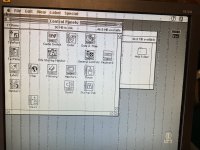
IMG_1539.jpeg


View attachment IMG_1538.mov
 
Looks like a memory fault to me as well. IIRC there's a way to move video memory to another memory block other than its dedicated, buffered 1MB block  .  .  .  yep, LEM.

Like the IIci, the IIsi uses onboard RAM for video, which slows the computer slighty. One way to speed things up is to add either a PDS or NuBus video card (see our NuBus Video Card Guide for more information). Another is to set aside the first 1 MB of RAM, since that is the bank shared for video and program space. This can be done by creating a large-but-slow 768 KB disk cache or using IIsi-RAM-Muncher by Paul Ripke. (Note that this program is worthless if you’re using virtual memory or RAM Doubler.)
Dunno if it does what I'm thinking it does, but if you can move the Vampire's fangs to a different memory block you might be able to isolate your problem to the RAM, buffers a/o subset of traces and logic used in video. Having moved video memory to a RAM disk in system memory, if the wonkiness disappear you may have a good start?

Dunno, but if you do isolate it to bad RAM, you can replace the OEM ICs with a 4MB loadout.

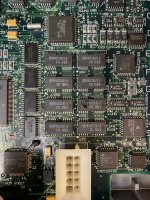
In terms of pictures, you're looking at the diagonal section of the board from backplane to front right (FDD) corner. Close details of the 8 memory chips, 4 vertical buffers and the memory controller on the other side of them to start.

 
Last edited by a moderator:
I tried running tech tool pro this morning and got a weird error on the RAM test. It said something like there's not enough memory to run the test. But then it ran and passed all of the other tests (PRAM, math etc). Here's a photo of the board around the soldered memory. I'll try reallocating the memory per @Trash80toHP_Mini's suggestion. If I need to replace the soldered RAM I might as well upgrade. What sort of spec should I be looking for?

Thanks for the help!

IMG_1541.jpeg

 
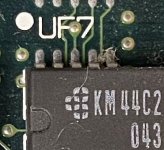
Forgot to mention taking matching pics of the solder side of the board. First thing I noticed is that grunge between pins 16 and 17 on UF7, if it's at all conductive that might be your problem.

IIsiMemGrunge.JPG

If we don't find something in the traces and you're comfortable with SMT Memory IC upgrade, I'd do that first. But I'm a technological knuckledragger and when all you have is a club  .  .  .

uniserver and I were talking about IIsi memory and he just went ahead, did the upgrade and it just worked. Threads are in hacks, IC info's in there. The upgrade may just work for fixing your problem. @trag & @Gorgonops does that look like a memory fault issue to you?

 
Dunno if it does what I'm thinking it does, but if you can move the Vampire's fangs to a different memory block
This does something else, the techniques mentioned block the remaining part of the IIsi's onboard one megabyte of memory, forcing system and application data to move onto SIMMs, on speculation that it'll speed up application performance. (basically to split video and application memory accesses into separate channels, if I remember correctly.) The video memory stays in the same spot regardless of whether or not you're using one of those programs.

I think the traces or bad memory chip (it would be one of the onboard ones) idea is probably the way to go here.

 
That was my sneaking suspicion, but thought I'd mention it because moving video memory to a RAM disk sounded like it might be mapped outside the buffered Meg. I wonder if one of the (245) buffers might be glitchy? I'd think a bad trace would give solid line artifacts?

Try taking a a screen shot to see if the artifacts are in video memory or are introduced on the way out through the RAMDAC to the port. If the screen shot comes up clean, it's not RAM.

 
I figured out that BT478KPJ66 at UA2 is the RAMDAC. Reflowing it didn't change the symptom.

Video with a radius Nubus card works okay and helped to confirm that the screen shots taken with internal video were clean.

Is it correct to suspect that BT478KPJ66 itself is probably faulty or are there other things to check first?

There's currently only 1 BT478KPJ66 on eBay with an asking price of $20. Is there a better source for cheap replacements?

 
Last edited by a moderator:
Back
Top