• Hello Guest! We're hosting a challenge to welcome vintage Intel macs to the MLA during the month of July! See this thread for more information.
  • We've made some quality of life improvements to the Trading Post. More info here.

IIfx Garbled Graphics/Artifacting After Zapping PRAM?

Ran into a weird issue with my IIfx tonight. It would hang at the desktop when my Apple external drive was connected through SCSI. I figured zapping the PRAM would return everything to normal (and it did, for the most part anyway, as my external devices are communicating once again with the IIfx).

But now I get this graphics issue:
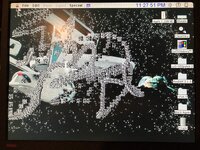
IMG_2132.jpeg
Is this the sign of a failing PRAM battery or am I looking into something bigger, like my 8.24GC card heading into retirement?

 
If you toggle bit/pixel-depth under the Monitors control panel and restart, does the problem persist? (I assume the answer is "yes" - but just want to double check)
 
I once had a scsi issue which I also resolved via a PRAM reset. But didn’t get the graphics issues you are seeing.

Looks like you have a desktop wallpaper extension running. Do you see the issue with it disabled?

There is also a known issue with the 8*24 GC card and System 7 with drag and drop enabled. I wrote a fix extension for that particular issue. But your screenshot doesn’t look like the patterns I saw with this particular issue. Which system version are you using? It would be interesting to see what happens with all extensions disabled.
 
Running 7.5.1 on my Apple external SCSI drive. Getting this junk after 30 minutes of use:
IMG_2139.jpeg
I checked the 8.24 GC card. Pins are good and it’s firmly secure in its designated NuBus slot.
 
Back
Top