• Hello MLAers! We've re-enabled auto-approval for accounts. If you are still waiting on account approval, please check this thread for more information.

IIc strange image

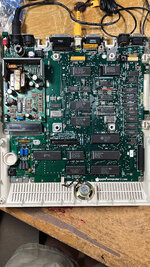
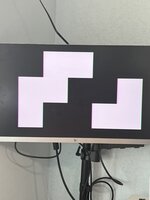
I recapped and cleaned this board both the PSU and motherboard. I now get this image on screen when turn on. I moved the rom, cpu, mmu, iou to another IIc and they all work fine. Anyone have ideas what to check for? Some detailed info would be great assistance.
I have removed the ram and put sockets for now. I need to get some spare ram just to have. I have also changed sockets for the rom, cpu and mmu but done all this after the issue started so it’s not the cause of the issue.
 

Attachments

  • C013BD8B-2345-4AA5-8421-33F20F3227E8.jpeg
    C013BD8B-2345-4AA5-8421-33F20F3227E8.jpeg
    1.2 MB · Views: 25
  • E8C5F1D6-29BD-477C-9866-FA8E60F36D01.jpeg
    E8C5F1D6-29BD-477C-9866-FA8E60F36D01.jpeg
    3.1 MB · Views: 25
I am bumping this to see if anyone has ideas and suggestions as I have been working on this all day today. I checked traces all from rom cpu mmu iou tmg and found no issues. Those were checked pin by pin to their locations and all other places they go. i also tested the rom cpu mmu iou in another machine and they work. The sockets for these 4 have all been replaced. Still getting this same screen. I seriously thinking it’s memory or other bad chip. This is fhe A2M4100 board with 4 memory chips only. Thanks.
 
Can you boot into system test?
No. That image is all I get with keyboard removed or attached. Pressing keys for test does seem to add another large block on the screen. After a bit some lines show up at bottom. On chips I feel some heat on mmu, iou, iwm, memory. Cpu and rom cold.
 
If I were you, I'd socket the RAM chips.

Dual wipe I'd go with these https://www.mouser.com/ProductDetail/3M-Electronic-Solutions-Division/4818-3000-CP?qs=IGgAdOvCTsRPXNYrGw8EYA==

For machine pin I'd go with these https://www.mouser.com/ProductDetail/Mill-Max/110-47-318-41-001000?qs=5aG0NVq1C4xxoOYTdZ6dOw==

If you're going to get a new set of chips you could probably do machine pin, but I generally prefer dual wipe.
The rams are socketed with the dual version. Even the cpu rom mmu iou I changed to dual. All rested for good continuity.
 
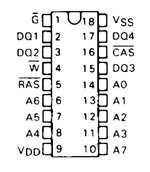
Here are the images for chip 1 out of 4. This the lower end. I did not do pin 1, 9, 18 as these are power and ground and the file names show the PIN number. As this the 4100 board, I am trying to find a clear schematic to get you the pinning info unless you have it already. I do have a schematic but it is VERY bad scan hard to read. I have to send a zip as it seems I can't attach bmp files that come from my scope. The files with B filename is for chip 3 the first in the higher memory part.
 

Attachments

I as about to post this. This the first chip and file and shows the PIN number. 2,3,15 look good and same type. 17 is upside down. Inverted. This the only one that is different to all chips and the 4 pins for data lines
 

Attachments

Can I see the schematic? You need to trace pin 4, the WE pin, it's got some issues in the write enable circuitry
 
Back
Top