• Hello MLAers! We've re-enabled auto-approval for accounts. If you are still waiting on account approval, please check this thread for more information.

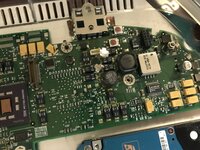
iBook G3 pram capacitor schematic

I disassembled my iBook G3/300, and the PRAM supercapacitor was fairly yucky
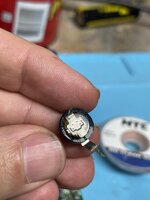
tempImageba3RJu.jpg

I tried to put a replacement in but couldn't get the solder to stick well to one of the holes. In the process of trying to do that I brushed the side of the cap with the iron and ruined it, so I'll need to get another. I took it out and now the holes look like this:
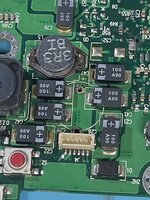
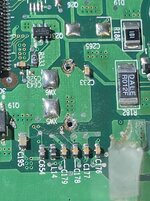
A44FF701-BFAC-4AF9-8730-4B19D0A0272D_1_201_a.jpeg IMG_8629.JPG

To me it looks like it's going to require some wires to fix. Does anybody know where to connect the other ends? Can anybody probe theirs?

Sigh.
 
I put the new one in, and after a comedy of re-assembly errors, eventually managed to get the machine back together. It still behaves the same: won't charge the battery (which is equally likely due to a bad battery), and shuts off when reaching the finder from the 8.6 boot disc.

But it's no worse than it was, and it'll be a long time before the new capacitor starts ruining the board again. Oh well! (Clamshell) case closed.
 
Desoldering this pesky capacitor would have been a perfect job for low melt solder! I did a similar job this January, and despite buying the special solder only a few months prior, I forgot I had it and went through a similarly painful supercapacitor replacement experience.

If the computer is crashing on boot, I would recommend trying to boot an OS other than 8.6, as only some (but not all) iBook Clamshells supported this operating system. I understand it is possible to upgrade the firmware on these computers, so even if your model initially ran OS8, in theory, it might not be compatible any longer.

Perhaps the MacOS9Lives (9.2.2) universal OS9 CD available online would be a good option for testing purposes?

Trying some different RAM (or temporarily removing a RAM upgrade altogether) may also be helpful for troubleshooting.

You should be able to operate the computer without any battery installed. I pulled mine years ago and only use the computer with AC power, as I have yet to replace the original (dead) battery.
 
even if your model initially ran OS8, in theory, it might not be compatible any longer.

And I believe that shutting off when you reach the Finder is indeed the symptom of a system which has been upgraded in this way!
 
Ah, interesting, thanks. When it shuts off in this way, it forgets the time and everything else. Which is why I suspected the bad capacitor.

Some more info: the restore disc is not the one that came with the machine, but the one I saved from my wife's original blueberry clamshell. So, as you say, this tangerine one may have been a later build, or maybe the firmware upgrade is responsible, I didn't realize that made them no longer able to boot from their original discs.

The CD-ROM is fussy about burned discs, but I'm able to boot fully from a pressed PowerMac G4 restore disc (9.0), then do a restore of the 8.6 software from the network (Bugdom is essential after all). Then I need to upgrade it to 9.0 using the retail disc to allow it to boot, which *mostly* works over the network. I think it would work if I built a disc image instead of just copying the files.

Thanks for the explanation. I don't need 8.6--I just needed to know why :)
 
Aw rats... Are these leaking now, or was this just a freak occurrence? I really don't want to tear down my 2 clamshells... I've got 2 dead boards that both look fine, but yikes.
 
So it's becoming common? I hadn't heard about it until now... Guess I gotta recap both of my clamshell boards soon. I might as well do the whole thing while I have it apart, there are only a few electrolytics. What part number on mouser/digikey did you use for the replacement?
 
I don't know how common it is. But, they're 20 years old. I didn't do the other electrolytic on there, I probably should have but I was getting sick of working on it.

For the supercapacitor, I couldn't find any on mouser or DigiKey. The closest I could find is this: https://www.ebay.com/itm/121149729936

It's a tight fit, the legs barely make it into the holes.
 
It's also worth noting that there's a supercapacitor used for CMOS on the original xBox which is notorious for leaking all over the board. The clamshell might begin to suffer the same fate...
 
Well, I took the blueberry apart and found this.
43B5C5E5-7F0B-4D5B-B167-F4DB2D476D15.jpeg
Who does this?!?!
I guess someone had an issue with it in the past… Maybe that’s why this board only likes to cold boot.
 
Hahaha you don’t have to worry about it leaking! May as well get C53 while it’s apart. That’s the one I skipped because I was tired of screwing up
 
The markings on this one are a bit confusing, if it's a 100uf 35v cap then I do have a replacement on hand, but why is the "f" marking next to the 35?
 
So it's becoming common? I hadn't heard about it until now... Guess I gotta recap both of my clamshell boards soon. I might as well do the whole thing while I have it apart, there are only a few electrolytics. What part number on mouser/digikey did you use for the replacement?
did you ever order these parts? I have 7 clamshells and 4 iBooks. would like the part # for super cap and the 100uf 35v if you have it!
 
I remember having a really hard time finding the right value PRAM capacitor. I believe I just bought one that was roughly near the original value, and it worked fine.
 
Back
Top