• Hello MLAers! We've re-enabled auto-approval for accounts. If you are still waiting on account approval, please check this thread for more information.

I want to do this...

Great job, Al. Is the connector one we can get hold of easily. It looks MOLEXy enough to be found in an automotive parts store.

You've got over three times that six pin count on the cable to your breakout box! ;)

 
It does look molexey. I figured I'd just carve up the cord it's already on. I'll look at the autozone down the street just in case tho.

 
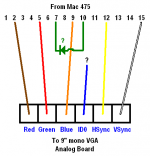
According to this: http://pinouts.ru/VideoCables/MacVideoToVGA_pinout.shtml, these are the Mac pins/sockets necessary for the video:

Wire Color - VGA - Signal - MacVid
Brown - 1 - RED - 2

Red - 2 - GREEN - 5

Orange - 3 - BLUE - 9

Blue - 11 - ID0 - 11

Yellow - 14 - VSync - 12

White - 13 - HSync - 15

1\ * Br * * R * * * /8

9\ O * Bl Y * * W /15

I'm still confused/worried about the function of the id0 (VGA 11), What does it do? Will sending the id0 signal to C/VSync Ground (Mac 11) work?

* On my adapter pictured in an earlier post, VGA 11 is not connected to any pin (nor the shield) on the Mac side. This is the adapter I used successfully to send video from the 460 and 475 to the 9"-mono-monitor, so I think I should not use the blue wire at all.

* On a different adapter I have (labeled "ADAPTER 21 640X480-1280X1024), VGA 11 is connected to the shield on the Mac side. I have not tried this adapter with any part of this set-up (460/475 to 9"-mono-monitor).

* On neither adapter is any pin on the Mac side connected to the shield.

On my working (first) adapter, Mac pins 7 & 10 are connected, so I should bridge them in my adapter cable, yes? The link above has a diode in-line, "pointed" at 7, should I incorporate that? Can I use my multimeter to determine if there is a diode in my adapter? I have my multimeter set to Ω, and it beeps and displays 0.000 (so, 0 Ohms of resistance, right?) both directions (red on 7 + black on 10, and black on 7 + red on 10).

Here's what I have so far:VideoDiagram.PNG

My questions are: Do I need the diode, and should I take the IDO to Mac 11?

 
Yup to the diode, it makes the two wires both on, one on or both off as I understand it.

Nope, haven't had a chance to look at the rest, I'm at work.

 
I've filled and sanded the FDD groove all the way across the Classic II's face (I'll post pics soon). Feels perfect. With my eyes closed I cannot tell where the sanded-smooth plastic stops and the wood-filler starts. So, it's ready for the next scary step...

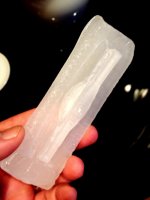
Here's my crazy plan to sculpt the pout on the front of this beast. I have the junker 605 case to use, but I hate to cut it up, even in its busted state. So I'm going to tape closed the back of the 605's floppy opening and fill it with melted wax to cast a negative of the pout.

I already have the Classic's face marked for where the pout needs to wind up, so I'll cut the least margin around the pout as I can, drop in the wax negative, and wood-putty fill all the gaps and cover the negative with a nice thick layer on the inside. Once everything's dried for a day or two, I can pop or melt out the wax and start sanding the face back to flush. I should have a nice pucker in place ready to paint.

 
Further research leads me to believe that ID0 likely needs to be implemented.

Is that line grounded? At the bottom of the second page of one of the links I've been studying (IIRC, it was the pinouts.ru page re: VGA) it says that line indicates the display to be SVGA w/o 1024 x 768 support. There's a table for the three ID signals on the VGS pinout and their indications of their states.

Gotta figure out how that translates across an adapter for sure, but a straight connection to pin 11 seems likely.

 
* On my adapter pictured in an earlier post, VGA 11 is not connected to any pin (nor the shield) on the Mac side.

* On a different adapter I have (labeled "ADAPTER 21 640X480-1280X1024), VGA 11 is connected to the shield on the Mac side.

* On neither adapter is any pin on the Mac side connected to the shield.
I assume the shield is the ground, so one of these adapters doesn't do anything with id0, and the other takes it to ground.

Once I get a working 475/605 board up and running, I'll try both adapters and see if a difference is made. I don't expect there will be much difference since the tested working adapter was the one without id0 connected.

 
Curious, thanks for that re-cap, Al. The question remains about id0 pin being connected to signal ground on the monitor side or not. I'm assuming it is, otherwise I think it'd be a 5 pin connection, as on a VGA->5BNC connection.

On an adapter, shield ground connections ought to be a different story, maybe I'll buzz a bunch of my own adapters as well. ;)

 
Ok, I have my wax mold of the 605's pout. Unfortunately, the floppy gap itself (the distance between the top and bottom horizontal lines of the floppy hole) is about a millimeter taller on the 605 than on the Classic. I'll need to do some carving to get it to slide in properly. Question is: should I shave the wax mold, or the Classic.

Sorry about the image sizes. They're straight off my phone.

image.jpg

image.jpg

 
Both! Scrape the flats of the wax mold to fit and then file the excess putty out of the slot after molding it to clean up the lines.

Alternately: file the existing Classic slot to match the 605's slot and then do the casting as planned, that'd be more true to the original concept.

 
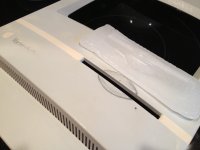
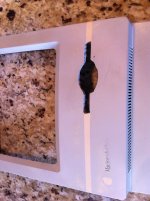
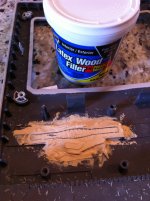
Fitted the wax negative pout hard against the bottom un-shaved edge with duct tape and filled in all the cracks and crevasses with latex wood putty. This should give me a good base for filling and sanding the new pout.

Now we test my patience. I hope I can wait until after work Monday for everything to set all the way up. Then I'll take a hair dryer to the wax to loosen it up and see how much touch up will be necessary.

I was worried that the angle and curve of the 605's pout negative wouldn't closely enough match the Classic II's face, but once it was in place it matched up beautifully. The curve is almost exactly the same and the distance inside from the front face to the front of the FDD mechanism is very very close enough.

If this doesn't work I'll be very disappointed, but I can always try the original graft-from-the-605 idea.

image.jpg

 
:p

I know it wouldn't be authentic, but I think a silverish gray color would make this thing look awesome when its all smoothed out.

 
Which brings up the question: what's a paint code that matches Mac platinum? This bucket is pretty un-yellowed, so I might get away with just the face painting.

Edit- found this:

Can't believe I found this on Apple's Support website:
http://docs.info.apple.com/article.html?artnum=866

"Apple does not normally use PMS color charts or Pantone color numbers to designate the platinum color that is now the company standard. Our platinum color number on a coded PMS chart is somewhere between 420 and 421, somewhat closer to 421. (This depends on the age of the chart and the light source used for viewing it."
 
Back
Top