• Hello MLAers! We've re-enabled auto-approval for accounts. If you are still waiting on account approval, please check this thread for more information.

I want to do this...

Joined HDD & FDD sections of a 6100's front bezel, a MonoFeet™ installed under the chin & the microRGB on top = microLC6475™

If you think the Cassic's CRT is good, I'll try throwing it into the ZipMacPlus™ along with the MoBo and A/B mcd sent to me . . .

. . . then maybe install the ATOM board in this new project . . .

. . . unless the Duo's LCD can be folded up to fit in there. }:)

 
I'll attach it as best I can with the two and a half screws that'll grip. I'll have to risk my life to discharge the anode though!

Wish me luck. If you never hear from me again, I did it wrong.
file.php


Just unhook the connectors from the A/B and bolt 'er up. ;)

Contrary to popular belief, those things can't even knock you on yer @$$ . . . :lol:

. . . not to say it won't smart quite a bit if you're dumb how about the way you go about it. 8-o

 
It was harrowing, but I survived. The doctor says my hair should grow back starting immediately, and the boys should re-descend within a week. The tic may never go away, but I'm getting used to it already.

CRT fits perfectly BTW. I put all the assorted plastic bits and swivel base back on (or loose in) the case, so you have your choice of what to use.

I'll get it to the US Package Smashers as quickly as after-school daycare allows.

 
Last edited by a moderator:
The 9" mono SVGA CRT was really the hard part of the tech side of this hack. I've been piecing together the rest, and it looks like the things I still need to make this functional are:

  • a working Q605 lobo. The P460 is standing in nicely, but the point was a Quadra Classic. (I'll be sending it to Uniserver for the re-cap)
  • a LC power supply with about 4 or 5 more inches of reach on the cables (Uniserver look for a PM soon)
  • a 9" floppy drive ribbon. I have a 16" (or whatever ridiculously long one comes with a Q900), but I'd like to reduce the clutter)
  • a shorter/less-bulky way to get the video signal to the monitor
  • a power switch & distribution system to the monitor and LC power supplies
  • an erector-set arrangement for an internal HD


To make things presentable I'm still sanding the smooth parts of the case-lift. I have yet to make any cuts for the pout. I'm scared. I'll get up the guts once the notch-fill is smooth as a baby's...

Then I need to (have jt) do the 2" port relocation board.

I have some ideas for heat transferring the words "Quadra Classic" to the front. We'll see how it goes.

I haven't decided exactly which scheme I'll go with, the square badge, or the Apple then letters in a line... I'll v-hack up some actual choices and post them to see what I like.

 
I jumped on the first likely candidate from ebay. I would've taken a 12" Apple Hi-Res Mono if it had come up first.

Looking at the two tubes' neck pins, if this little SVGA mono's tube hadn't fit perfectly, I would've tried to use it's electronics to run the original CRT.

 
:)

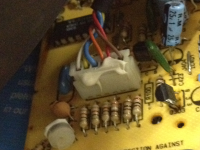
VGAmolex1.png

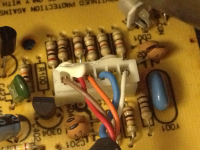
VGAmolex2.png

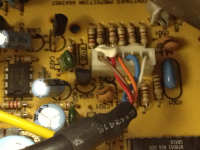
VGAmolex3.png

I guess I will eventually have to take a tool of some destructive sort to the VGA plug to see which pins those 6 colored wires belong to.

I haven't got up the guts to pull that Molex plug off the analog board yet, but when I do I'll head over to the local electronics wholesaler and see if they have any blanks I can populate.

 
Continuity testers aren't destructive, pin to pad testing with it plugged in will tell us all we need to know about the direct connection.

What resolutions does the monitor support and which one do you want to use? We may as well noodle out the sense code conversion to do it in the cable harness. It sounds like you don't have room for a standard converter in there. If you do have room for a short one, it'll be a lot easier to do your connection. Snag one of these . . .

http://www.l-com.com/item.aspx?id=3264

. . . with the right angle mounting kit if you have room for that and the adapter . . .

http://www.l-com.com/item.aspx?id=5796

. . . and you'll be good to go.

If there's no room for the VGA Adapter, we cut down one of these . . .

http://www.l-com.com/item.aspx?id=3256

. . . and wire it directly to a Molex Connector with the VGA conversion done in the cable.

Easy peasy, nice-n-easy! 8-)

 
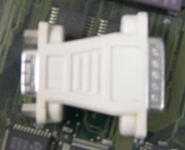
I've been using a no-name no-switches D-SUB-15M to HD-15F adapter.

switchless.png

When I had the Q605 up and running through ^that^ on the little color monitor, it was able to send VGA (640x480) or XGA (1024x768). The mini monochrome monitor is labeled "SVGA" which is technically 800x600 but also kind of a catch-all for "more than 640x480," so I tried it with a nearby PC. It does not like 1024x768@60 so I guess it's literally SVGA... poop. I guess it's good I don't have to go find 512k VRAM for it now. :-/

Apple says the Q605 doesn't do 800x600, and it would be very weird if the mini-mono-monitor supported 832x624, so simple VGA is all I'm aiming for.

I was assuming the switch-less adapter was just reassigning pins. I can't imagine there is much processing going on in there. I really hope to just cut off the VGA plug, and stick the appropriate wires to the appropriate pins in a D-SUB-15M plug.

I guess I could just drastically shorten the VGA cable, make my own teeny Mac extension cable and leave the adapter in there. That would be inelegant, but if it's necessary...

I'll try to get up the guts to disconnect the Molex by Monday.

 
If the 605 won't do 800 x 600 @ 60Hz . . . I'd like to say that I'd hate to say it, but I don't have any qualms about this one at all . . . }:)

. . . do the upside down Shortbed Takky Hack or at least the Quadra 630 routine (dunno what the CC crowd calls that one) and forget about keeping the tailgate of your Classic stock.

What's nice about the 630 series is that the Video Connector is already inside the box hanging off one of the ribbon cables on the Medusa Mess.

What's the point of doing a Quadra hack only to wind up with a paltry 640 x 480 resolution? :?:

edit: We can probably come up with a volunteer to do the case cuts/MoBo adaptation on the @$$ end of the Classic for you.

It's the work on the front bezel and behind the opening in it that's the main focus of your very cool hack. ;)

 
Nah. If I need higher res I'll just drop in an LC-PDS video card. I'm dedicated to the what-if-Apple-made-one-more-Classic stealth hack idea. At this point if I was just gonna jam something that'll run 800x600 in there, I'd use my spare G4 MacMini.

Do you think there's anything but wire rearranging going on in that adapter?

 
That's cool, I wasn't sure if it was more important to keep it stealth or to keep it Quadra. The Quadra 630 appears to be the only game in town for 800 x 600 @ 60Hz SVGA in that form factor.

Be sure to test your monitor doing 1024 x 768 @ 60Hz SVGA refresh rates from a VGA friendly Mac. The reason the 9" GS monitor doesn't like the 1024 x 768 you've fed it so far is that it's probably at the 19" Mac resolution's 75Hz refresh rate. I'm almost willing to bet that this is the same problem that you've had with getting the 10" Fujitsu to work at 1024 x 768 as well, they both expect the 60Hz SVGA signal.

It looks like any of the three RasterOps ColorVue Cards for the LC Slot will give you 1024 x 768 @ 60Hz in 8bit Grayscale. None of the available cards do 800 x 600 at all from the info available on LowendMac.

There's a bit more going on in those adapters than a simple switcharoo. As I understand it, some of the sense lines wind up getting tied together or to ground, but it has been a long time since I've has a passing familiarity with the process . . .

. . . gotta study up on it again, I'm way behind on the Radius Color Pivot II/IIsi cable building project. :-/

 
I hooked the 9" mono to a PC running at 1024x768@60Hz. Got bad horizontal squeals/squiggles in the center third of the screen. I didn't try other freqs, because I was pretty sure the 605's version of XGA was at 60Hz.

I didn't have any trouble with the 10" color monitor at XGA, it worked great! 4-bit, because I only have 2x256k VRAM instead of the 2x512k in the 605, but sharp and bright on that little screen. Once the 605 board is re-capped and happy I'll try it with the 9" mono and see if anything better than squeals & squiggles comes up. I'm not worried about it though. Even though VGA is not a lot of real estate, 9" is not a lot of room. I felt like the 10" at XGA was pushing it too small. System 7's icons weren't meant for a retina display :) VGA grayscale will be a nice evolutionary step in Classic alternate history. The icons will be smaller than on previous Macs, but not ridiculously small.

800x600 would be nice, but again, I'm not unhappy with VGA on a 9" monitor. If I have internal video working and I need more real estate, it's only an LC-PDS video card and a modern monitor away.

I'll take a continuity tester to the switch-less adapter and the VGA cable when I get a chance Monday.

I really need to get on with the cosmetic portion of this hack. Poor thing is sitting there with it's crack spackled, but unsanded. Looks like a monkey flung poo on it. Need to make some big wood and sandpaper files :) Still need to figure out a way to reproduce the pout.

 
Made some progress on the mono-VGA monitor cable. I'm going to call the board inside the monitor its analog board. At the analog board there are 6 lines in,

file.php


with the following arrangement:

| Br | R | O | Bl | Y | W |

I used a multimeter I had in a drawer and the continuity to the VGA plus was

\ Br R O * * /
\ * * * * * /

\ Bl * W Y * /

So the wire colors, to VGA pins, and signal are:

Wire Color - Pin - Signal
Brown - 1 - RED

Red - 2 - GREEN

Orange - 3 - BLUE

Blue - 11 - ID0

Yellow - 14 - VSync

White - 13 - HSync

I'm confused about what the ID0 pin accomplishes.

Not a huge technical breakthrough, but I'm pretty proud of myself for figuring out how to hold two ends of the cable and both probes in two hands at my messy desk at work and actually test continuity :)

The hardest part was getting up the courage to pop the cable off the analog board.

 
Who was the man that removed the mountain? The same man that started by removing a single pebble.

Chinese proverb or something. |)

 
Back
Top