
-
 Hello Guest! We're hosting a challenge to welcome vintage Intel macs to the MLA during the month of July! See this thread for more information.
 -
We've made some quality of life improvements to the Trading Post. More info here.
You are using an out of date browser. It may not display this or other websites correctly.
You should upgrade or use an alternative browser.
You should upgrade or use an alternative browser.
How to transfer files from PowerBook 1400c to MacBook M3?
- Thread starter mvallance
- Start date




Best I know of:
- Get a CF PC Card adapter, something like this: https://www.amazon.com/PCMCIA-Compact-Memory-Reader-Adapter/dp/B09NP3MJS2/ref=sr_1_9?crid=2GOIYQYAU41BS&dib=eyJ2IjoiMSJ9.7gXg2ADYK5ejg4oPx_2edFNOhK6turKFHNLuFUJRd-diasxhV-i80jD-2O_s6Kbl-bsXHQfICHQrSOdaMAx9EXVKwZonoAOnFzxrFtbJ3cdH5QWzqeIABNF1XCDVzsWeg9GM3s1nvmx5UYzBJi-ajtgIzGTADbzk6vicTvGq3y8SqSjNFfe4lJpbwUFYSEekQsTJE3rjcRCk6p3svxRWKhgn_JjdYEF4qTRbW_U74fY.bLlctnHUp-Uds5PuUQzDOT18BJvFEylMgZRIK5QVwXE&dib_tag=se&keywords=CF+PC+card+adapter&qid=1767009854&sprefix=cf+pc+card+adapter,aps,179&sr=8-9
- Get a compatible CF card as well. Format it in the 1400 (HFS+/Mac OS Extended format).
- Have a USB CF reader: https://www.amazon.com/SmartQ-C368-Multi-Card-Compatible-Supports/dp/B06Y1G18KS/ref=sr_1_4?crid=QVMVIBYVNFIJ&dib=eyJ2IjoiMSJ9.BVgIJ1nZD44wxmCIPAia4OwVvbKASK6BG2DMzBSboFWN05leTclB0jjZ519MchZN74rpMgqMceFRugniwu3RBEXAdwe_xFpPl15tWytAzFgKr75F_QpVaFkJvC_vsrXVNruEjI4LnS22wbXX9E_jhYPmFhr6tzUuBz6lPIpsNeflC_YygA5HJr6yF1mc9bfYpM7S6R-GQISxowOGtZGb4fW3UMFykdf9V3l8ck46teA.LcxIqKq4JQ4_M0Na8d2rkeROx4JU0N3zKQT-4UCrke8&dib_tag=se&keywords=USB+CF+reader&qid=1767009976&sprefix=usb+cf+reade,aps,224&sr=8-4
- Copy the files on the card from the 1400, insert into the M3, and you should be good to go.
- Get a CF PC Card adapter, something like this: https://www.amazon.com/PCMCIA-Compact-Memory-Reader-Adapter/dp/B09NP3MJS2/ref=sr_1_9?crid=2GOIYQYAU41BS&dib=eyJ2IjoiMSJ9.7gXg2ADYK5ejg4oPx_2edFNOhK6turKFHNLuFUJRd-diasxhV-i80jD-2O_s6Kbl-bsXHQfICHQrSOdaMAx9EXVKwZonoAOnFzxrFtbJ3cdH5QWzqeIABNF1XCDVzsWeg9GM3s1nvmx5UYzBJi-ajtgIzGTADbzk6vicTvGq3y8SqSjNFfe4lJpbwUFYSEekQsTJE3rjcRCk6p3svxRWKhgn_JjdYEF4qTRbW_U74fY.bLlctnHUp-Uds5PuUQzDOT18BJvFEylMgZRIK5QVwXE&dib_tag=se&keywords=CF+PC+card+adapter&qid=1767009854&sprefix=cf+pc+card+adapter,aps,179&sr=8-9
- Get a compatible CF card as well. Format it in the 1400 (HFS+/Mac OS Extended format).
- Have a USB CF reader: https://www.amazon.com/SmartQ-C368-Multi-Card-Compatible-Supports/dp/B06Y1G18KS/ref=sr_1_4?crid=QVMVIBYVNFIJ&dib=eyJ2IjoiMSJ9.BVgIJ1nZD44wxmCIPAia4OwVvbKASK6BG2DMzBSboFWN05leTclB0jjZ519MchZN74rpMgqMceFRugniwu3RBEXAdwe_xFpPl15tWytAzFgKr75F_QpVaFkJvC_vsrXVNruEjI4LnS22wbXX9E_jhYPmFhr6tzUuBz6lPIpsNeflC_YygA5HJr6yF1mc9bfYpM7S6R-GQISxowOGtZGb4fW3UMFykdf9V3l8ck46teA.LcxIqKq4JQ4_M0Na8d2rkeROx4JU0N3zKQT-4UCrke8&dib_tag=se&keywords=USB+CF+reader&qid=1767009976&sprefix=usb+cf+reade,aps,224&sr=8-4
- Copy the files on the card from the 1400, insert into the M3, and you should be good to go.

I have a PB1400c & MBA M2. I've found the PB1400<->PCMCIA/CF<->CF\USB<->MBA M2.Hello. I have a beautiful PowerBook 1400c with OS8.5.
Is there a way I can transfer files such as txt or doc from the PowerBook to my current MacBook?
Thank you.
Having said that, it's not the only way. I've transferred data via Zip drives; and also via an IDE<->USB interface (unplug the PB1400's HD and plug into an external USB/IDE drive. Of course, you can't do that many times, you'll fatigue the PB1400's IDE cable). Or, if your PB1400's HD is a µSD or SD card and you have an SD/USB interface that's another way if the µSD is accessible. Of course, if you have Ethernet on both that's another way; or even serial ports at a push.
One final bit of advice, obviously if you're using an original PB1400 HD (e.g. the 750MB one), back it up and switch to some kind of SD/µSD. Check out my threads on my PB1400.
Unless he has an Ethernet PC card or some sort of serial to ethernet/appletalk device, that will be basically impossible.I use A2Server on a Raspberry Pi 2b. Everything on my network can see it, Apple IIgs - Mini, Win7 - Win10. If you want, you can mount M.2 drives to it with adapters for very large drives.


The CompactFlash adapter suggestion is nice, but those links are "hot links", with all kinds of tracking and advertising bull%#)! information in them. A shorter, safer link would be like this:
https://www.amazon.com/dp/B09NP3MJS2
https://www.amazon.com/SmartQ-C368-Multi-Card-Compatible-Supports/dp/B06Y1G18KS/
Furthermore, versions of Mac OS X roughly around 10.10 or higher aren't the best for working with old Mac file formats. While they can do it, there's better choices.
Networking is still the best way to go even today. Netatalk works great in virtual machines, although macOS host machines wouldn't be my first pick. You can get devices like the Farallon EtherMac PC card, like part number 590 or 595, which are still around. If the dongle is not included, don't buy it. Other stuff like Zip disks and Jaz things are kind of a thing of the past.
https://www.amazon.com/dp/B09NP3MJS2
https://www.amazon.com/SmartQ-C368-Multi-Card-Compatible-Supports/dp/B06Y1G18KS/
Furthermore, versions of Mac OS X roughly around 10.10 or higher aren't the best for working with old Mac file formats. While they can do it, there's better choices.
Networking is still the best way to go even today. Netatalk works great in virtual machines, although macOS host machines wouldn't be my first pick. You can get devices like the Farallon EtherMac PC card, like part number 590 or 595, which are still around. If the dongle is not included, don't buy it. Other stuff like Zip disks and Jaz things are kind of a thing of the past.
Thank you, but can you also show me how to strip all of that out?The CompactFlash adapter suggestion is nice, but those links are "hot links", with all kinds of tracking and advertising bull%#)! information in them. A shorter, safer link would be like this:
https://www.amazon.com/dp/B09NP3MJS2
https://www.amazon.com/SmartQ-C368-Multi-Card-Compatible-Supports/dp/B06Y1G18KS/
Furthermore, versions of Mac OS X roughly around 10.10 or higher aren't the best for working with old Mac file formats. While they can do it, there's better choices.
Networking is still the best way to go even today. Netatalk works great in virtual machines, although macOS host machines wouldn't be my first pick. You can get devices like the Farallon EtherMac PC card, like part number 590 or 595, which are still around. If the dongle is not included, don't buy it. Other stuff like Zip disks and Jaz things are kind of a thing of the past.
As far as files, I regularly use macOS 10.14, and 15 and save files on a CF for my 1400...no issue.

Sorry, I forgot to mention the LocalTalk bridge (control panel) which will run on any pre-Lombard Powerbook that has RJ45 Ethernet. 2400c, 3500C, Wallstreet. That is one way to connect your 8 Pin Din AppleTalk port to a RJ45 TCP/IP network.
Unless he has an Ethernet PC card or some sort of serial to ethernet/appletalk device, that will be basically impossible.
That would work...unsure with what he said that he has any other classic Mac, however.Sorry, I forgot to mention the LocalTalk bridge (control panel) which will run on any pre-Lombard Powerbook that has RJ45 Ethernet. 2400c, 3500C, Wallstreet. That is one way to connect your 8 Pin Din AppleTalk port to a RJ45 TCP/IP network.

If it's just a txt or doc file, why not just over serial using something like Kermit?
I'm sure most people have Mac serial mini-DIN to USB converters in their back pockets!If it's just a txt or doc file, why not just over serial using something like Kermit?

I’ve also done it with a modem on each end and a null modem cable in between.I'm sure most people have Mac serial mini-DIN to USB converters in their back pockets!
The myriad ways of accomplishing something! You guys never cease to amaze me.I’ve also done it with a modem on each end and a null modem cable in between.
Mini-DIN to DE9 -> DE9 null modem cable -> DE9 to USB serial cable. Inexpensive and readily available in terms of kit... then simply make a serial connection. For instance, Kermit on the new Mac (install via Homebrew, free, pretty easy to use in Terminal), and Kermit on the old Mac (or ZTerm, or the like, that can use Kermit protocol).I'm sure most people have Mac serial mini-DIN to USB converters in their back pockets!
I will admit configuration can feel fussy if you're not familiar with it, but it's not 'hard' or mysterious.
I actually prefer using MacIPRpi with an AsanteTalk box to move things around - drag-and-drop is nice. But if it's just a simple file send and you don't want / need all of the infrastructure, serial exists as a simple, cheap and well-established method.
Last edited:

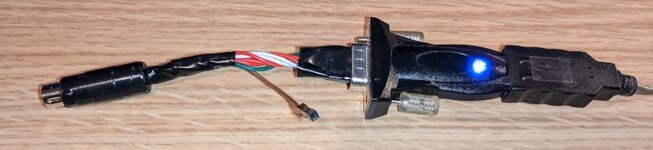
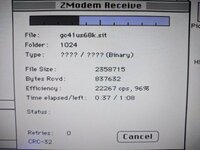
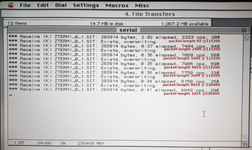
These days I sure didn't! I don't really know what counts as fast here, but I'm getting up to 8000 cps with kermit and 22000 cps using zmodem from this thing.I'm sure most people have Mac serial mini-DIN to USB converters in their back pockets!
Having said that, I started with ClarisWorks to get ZTerm onto that machine and I didn't test the capabilities of ClarisWorks. If someone doesn't have a terminal program of some sort and any needed supporting system extensions already, then that might be an issue. Also I don't remember how this thing is wired up, though the header is potted with glue and can be unplugged from the USB serial adapter if I ever wanted to buzz it out I guess.
On the USB side was a modern PC running Fedora with c-kermit and minicom.
A CompactFlash memory card and a PC Card adapter for CF in the PowerBook, as suggested by LaPorta, is the way I would use in a similar case. If necessary, the card can be PC-formatted (FAT).
With an appropriate Ethernet PC Card, or an Orinoco Silver or Gold Wi-Fi PC card (with the thick antenna), it would alternatively be possible to use TCP/IP for transfers via a Wi-Fi router. An old/spare router may be used as an intermediary in order to temporarily handle WEP or lower wireless security.
Since "normal" file sharing is not directly possible between old and new Macs, a workaround may be to use local web sharing as described in the following article (this web sharing method works one way, from the old to the new Mac):

 happymacs.wordpress.com
With an appropriate Ethernet PC Card, or an Orinoco Silver or Gold Wi-Fi PC card (with the thick antenna), it would alternatively be possible to use TCP/IP for transfers via a Wi-Fi router. An old/spare router may be used as an intermediary in order to temporarily handle WEP or lower wireless security.
Since "normal" file sharing is not directly possible between old and new Macs, a workaround may be to use local web sharing as described in the following article (this web sharing method works one way, from the old to the new Mac):
Network Your Classic Macintosh with Windows, Part 4 – Using Web Sharing
Welcome to part 4 in our series of posts on various and interesting ways to network your classic Macintosh with Windows. In previous posts in this series, we have looked at networking using Dave, D…
happymacs.wordpress.com
Buy an old printer and print the documents. Take the printed documents over to the newer computer and set them on top. Now the documents are on the new machine.
Later if you want to, scan the document and save it on the new computer. No fuss.
Later if you want to, scan the document and save it on the new computer. No fuss.
Similar threads
- Replies
- 0
- Views
- 110


- Replies
- 3
- Views
- 199


- Replies
- 10
- Views
- 249
