


• Hello MLAers! We've re-enabled auto-approval for accounts. If you are still waiting on account approval, please check this thread for more information.

How do I install the apple 32-bit enabler on 7.1.1 SE/30

I have 7.1.1 running on an SE/30 with 16MB of RAM.  I was going to use the MODE32 which I have used without issue before, but I need the thread manager and the readme states that it is incompatible with all versions of MODE32, so that leaves me with the apple 32 bit enabler.  I have downloaded this from 2 different sites, and extracted it without issue, but I end up with a single file that is neither an extension or a control panel applet.    I am uncertain how to actually install this program.  Any advice would be appreciated.  Thanks again..
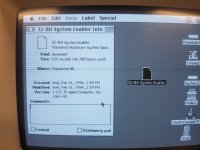
20200401_222628.jpg

 
My recollection is that system enablers are just dropped into the top level of the System Folder (where the Finder and System suitcase are).

 
Hey that worked great.  Thanks so much mdeverhart for the info.  I feel silly now that it was indeed that simple.  I have a way of over complicating stuff sometimes.  

 
What exactly is the issue with MODE32 and thread manager? I am pretty certain that I use those two together without a problem.

 
Happy to help @lowlytech. No need to feel silly, these systems are old and it can be hard to find good documentation online for them. I only remember from a LOT of time on System 7 machines back when they were new(-ish).

 
What exactly is the issue with MODE32 and thread manager? I am pretty certain that I use those two together without a problem.
Looks like maybe there was an issue before mode32 7.5.  Searching, I found several instances where new features of mode32 was that it was compatible with thread manager.  I didn't actually try mode32 on my se/30, but maybe the readme file i was looking at from the thread manager install was before mode32 v7.5 was a reality.

 
Back
Top
