• Hello MLAers! We've re-enabled auto-approval for accounts. If you are still waiting on account approval, please check this thread for more information.

help with USB floppy drive on Powerbook G4

mraroid

6502
Folks...

I have a powerbook G4.  It is this model:

http://www.everymac.com/systems/apple/powerbook_g4/specs/powerbook_g4_1.5_15.html

I am running tiger - 10.4.11

I bought a modern USB Mac/Windows USB floppy drive.  The drive said it needed no software for a Mac or a windows box.  Just plug and play. 

I plugged in the USB floppy drive.  stuck in a floppy.  The light on the floppy drive lights up and  I hear it running, but nothing on my desktop.  I have Toast 6 titanium installed.  When I look at the system profile, it will see my USB floppy drive.  It IDs it as TEACV 2.0.

Do I need to do some magic so that tiger can see this drive?  I install a floppy and nothing appears on my desktop.  I have used floppies that are good - they work in my Color Classic.  I have installed new floppies and working floppies but nothing shows up on my desktop.

I must be doing something wrong, but I am not sure what...

Any suggestions?

Thanks

mraroid
 
It doesn't sound like you're doing anything wrong, but that something isn't working right. I have a Teac USB drive as well. If you plug in the floppy drive without a disk inserted, the motor should run and it should make ticking noises periodically as the OS polls it to see if a disk is in the drive. If it doesn't, then something is likely wrong with the drive, or there may be a power issue at the USB port. Try a different port. If the drive does behave as I've described above, try inserting a floppy after connecting the drive and seeing if it appears on the desktop. If it doesn't, open a Finder window and see if it's in the sidebar. (Perhaps removable devices aren't set to display as icons on the desktop.). If it doesn't appear in the Finder, open Disk Utility from /Applications/Utilities and see if the drive and disk are there.

 
That was a very good tip rsolberg.  When it is plugged in, I can hear the clicking sound.  Same in both USB ports on my powerbook.  Going to disk utility I can see the USB floppy drive.  When I stick a disk in it, it can not read it.  It will not format it or partition it.  I took a fresh floppy and formatted it on my CC II.  I stuck it in the floppy drive, and it just clicked and clicked and clicked.  Once I had a white drive appear on my desktop.  I tried to drop a small file into it.  When I did that, the white desktop drive disappeared. 

I ran some hardware tests on my powerbook.  All came back clean. Maybe I have a bad USB floppy drive.... ?

mraroid

 
And as a follow up on shooting this trouble.....
 
I plugged the USB drive into my windows 10 box.  It saw the drive.  I stuck in a blank floppy and it formatted it as FAT 32.
 
I moved the drive and floppy to my powerbook G4 and launched Disk Utility.  It let me re format the floppy as a mac floppy.  A small white hard drive appeared on my desktop.  But when ever I drop a small file into that small white hard drive icon one of two things will happen:
 
1)  the hard drive icon will disappear and I well get an error message.
 
2) the drive will act like it is trying to copy the file to the floppy.  But after a few seconds it will fail and give me an error message.
 
I am working on other solutions.....

mraroid

 
Further tests.......

I can't figure out if my SCSI2CF adapter is bad or my formatting is bad.  I switched CF cards and have to same issue.  So I do not think it is the CF card. This is for my Color Classic II

 
I have a pcmcia card that I can plug a CF card into.  So I thought I was being cleaver.  I booted my powerbook G4 running Tiger.  I launched Disk Utility and it saw my CF card.  I formatted it.  I could choose Mac formatting with our with out Journaling.  I don't know what Journaling is so I tried both.  My goal was to format this CF card to use as a SCSI hard drive in my Color Classic II running 7.6.
 
Well the formatting went off with out a hitch.  I installed the CF card in my Color classic II and booted to a apple branded 7.6 CD.  It would not see the partitions made with tigar.
 
I have heard good things about Lido.  So using my tiger powerbook, I down loaded it.  It will not run under tiger and my powewrbook is the kind where I can not install a classic OS.  I do have a USB floppy drive that is suppose to work under Tiger with out any drivers.  It turns out that it will not work.  It works fine under Windows 10, but it will not work under Mac.  I bought it specifically because it said it would run under Mac OSX  I bought this:

https://www.amazon.com/Sabrent-External-Floppy-Drive-FL-UDRV/dp/B00E9MD700/ref=sr_1_1?ie=UTF8&qid=1497899050&sr=8-1&keywords=sabrent+fl-udrv
 
I tried looking for OSX drivers for it but found none.
 
I have a CD reader hooked up to my Color Classic.  I can always boot to my apple brandied 7.5 CDs (I actually have three apple branded CD).
 
I sent email to the folks here on the forum that make SCSI2SD devices:

https://68kmla.org/forums/index.php?/topic/26188-new-batch-of-scsi2sd-adapters-and-microsd-bundles-in-stock-and-ready-to-ship-from-usa/
 
I thought I would buy a replacement SCSI2SD unit.  If I can talk them into also selling a floppy with Lido (or any other working formatting software) on it, I would give that a try.
 
Can I do any magic under Tiger to copy a file (like lido) to my USB floppy drive?
 
Can I downgrade to a earlier version of OSX or upgrade to a newer version of OSX to make the floppy drive work?
 
I have Titanium Toast 6 running on my Tiger power book.  But from what I can understand it can not see or format a floppy. Would older or newer versions of Toast let me format a floppy disk under Tiger?
 
Suggestions welcome.
 
Thanks
 
mraroid


I am using one with Leo and have no issue, never used any driver, worked fine just out of the box.

Any trouble with the USB connector ?

 
What version of OSX are you running bibilit?  The USB cable that comes out of the USB drive is hard wired at the USB floppy end, and has the USB plug on the other.  I have two USB ports on my powerbook.  I unplugged my mouse and tried one USB port.  No luck.  I tried the other USB port. The USB plug looks OK, and the floppy works just fine in my windows 10 box....

I think I am just going to have to buy another here in Ecuador (If I can find such a thing), or pay the big $$ for postage and have one shipped to me from the US.  Not sure what else to try other than changing the version of OSX on my powerbook....

mraroid

 
Weird problems you've got. You might try hunting for a USB 2.0 cardbus (PC card) adapter and see if that improve the situation. Although obviously that won't fix a drive problem. You say you used the drive with a Win10 machine and formatted a floppy, did you try reading and writing other files from it?

 
Last edited by a moderator:
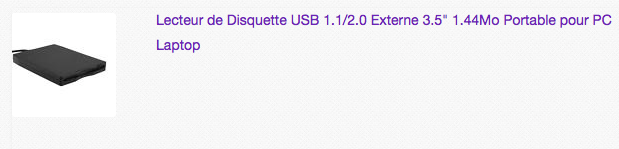
@mraroid -  is it this kind of floppy drive ? :

Capture d’écran 2017-06-20 à 11.07.56.png

https://www.ebay.fr/sch/i.html?_from=R40&_trksid=p2065393.m570.l1313.TR0.TRC0.H0.XLecteur+de+Disquette+USB+1.1%2F2.0+Externe+3.5%22+1.44Mo+Portable+pour+PC+Laptop.TRS0&_nkw=Lecteur+de+Disquette+USB+1.1%2F2.0+Externe+3.5%22+1.44Mo+Portable+pour+PC+Laptop&_sacat=0

Bought one very cheap (11€) from a seller in Hong Kong. Turns out the thing doesn't work on any of my Macs. it does shows at "TEACV-something" in the system infos when plugged to a Mac running 10.5 though. I've disassemble it and the control card inside is old and dirty. tried cleaning but doesn't change a thing... 

So I believe they use old floppy drives (even no working), stuff them in new very basic cases and sell them off the bay. Some work, some don't.

No wonder they are so cheap.

I'm trying to get a refund just for the fun of it ;)

Reminds me the story of the 500Gb USB external drive sold cheaper than any other in China, turned out to have a 4Gb USB storage inside and a chip "faking" a 500Gb drive. Each time you'd write something it would fill the 4Gb , then erase it , then write the rest and so on...

Plus there was a steel bolt glued inside the case to make the weight :D

 
I would bet the USB floppy drive is trying to pull more current than your G4 can supply. It works OK when there's no disk in the drive and the motor isn't on. But when you insert a disk and the motor spins, it draws lots of current, the supply voltage droops down, and it works erratically or not at all.

Try connecting it through an externally-powered USB hub, or use one of those 2:1 USB cables that are often sold with external DVD drives.

 
Last edited by a moderator:
BMOW: Good idea with the powered hub. I don't think the 2 to 1 cable will work without hackery as the floppy drive has a non-removable cable and those 2 to 1s usually are 2 type A male to 1 type mini B male. I use my USB floppy drive with a variety of Macs, including with USB 1.x ports on my iMac G4 and Quicksilver, but I've not tried it on a PPC laptop. I'm pretty sure mine identifies as a Teac chipset and has a NEC drive inside.

 
Last edited by a moderator:
My USB floppy drive is made entirely by NEC, with a NEC chipset, and NEC drive. It also has a mini B receptical.

 
I also thought about the small boxes that you can use to make a hard drive into a external USB drive.  It has the two USB connectors on it.  But as was pointed out, the cable from my USB  floppy device is hard wired in place.  It would take some doing to break it open and figure out the wiring.
 
I did not think about a external powered USB hub.  That sounds like a very good test.  I can even pick something like that up here in Ecuador. 
 
I will give that a shot first.  If that fails, maybe upgrade my OS?  I think this powerbook can take leopard and I do have a apple branded Leopard DVD....
 
Thanks everyone for the help.
 
mraroid

 
Good luck I guess, let us know how that goes.

I have an iBook G4 14" (A1134) running 10.4.11 as well and I just tested a Dell branded TEAC USB floppy drive that I have with it. It didn't seem to mind accessing the disk and copying a file from it. Given that I doubt you need an OS upgrade.

How expensive is ordering/shipping from the US to down there?

P.S.

If you haven't already you should try plugging in/using handful of other USB devices (mouse, keyboard, flash drive) to see if there's anything wonky with the USB port, although a dead/messed up USB floppy drive (dirty read/write heads?) seems a little more likely.

 
Last edited by a moderator:
This is the drive I bought:

https://www.amazon.com/gp/product/B00E9MD700/ref=oh_aui_detailpage_o05_s00?ie=UTF8&psc=1

I bought it around the end of may 2016.  I did not use it until a week or two ago.  It can read and write in my windows 10 box.

I like the powered USB hub idea the best.  I can buy this here in Ecuador. 

People use FedeX or DHL if you want your stuff to arrive.  A few sheets of paper form the US to here via FedeX is around $70.  I handfull of caps, resistors, and some diodes cost around $170.  So shipping is really rough here.

I don't think I can find a USB floppy drive here, but I will look around. 

thanks for ther additional info.

mraroid

 
I had to special order it, but finally found a USB hub with external power.  Looking forward to testing it when it arrives.....  Fingers crossed.

mraroid

Ibarra Ecuador

 
It was an excellent suggestion to connect a powered USB hub to my powerbook to see if that would make my USB floppy drive work.

My powered USB hub arrived last night.  I am sorry to say, it was a failure.  I am so *&^%$# off that I can not get this floppy drive to work on my powerbook.

Maybe I need to buy another brand.  It is so costly and time consuming to ship things to Ecuador.  I need a computer or workig floppy to support my Color Classic.

If anyone here has gotten a floppy drive to work in my Powerbook G4, please post the name and model number.  I will give it another try.  This is th eexact model number of my Powerbook G4:

http://www.everymac.com/systems/apple/powerbook_g4/specs/powerbook_g4_1.5_15.html

This is tht eexact floppy drive I bought:

https://www.amazon.com/gp/product/B00E9MD700/ref=oh_aui_detailpage_o05_s00?ie=UTF8&psc=1

My last thought is to upgrade to the next version of OSX. I have a apple branded copy of Leopard.  But I prefer to run older versions of OSX unless I have to.

The floppy drive works great under Windows 10. I can format and write to the floppy.  I can use my Color Classic to format a floppy disk, and then put that floppy into the floppy drive connected to my Powerbook.  But writing to it or reading from it, is a total failure.

Thanks for the many tips folks!  It was a great idea. I will keep lookig for a solution.

mraroid

 
I'm sorry to hear the powered hub didn't help. The floppy drive works under Windows 10, so you know it's OK.

I remember reading somewhere that G4 Macs only support USB 1.0, not USB 1.1 or 2.0. If that's true, maybe your floppy drive doesn't work correctly when falling back to USB 1.0 speed?

What exactly is it that you're trying to do with your Color Classic and Powerbook G4? Do you specifically need a floppy disk, or is there another solution possible, like Floppy Emu, SCSI2SD, Ethernet, LocalTalk, etc?

 
Back
Top