• Hello MLAers! We've re-enabled auto-approval for accounts. If you are still waiting on account approval, please check this thread for more information.

Help with SE/30

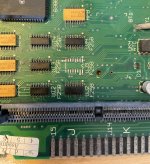
Ok, so found an error. Pin 12 on UJ3 shorts to pin 10 and 13. And pin 4 has no contact with the board. Have no idea if this error has been there all the time, or if I've caused it with my messy cleaning and re-soldering... But UJ2 and UJ3 were the most damaged components on the board. Maybe I should try to remove UJ3 and clean it up. I'm just worried my clumsy hands will mess things up more. I'll sleep on it.

 
I had a SE/30 with a simasi mac and had to change UJ3 and UJ4. Afterwards it worked. Looks like your LB had some corrosion in this region. I would change UJ4 too.

 
Last edited by a moderator:
I had a SE/30 with a simasi mac and had to change UJ3 and UJ4. Afterwards it worked. Looks like your LB had some corrosion in this region. I would change UJ4 too.
How did you know that you had to change those two chips? Were they visible damaged, or did you measure somehow? With shaky hands I managed to replace UJ3... It's not pretty, but I now have continuity on pin 4 again, and pin 12 is not shorted to pin 11 and 13. Unfortunately the replaced chip didn't solve anything... :(  

I could try to change UJ4 too. And UJ2, it's also in bad shape. But I do have continuity on all UI/UJ. I don't have a scope (nor the knowledge) to measure them further...

 
the 74F253 is known to go bad in the SE/30 anyways. Even without visible corrosion. Any time I run into intermittent RAM Issues on an SE/30, I dont waste my time. I shotgun all 6 of them. 

 
the 74F253 is known to go bad in the SE/30 anyways. Even without visible corrosion. Any time I run into intermittent RAM Issues on an SE/30, I dont waste my time. I shotgun all 6 of them. 
Oh, I didn't know that. I went ahead and changed UJ4 and UJ2 too, but I left the UI chips because they didn't look to bad. I guess I should've change them all when I was on to it... I also understand now that it was a mistake to take the replacements from my other (damaged) LB without knowing their status. They just looked to be in good condition... :(

The LB is in another bath right now, it was so full of flux residue and other gunk, it needed a good rinse. We'll see how it works when it's dry again, but my hopes are not so high (anymore).

 
We have major a breakthrough!

So I replaced UJ2, UJ3, UJ4, let the board soak in vinegar for a couple of hours, rinsed it in soapy water and then let it dry over the evening and night.

When I just powered it on there was a normal chime (not as loud as the chimes of death I had a week ago), but still the same horizontal bars. I restarted it a few times and sound was gone again, and horizontal bars every time. Then I remembered that I forgot to put the video ROM back after cleaning... Now:
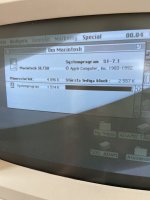
IMG_0290.jpeg

So the two obvious issues right now:

- sound. Only twice have I heard the startup chime, otherwise sound is dead. Also on the headphone jack.

- the display has issues. It's very dark, and I don't know if you can see it on the picture, but there's some lighter "shadowing" to the right of black pixels.

Any advice where to start troubleshoot these issues? I can try to adjust the brightness trim pot on the analog board, I just need to get a proper tool first. I guess the analog board needs a re-cap too... I'm not just that comfortable yet with CRT discharging and handling the high voltage side of things.


 
Recap the analog board and the PU. The discharging is not very difficult. Often it is not necessary, but I do it every time, when I work at the CRT. This video shows how to do it.:


Recap the analog board and the PU. The discharging is not very difficult. Often it is not necessary, but I do it every time, when I work at the CRT. This video shows how to do it.:
I guess going over the analog board and PSU is inevitable.

Another issue now is that the floppy doesn't work anymore. It worked when I got the Mac, and it mounted the first floppy I inserted today, but started to behave weird when it was ejected. Now it can't read any disks. I just replaced the floppy drive with one from a Classic (unknown condition), but it acts exactly the same with the replacement drive. But at least I just got to practice to discharge the CRT...

Edit: Actually it reads and formats some disks just fine. So need to give that some more time...

 
Last edited by a moderator:
The floppy drive needs some cleaning and new grease. Sometimes the ejection gear is defect. 


Last edited by a moderator:
The floppy drive needs some cleaning and new grease. Sometimes the ejection gear is defect. 
I think the drive somehow corrupted all the disks I inserted. The replacement drive works fine now, but I had to re-format the disks. Other disks that I never tried in the faulty drive works fine.

But the drives definitely needs a good clean anyway, so I'll bookmark the video, thanks!

 
I think I'll try and move the HDD/floppy/logic board to my other SE/30. I think/hope the screen/analog board/PSU are in better condition on that one. That way the analog board re-cap can be a future project. :)  

Just need to clean up some rust first...

 
I went ahead and swapped the logic board, floppy and HDD over to my other SE/30, and now the display is very bright and nice. I also did some extra scrubbing with IPA and a cotton swab around the sound components, and sound is also back. So until the next thing breaks, I almost consider this Mac finished. One new issue though...

It won't accept RAM SIMMs on Bank B. As soon as I populate Bank B, chimes of death at startup. I've tried several SIMM combinations (all 1 MB SIMMs), always the same issue. Four of them are confirmed to work in my Classic, but they won't work in the SE/30. Should I continue look for bad traces, or can it be a specific component that is known to fail, causing this issue?

Then some future things I need to fix:

- re-cap the AB

- adjust the CRT yoke, the display is somewhat tilted

 
Last edited by a moderator:
Back
Top