• Hello MLAers! We've re-enabled auto-approval for accounts. If you are still waiting on account approval, please check this thread for more information.

Help with SE/30 and Micron Xceed SE/306-48

Hello all,

I purchased a Micron Xceed SE/306-48 card a while back for my SE/30 and I have not been able to get it to work.

Set up:

  1. Micron Xceed SE/306-48
  2. System 6.0.8
  3. Micron Xceed control panel 2.0.1 downloaded from Gamba's Site
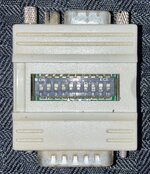
  4. DB15-HD15 adapter: MAC/IBM Video Adapter 15DM/HF-10p
  5. 2 different monitors with VGA input: Dell U2412Mb, ViewSonic VE155b


Results:

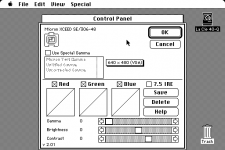
  1. I can see the external monitor in the monitors control panel (see attached screenshot)
  2. I can select the external monitor and change it's settings for bit depth, gamma, etc (see attached screenshot)
  3. I can change the location of the external monitor relative to the internal display
  4. I get no picture using either monitor
  5. When I move the cursor over to the other monitor, it disappears off of the main monitor,  but then I cannot get it back until I restart


Steps taken thus far:

  1. I washed the original motherboard in the SE/30 which has not been recapped. Before and after washing the board produces no sound. Most likely bad caps. No change after washing.
  2. I washed the Micron Xceed board with no change.
  3. The DB15 display connector on the Xceed back panel looked a bit corroded, so I replaced it. No change.
  4. I bought another SE/30 on ebay and washed the motherboard. This motherboard had sound after washing. No change.
  5. I tried all of the suggested settings on the dip switches on the video adapter
  6. I tried setting the resolution to just 640x480 and 640x480 (vga)
  7. I tried color and black and white


The next step is to recap the motherboard.

Any other suggestions would be greatly appreciated.
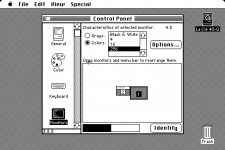
Monitors Control Panel.png

Micron Xceed Control Panel.png

 
I’m going to venture a guess that your monitors aren’t able to handle the video settings.  I had a similar problem with a IIci and not until I hooked an Apple CRT to it did I see a picture.

 But of course that doesn’t explain the lost cursor, so maybe that’s not the issue.

 
How many switches does your adapter have?
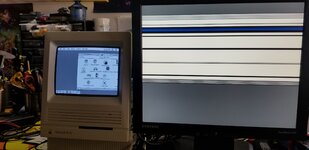
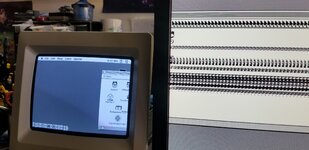
so i managed to get it to display and its weird. The adapter i got has alot of switches and ive checked everything from trying composite signals to sync with green etc but still displays a weird way where it would only show about half an inch on one side of the screen and the rest would just repeat/stretch. Not sure if the card has problems but it does this on 3 monitors so I know its not them or the vga adapter.
 

Attachments

  • 20230519_072644.jpg
    20230519_072644.jpg
    1.5 MB · Views: 51
  • 20230519_072753.jpg
    20230519_072753.jpg
    2.3 MB · Views: 43
What did you do to make it show up on the external monitor? It wasn’t working at all before, right? Did you try it with an Apple CRT (if you have one handy)?
 
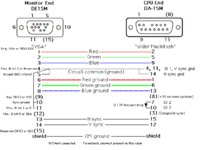
no i dont have a apple crt atm but i used to just few months back. I read up online to use a diode between lines 7 and 10 to enable vga mode which i found out my adapter could do it with one of the switches. Now it works on 2 of my lcd monitors but both monitors display the same. I know its not the monitors because this isnt my only xceed video card. I did buy this card untested from japan so im not suprised it has problems but now i just want to find out whats wrong with it. This is microns first video card for the se30 so i wouldnt be surprised if one of the gal chips are bad or ram being early model. Iirc I have seen this issue with other video cards somewhere being ram/driver chip related.
 
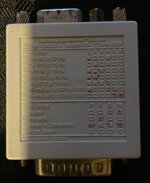
If you are using one of these
IMG_0395.JPG
then I have mine set Number 1, 4, & 8 on and the rest off, to work on SE/30, IIsi, Performa 400 with LCD 680x480.
 

Attachments

  • IMG_0393.JPG
    IMG_0393.JPG
    1.6 MB · Views: 33
Sorry but I cannot part with my adapter. Also I cannot assist any further because I never had that Micron card. You say it came from Japan. Perhaps it requires a different refresh rate or maybe it’s damaged.
I have never seen all of those options in the Monitor Control Panel shown in your posted picture. Clearly your card is more advanced than the one in my SE/30.
 
Last edited:
Sorry but I cannot part with my adapter. Also I cannot assist any further because I never had that Micron card. You say it came from Japan. Perhaps it requires a different refresh rate or maybe it’s damaged.
I have never seen all of those options in the Monitor Control Panel shown in your posted picture. Clearly your card is more advanced than the one in my SE/30.
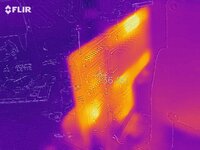
japan uses same hz and voltage as us lol anyways i already found the problem, one ram logic gate chip is getting real hot viewing from my thermal camera so i ordered some from digikey so will see how it goes when i swap it out (top chip in the pic).
 

Attachments

  • flir_20230520T174359.jpg
    flir_20230520T174359.jpg
    1.4 MB · Views: 32
Pretty sure I had to swap out that exact chip on mine a few years ago. It’s a flip flop chip right? Good luck!
 
I could never get my Xceed SE/306-48 to sync with any of my LCD monitors. I have a slightly different 10-switch adapter and I tried so many combinations. I would get half displays, no sync, or a flicker screen. It does work completely solid with my AppleColor High-Resolution RGB Monitor. I'm guessing is outputs 66.7Hz refresh that none of my LCDs and cope with.
 
I could never get my Xceed SE/306-48 to sync with any of my LCD monitors. I have a slightly different 10-switch adapter and I tried so many combinations. I would get half displays, no sync, or a flicker screen. It does work completely solid with my AppleColor High-Resolution RGB Monitor. I'm guessing is outputs 66.7Hz refresh that none of my LCDs and cope with.
i would check if your adapter can add a diode to pin 7 and 10 which this diagram shows, so it tells the card to output vga. If that dont work then i would look if any chips are getting hot like mines is doing
 

Attachments

  • 1684660407122.png
    1684660407122.png
    25 KB · Views: 43
Pretty sure I had to swap out that exact chip on mine a few years ago. It’s a flip flop chip right? Good luck!
yeah it is that chip, so if you fixed yours then prob mines is same issue! I really hope this works because im planning to use this card to non-destructive convert my se/30 to color LCD and have a raspberry pi to convert the B&W output from the board to hdmi so that i can switch back and forth. Then if i ever want to go back to crt, i can just unbolt and swap it back in. Prob will also add a switch to disable the flyback or just desolder it.
 
yeah it is that chip, so if you fixed yours then prob mines is same issue! I really hope this works because im planning to use this card to non-destructive convert my se/30 to color LCD and have a raspberry pi to convert the B&W output from the board to hdmi so that i can switch back and forth. Then if i ever want to go back to crt, i can just unbolt and swap it back in. Prob will also add a switch to disable the flyback or just desolder it.
Did you fix it?
 
Hello I’m back after a 4 year hiatus! I recapped my SE/30 logic board recently and put the xceed card back in last night. I’m going to test it on a VGA monitor this evening. I’ve also ordered the VGA adapter from BMOW in case syncing is part of the problem.


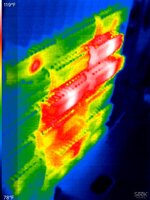
If that does not work I am going to get a thermal camera to check if some of the chips are possibly bad as shown by DatMac.
 
Hello all.
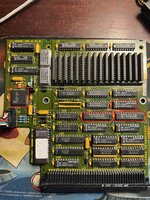
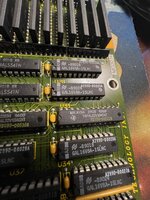
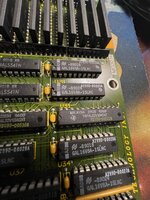
I was able to borrow an IR camera. I imaged the Micron XCeed 306-48 with the power on and a VGA display connected through an adapter.
The first two pictures are of the chips that looked hot. The third picture has those suspect chips circled in red. The last two pictures are closups of the suspect chips.

They are.
  • 1x AM81C478-35JC 913LXKT DV
  • 1x GAL16V8A-15LNC -B9024 A2990-00025A
  • 1x TIBPAL22V10ACNT H2090-00022B
  • 1x TIBPAL22V10ACNT H2090-00030B

Searching online is looks like GAL16V8A-15LNC and TIBPAL22V10ACNT are Programmable Logic ICs. I speculate that means that the chips were programmed (flashed?) prior to soldering onto the board. In that case I guess I am SOL. If that is the case, and if anyone is interested in the board for parts, please make me an offer.


XCeed 306-48 Hot Chips 1 IR.JPG
XCeed 306-48 Hot Chips 2 IR.JPG
XCeed 306-48 Overall.jpg

XCeed 306-48 Hot Chips 1 Visible.jpgXCeed 306-48 Hot Chips 2 Visible.jpg
 

Attachments

  • XCeed 306-48 Hot Chips 1 Visible.jpg
    XCeed 306-48 Hot Chips 1 Visible.jpg
    847.1 KB · Views: 4
Hello all.
I was able to borrow an IR camera. I imaged the Micron XCeed 306-48 with the power on and a VGA display connected through an adapter.
The first two pictures are of the chips that looked hot. The third picture has those suspect chips circled in red. The last two pictures are closups of the suspect chips.

They are.
  • 1x AM81C478-35JC 913LXKT DV
  • 1x GAL16V8A-15LNC -B9024 A2990-00025A
  • 1x TIBPAL22V10ACNT H2090-00022B
  • 1x TIBPAL22V10ACNT H2090-00030B

Searching online is looks like GAL16V8A-15LNC and TIBPAL22V10ACNT are Programmable Logic ICs. I speculate that means that the chips were programmed (flashed?) prior to soldering onto the board. In that case I guess I am SOL. If that is the case, and if anyone is interested in the board for parts, please make me an offer.


View attachment 78165
View attachment 78167
View attachment 78164

View attachment 78168View attachment 78169

GALs/PALs and RAMDACs running hot is typical (in general, though not speaking for Xceed card in specific), I'd not be immediately alarmed by that. If they were a dead short I'd expect them to be hotter. I believe the Equations of these cards are known - appears in the tech docs - so it would in theory be fixable if you really wanted to get into the nuts and bolts of it.
 
Back
Top