Hey there
First of all, I've read the Classic Mac Networking guide. So, I sorta know what I'm supposed to do.
What you need to know:
I have an SE/30 running 7.5.1 with only 8mb of RAM (I plan on buying more of the stuff soon). I do not plan on upgrading it to 7.5.5 as I want to keep the original install as original as possible. Open Transport is supposed to work on 7.1 so 7.5.1 should be good.
The SE/30 is equipped with an Asante MacCon IIsi (the one with the ethernet port).
Let's recap on what's been done.
1/ ... or rather what hasn't been done... I didn't install the Asante ethernet drivers because when I tried to install them, a window popped up telling me that a later driver already existed on my hard drive. I knew 7.5 had build in ethernet drivers so that wasn't surprising at all.
2/ I went on and installed MacTCP 2.0.6
3/ I patched it to version 2.1
4/ Then, I installed OT 1.1
Technically, that should have been sufficient. But apparently not.
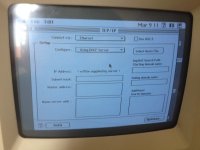
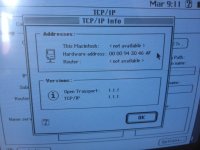
MacTCP is now hidden, so that's good. But when I set the TCP/IP control panel to DHCP, nothing happens. I know it's supposed to show me the IP address and all because I did this on my iMac G3 a year ago and it worked flawlessly. Interestingly enough, before I installed OT, I was able to select Ethernet in the "Network" control panel, and now I can't... I don't think that's normal.
I should probably update OT to version 1.1.2 and then to 1.3 as the guide suggests doing, but even that doesn't work. The net install thing asks me to insert "Install 1", but because this is a net install and not a floppy install, there's no "Install 1" floppy... It seems the installer cannot see the "Install 1" folder... What am I doing wrong?
Any help appreciated...
First of all, I've read the Classic Mac Networking guide. So, I sorta know what I'm supposed to do.
What you need to know:
I have an SE/30 running 7.5.1 with only 8mb of RAM (I plan on buying more of the stuff soon). I do not plan on upgrading it to 7.5.5 as I want to keep the original install as original as possible. Open Transport is supposed to work on 7.1 so 7.5.1 should be good.
The SE/30 is equipped with an Asante MacCon IIsi (the one with the ethernet port).
Let's recap on what's been done.
1/ ... or rather what hasn't been done... I didn't install the Asante ethernet drivers because when I tried to install them, a window popped up telling me that a later driver already existed on my hard drive. I knew 7.5 had build in ethernet drivers so that wasn't surprising at all.
2/ I went on and installed MacTCP 2.0.6
3/ I patched it to version 2.1
4/ Then, I installed OT 1.1
Technically, that should have been sufficient. But apparently not.
MacTCP is now hidden, so that's good. But when I set the TCP/IP control panel to DHCP, nothing happens. I know it's supposed to show me the IP address and all because I did this on my iMac G3 a year ago and it worked flawlessly. Interestingly enough, before I installed OT, I was able to select Ethernet in the "Network" control panel, and now I can't... I don't think that's normal.
I should probably update OT to version 1.1.2 and then to 1.3 as the guide suggests doing, but even that doesn't work. The net install thing asks me to insert "Install 1", but because this is a net install and not a floppy install, there's no "Install 1" floppy... It seems the installer cannot see the "Install 1" folder... What am I doing wrong?
Any help appreciated...
Last edited by a moderator: