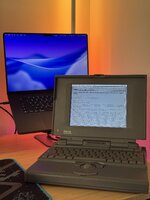
Hi all. New here. I picked up my first 68k Powerbook (second 68k Mac, next to my Quadra 950), and I've been spending days arguing with its display.
When it arrived, it booted right up into system 7.1, and the display was flawless. I think that boot was the 160mb scsi hdd's final heroic act, as it was making "please let me die" noises, and soon parked its heads and didn't want to resume. No problem, I had a bluescsi waiting for it anyway. I swapped drives, and when I booted again, the display was suddenly rendering a bunch of artifacts. And I smelled fish. But I accounted for this, too, and had a fresh set of caps on the way.
Recapped the next day, booted, and it was glorious. Not a lot of damage on the board, I could only see some minor corrosion on the old solder under the caps. I suspect it had been sitting for a while, and they gave in once I started running power through it for more than a minute.
Through that first day, there was a horizontal line spanning the display, about 1/4 from the top (between driver tabs 1 and 2). Not steady. It kind of faded in and out, sometimes solid, sometimes gone, and sometimes kind of just ghosting. Annoying but, old macs gonna be like that. So I got on with things. My 180c came with a set of original disks, which I imaged first then went on to install 7.1 from original media (super cool tbh)
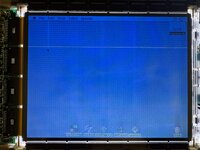
 Then the flicker started. Not a backlight flicker, like the render would get wonky in various way. Sometimes for just a flash, sometimes for a few seconds. Its not the typical bad capacitor distortion, like it shifts the color gamut of the display in a somewhat uneven way. Sometimes it washes out the screen. Sometimes it blue shifts everything. Not sure how to really qualify it but heres a shot of one instance (from later in my story, but same behavior).
 I checked my caps (probably ten times at this point), 99% sure they're fine.
The flicker (and the line for that matter) get worse once the machine warms up.
So, I pulled the display apart and started probing. I noticed what looked like a marginal joint on the 3rd pin of the 2nd tab. When I probed it, the entire horizontal driver bus collapsed, and stayed collapsed. Nothing usable on the screen.
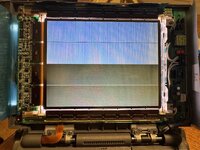
With the display off, I noticed that pin 3 on the other 3 tabs short to each other, but not the suspect pin. I tried tracing that pin out, and made it to the AC04 chip in the top left corner, but that chip seemed stable. Then I realized that C40 above the top tab grounds to pin 3 on the other tabs but not the faulty one. I tried tracing that path directly, and got as far as (i think it was) D2 -> mystery 100 ohm resistor -> C40.
I also scoped all pin 3's and learned that the faulty one was running ~8.3v while the others were ~1.9v. I wound up bodging the X11 transistor (first stop off tab 2 pin 3) to C40. And that fixed the collapse, but got me right back to square one, line and flicker with the same behavior as before (and 12v restored to all pin 3's)
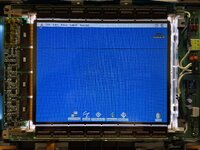 With my scope attached, I realized that the 12v feed to the tabs has a -5v drop during the flickers. That same -5v is measure on the other side of C40. Its neighbor, C35, measures a -2v sag. And thats as far as I've been able to make it after spending the better part of the past two days on it.
I do know that its not the power delivery from the system. The backlights stay solid and there is no drop measured on the rails coming into the inverter board.
I'm really hoping its not the tab. If its not the tab, it should be fixable. I can't entirely rule it out. I'm sometimes able to induce flicker by pressing gently on the tab with a spudger, but thats not reliable. I'm *fairly* confident that its upstream from the tab, but I'm not 100%.
Any advice is appreciated. This 180c in basically brand new condition, and the screen is physically flawless, these issues not withstanding. I really want to save it and keep it alive forever, and if I can do that without needing to find another screen (which prob wont be as clean as this one), that would be the dream.
When it arrived, it booted right up into system 7.1, and the display was flawless. I think that boot was the 160mb scsi hdd's final heroic act, as it was making "please let me die" noises, and soon parked its heads and didn't want to resume. No problem, I had a bluescsi waiting for it anyway. I swapped drives, and when I booted again, the display was suddenly rendering a bunch of artifacts. And I smelled fish. But I accounted for this, too, and had a fresh set of caps on the way.
Recapped the next day, booted, and it was glorious. Not a lot of damage on the board, I could only see some minor corrosion on the old solder under the caps. I suspect it had been sitting for a while, and they gave in once I started running power through it for more than a minute.
Through that first day, there was a horizontal line spanning the display, about 1/4 from the top (between driver tabs 1 and 2). Not steady. It kind of faded in and out, sometimes solid, sometimes gone, and sometimes kind of just ghosting. Annoying but, old macs gonna be like that. So I got on with things. My 180c came with a set of original disks, which I imaged first then went on to install 7.1 from original media (super cool tbh)
Then the flicker started. Not a backlight flicker, like the render would get wonky in various way. Sometimes for just a flash, sometimes for a few seconds. Its not the typical bad capacitor distortion, like it shifts the color gamut of the display in a somewhat uneven way. Sometimes it washes out the screen. Sometimes it blue shifts everything. Not sure how to really qualify it but heres a shot of one instance (from later in my story, but same behavior).I checked my caps (probably ten times at this point), 99% sure they're fine.The flicker (and the line for that matter) get worse once the machine warms up.
So, I pulled the display apart and started probing. I noticed what looked like a marginal joint on the 3rd pin of the 2nd tab. When I probed it, the entire horizontal driver bus collapsed, and stayed collapsed. Nothing usable on the screen.
With the display off, I noticed that pin 3 on the other 3 tabs short to each other, but not the suspect pin. I tried tracing that pin out, and made it to the AC04 chip in the top left corner, but that chip seemed stable. Then I realized that C40 above the top tab grounds to pin 3 on the other tabs but not the faulty one. I tried tracing that path directly, and got as far as (i think it was) D2 -> mystery 100 ohm resistor -> C40.
I also scoped all pin 3's and learned that the faulty one was running ~8.3v while the others were ~1.9v. I wound up bodging the X11 transistor (first stop off tab 2 pin 3) to C40. And that fixed the collapse, but got me right back to square one, line and flicker with the same behavior as before (and 12v restored to all pin 3's)
With my scope attached, I realized that the 12v feed to the tabs has a -5v drop during the flickers. That same -5v is measure on the other side of C40. Its neighbor, C35, measures a -2v sag. And thats as far as I've been able to make it after spending the better part of the past two days on it.I do know that its not the power delivery from the system. The backlights stay solid and there is no drop measured on the rails coming into the inverter board.
I'm really hoping its not the tab. If its not the tab, it should be fixable. I can't entirely rule it out. I'm sometimes able to induce flicker by pressing gently on the tab with a spudger, but thats not reliable. I'm *fairly* confident that its upstream from the tab, but I'm not 100%.
Any advice is appreciated. This 180c in basically brand new condition, and the screen is physically flawless, these issues not withstanding. I really want to save it and keep it alive forever, and if I can do that without needing to find another screen (which prob wont be as clean as this one), that would be the dream.