• Hello MLAers! We've re-enabled auto-approval for accounts. If you are still waiting on account approval, please check this thread for more information.

Getting the most out of my LC III

Hey guys,

I've been messing around with my LC III more and noticed it can be pretty sluggish at times. Most notably games, I tried running doom out of curiosity and that went very poorly, haha. 

My ram is already maxed and I am using a 10k rpm laptop drive (SCA converter). I know you can overclock to 33mhz from 25, and I also have an open vram slot. Other than those, what else can I do? Were there any accelerator cards for the LC III that aren't hard to find?

My other option is to upgrade my IIvx, which I know is crippled compared to the LC but has more slots for upgrades( nubus and more ram). Lemme know what you guys think!

edit: oh yeah! My internal speaker doesn't work at all. I've already recapped.

 
Last edited by a moderator:
What system are you on? If you are using System 7.5 or higher, it and your other programs are probably bloated with PowerPC Code. You would need to use a PowerPC Fat Checker and strip the PowerPC code out. This will make it purely 68K and shrink the programs/System by as much as half. This would increase your loading and hard drive access speeds, and use a lot less RAM so you wont be needing Virtual Memory as much. Read:

https://68kmla.org/forums/index.php?/topic/23429-a-promised-hack-is-here/

Get a FPU for your LC III (for that empty socket on the board) will also speed up some games and graphics programs. Get the 33MHz version. And check what CPU is on your LCIII, it might already be 33MHz.

If you are going to use the PowerPC Fat Stripper, back up your stuff and strip what you have on the LC III, not your original copies or backup copies.

 
Last edited by a moderator:
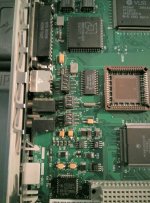
might have a bad sound chip, or maybe there are some broken traces where you did your re-cap... can you take a picture of the upper left hand portion of the board? thanks.

 
I'll have to check out that fat remover tool, looks pretty neat.

As for my solder job... it wasn't very clean mostly because the tip on my iron is too big. From what I can tell I have a lot of excess solder, especially on the middle cap. I'll have to go clean it up when I get a better iron. Also just to note, the sound was not working before the recap.

IMG_20160216_190441-3.jpg

 
Last edited by a moderator:
Looks like a good job to me. You might have replace the soldering iron tip for a smaller one, depending on your iron. A Weller's Soldering Iron you can put an assortment of tips to it that they sell.

That empty socket in the picture - get an FPU for it, an 68882 in PLCC format.

(The black one here:)  http://www.cpu-world.com/CPUs/68882/

It will speed things up depending on your software. Games and graphic programs will definitely get a boost from it. Microsoft Word 4.0.... Eh.... I don't think so! LOL!

 
Thanks :) Some of you guys are pros at soldering so I feel ashamed when I post my stuff haha.

For the FPU, does the speed have to match the CPU speed? My LC III is 25mhz but I plan to overclock. 

 
A 25MHz FPU at 33MHz should be fine. But I've heard reports that some FPUs run hot at 33MHz, so get a small heatsink and some heatsink tape mount it with.

 
Ugh, bad news today.

I didn't have the supplies to clean the board today so in the mean time I was going to get ftp working on my IIvx. I swap the hdd over from the LCIII to the IIvx ( I'm cheap and only have one ) and it wouldn't boot. Messed around with the jumpers on my SCA converter... nothing. Give up, put it back in the LC, nothing... I think my drive died.

I'll have to get back to you on the sound once I get this figured out. :(

 
Take your time with it. I have a lot of LCs with dead hard drives, so I'm in the same boat as you are.

I still have other machines to fix/get running again. It's going to take time.

 
It's one of those 10K rpm Seagate/IBM drives so I'm kinda surprised it failed. It could also be the Chinese SCA adapter... I ordered one of the nicer ones with termination to replace it. We'll see which fixes the issue. :)

 
if its unterminated, you need a terminator. 

And with this weather, all it takes is a little ESD zap from walking across the room, or getting out of a chair and its toast. 

 
It's terminated with a zip drive.

I tested the LC with a normal SCSI hdd and it boots, so I didn't zap the main board, thankfully.

 
This is good news. Now, excuse my French but "Lets Get This Puppy Howling!"

How is the work on the LC's audio work coming along.

 
Ok... so I got the new converter with termination and it still does not work on my LCIII and IIvx. I'm just going to assume the hdd died and order another one. 

I cleaned the spots uniserver mentioned and nothing changed. Either I didnt clean deep enough or there is some other issue. I'll try a different speaker when I get a chance, although I feel that wont make a difference.

 
Back
Top