• Hello MLAers! We've re-enabled auto-approval for accounts. If you are still waiting on account approval, please check this thread for more information.

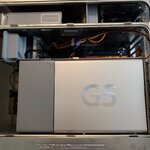
G5 quad. Is it dead?

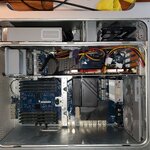
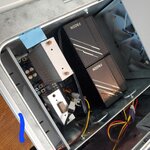
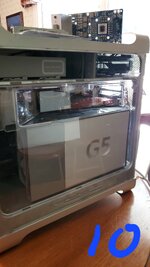
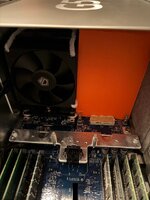
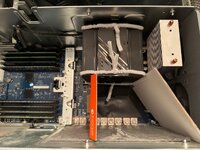
It has been a while since I last posted this and this is a bit of a followup. I wanted to be done with water cooling so I followed a guide on Macrumors. There weren't any issues with the process of doing the mod and in fact it went quite smoothly. However, when removing the LCU (rebuilt a couple years ago) I noticed a dark mass in the hose on the inlet/outlet of CPU A waterblock. My guess is that mass was enough to restrict the flow and cause CPU A to overheat.

After completing the air-cooled mod and putting everything back together I was hopeful. I pressed the power button and all the fans (including new CPU fans) came on like normal and not full blast. When the system was on LEDs 3 and 4 were lit. LED 5 never came on. LED 7 checkstop was kinda flickering on all attempts. Changing RAM configuration or removing RAM doesn't have an effect. White LED above power button stays lit with no blinking.

I found a post somewhere that said if checkstop blinks in groups of 2 that means CPU B is dead. Therefore, I think CPU A is dead from the previous overheating. It blinks brightly once then "flickers" out. There is a video of this in the same Macrumors thread here.

I have 1 question. Will the computer boot if I move CPU B to A (top) position until a replacement CPU can be found?
 
If memory serves me correctly, myself and other techs would only install one CPU to see if the machine reacts differently or even boots up. So go for it.
On some G5's, there were multiple versions of the processor modules (not just speeds) and they had to match (e.g. two V2 or two V3). Mismatch of versions would not allow both processors to be recognized together (only one would show up).
 
I didn't know there were multiple versions of the modules. Where would this be found? After looking at images I've taken while rebuilding the original LCU neither the white sticker on the bottom or the CPUs themselves seem to have a version number. They each have a matching board number on the topside (820-1792-A) but that seems generic for the PCB itself.
 
I'm not certain which model you specifically have, so I threw out info to be aware of when working on G5's. The June 2004 model had V1, V2, V3 processors that had to match. Mismatching produced a single processor unit instead of dual. Looks like the 2005 models did not do the different processor versions. The 820-xxxx-x are always board assembly numbers and do not 100% guarantee a perfect match since different components/configurations could be present. On every Apple part is a Serial number tag. Contained in the last 5 digits, typically is called an "EEE" Code. This is used to cross reference to specific Apple part or in some cases multiple parts if substituted or updated. DVWarehouse has a really good cross / lookup for the older products.
 
Specifically the model is M9592LL/A with 2X 2.5GHZ 970MPs.

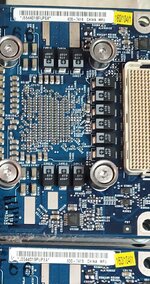
I've attached 2 images taken before I finished rebuilding the LCU a couple years ago. The 1st one is cropped showing only the barcodes. The Apple service manual identifies the quad processor as part 661-3729 but I think that's the whole unit with LCU and dual CPUs. Is the CPU part number the other number (630-7419) next to the serial number? It looks like DVWarehouse used to sell the whole unit for $400 and shows a matching EEE code of UPE. So in my search I'd have to find either a matching pair or a single with the same EEE code as mine. Or does it not matter for this model? As a last resort I could take a gamble on a quad on ebay listed as not booting and hope the CPU cards aren't piles of goo.

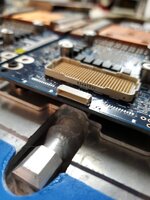
The 2nd image is of a small connector facing the outside of the board. Was this used for testing/diagnostics?

Thanks for all the help thus far.
 

Attachments

  • 20230529_093912.jpg
    20230529_093912.jpg
    334.4 KB · Views: 27
  • 20230820_133929.jpg
    20230820_133929.jpg
    1.4 MB · Views: 23
Sorry, the LCU Dual processors were replaced as a set like the picture you saw on DVWarehouse. We never tried pulling one processor to help isolate on this model as the manual specifically says not to do this.The other G5 models you could swap these around and see what changed, that's why I suggested it . It may be possible that these CPU boards could be replaced individually but I have no experience in trying that. Maybe someone may chime in any say it can be done.

The 630-xxxx were a factory part number but I've never seen a cross reference for these numbers to where they are used.
I do not remember that connector and have no knowledge what it is used for.
Funny thing is the manual for the Power Mac G5 (Late 2005) talks about two versions of the Dual 2.5 GHz processor (Ver1 & Ver2) but the exploded view does not show two part numbers???
 
Well, i'm gonna try swapping the CPUs and even try just 1 this weekend. Kinda wanna know what will happen since I find conflicting info on a quad running with 1 CPU. I know the 2nd one can be disabled in Open Firmware but that's with a booting system with 2 functional CPUs.

The 2 versions of the of the quad are the types of cooler used. The version 1 cooler uses 1 pump and is prone to leaking. I'm not sure how the radiator works since images of it show 3 hoses connected to it (and I don't have 1). The version 2 cooler (what mine is) uses 2 pumps and the radiator is technically 2 with each CPU having its own inlet/outlet on its side of the radiator. I have verified this by flushing the radiator and each side is separate. From what I understand the CPU cards are identical. The pump power connectors look the same. Maybe the 2 versions are interchangeable? The exploded view in the manual shows the version 2 cooler. I'm guessing it's the final design before they abandoned the G5 and was used for extended warranty replacements. The processor support bar looks the same and unused holes that are visible in systems with version 1 coolers are used with version 2 coolers.
 
The 2 versions of the of the quad are the types of cooler used. The version 1 cooler uses 1 pump and is prone to leaking. I'm not sure how the radiator works since images of it show 3 hoses connected to it (and I don't have 1).
One inflow hose (from pump), two outflow hoses (one for each CPU). Then the CPU outflow is joined with a tee fitting and returns to the pump. I believe the internals of the radiator are combined.
 
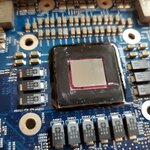
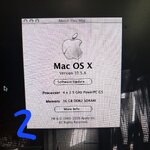
I have a partial success. Apparently CPU A wasn't as dead as I thought it was. CPU B has a crushed corner on the die.

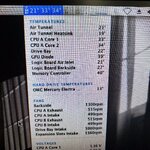
As soon as I plugged power in the LEDs for trickle power and CPU B came on. This was to be expected especially with only 1 CPU. When I pressed the power button the power good LED came on and after a couple seconds (seemed like forever) OF good came on and it chimed. It booted right to the desktop and has good temps. At idle its in the 30s and max temp while running Cinebench was 86C with dips in the low 70s. When the benchmark completed it quickly dropped back to idle temp. This was with the "automatic" option in power saving settings. When set to reduced the highest it gets is 52C.

Guess I can call this a PowerMac G5 Half Quad.

I've uploaded some videos to youtube here and here.
 

Attachments

  • 20250614_130709.jpg
    20250614_130709.jpg
    3 MB · Views: 21
  • 20250614_140555.jpg
    20250614_140555.jpg
    4.9 MB · Views: 21
  • 20250614_130528.jpg
    20250614_130528.jpg
    710.1 KB · Views: 22
  • 20250614_111320.jpg
    20250614_111320.jpg
    1.3 MB · Views: 22
  • 20250608_164717.jpg
    20250608_164717.jpg
    872.9 KB · Views: 30
An update.

I received the eBay replacement for CPU B. The CPU was clearly made for the version 1 LCS and my system used the version 2 LCS. The "EEE" codes and the long CPU model number etched on the white substrate under the black "cover" around the CPU die matched. It may look weird but when it's all put together you don't even see it.

The fans run normally but CPU A (untouched) does run hotter than CPU B by more than 10C when under sustained 100% load while CPU performance is set to highest. I may eventually remount the cooler on CPU A but it's a fully working system again. Although CPU B core 2 has comically low temps ranging from 4-23C depending on load.

Perhaps I could try running thermal calibration with the LCS plugged in and sitting outside of the case? I've turned it on before (with no CPUs) in an attempt to bleed the bubbles out after rebuilding the LCS the first time.

Suppose it's a frankenMac now...
 

Attachments

  • image1.jpg
    image1.jpg
    2.2 MB · Views: 24
  • image2.jpg
    image2.jpg
    3.8 MB · Views: 24
  • image10.jpg
    image10.jpg
    1.8 MB · Views: 22
Nice work! It's best to get rid of the liquid cooling all together, as it will always require maintenance. Nice solution!
 
An update.

I received the eBay replacement for CPU B. The CPU was clearly made for the version 1 LCS and my system used the version 2 LCS. The "EEE" codes and the long CPU model number etched on the white substrate under the black "cover" around the CPU die matched. It may look weird but when it's all put together you don't even see it.

The fans run normally but CPU A (untouched) does run hotter than CPU B by more than 10C when under sustained 100% load while CPU performance is set to highest. I may eventually remount the cooler on CPU A but it's a fully working system again. Although CPU B core 2 has comically low temps ranging from 4-23C depending on load.

Perhaps I could try running thermal calibration with the LCS plugged in and sitting outside of the case? I've turned it on before (with no CPUs) in an attempt to bleed the bubbles out after rebuilding the LCS the first time.

Suppose it's a frankenMac now...
How did you mount your fans to the heatsinks, it looks neater than the duct tape used in the guide?
 
If I ever get around to fixing one of my Quads (I have one which no doubt is completely dead, and another that allegedly worked when I got it almost 10 years ago), I'm going to have to convert it to air cooling. Odds are that between the two, I can find enough parts to get one working machine, unless all four CPUs are damaged beyond repair (which is not impossible).

That said, I'm totally not into this liquid cooling nonsense. I'm not really even sure why Apple couldn't have just not bothered with liquid cooling and went with air instead, since air cooling has been tried and proven to be more than adequate for this model. It would've made life so much easier for Quad owners come maintenance time, and death by LCS leakage wouldn't be the scourge that it is, taking down otherwise very decently made machines.

People tend to think that post-NeXT Apple is virtually infallible (especially during 2003-2006, when the G5 was released, and the Intel transition began), but they still made some boneheaded design choices. And liquid cooling in the Quad G5, neat as it is in principle, is one of them.

c
 
I always thought liquid cooling a computer was a really, really, really bad idea for what I thought should be obvious reasons.
 
People have air cooled the 970fx-based 2.7DP to mixed results (I have, and it mostly works but can overheat depending on what software's running - it doesn't always seem to figure out that it's getting hot until it's nearing 80°C unless iMovie (for example) is running in the background, then it's fine). There are a few threads here about it.

The 970MP-based DC models have a much larger heatsink on the single chip models (the 2.0 and 2.3DC) because they have to cool twice as much CPU vs. the 970fx, so air cooling a 2.5QC is a challenge because two DC heatsinks won't physically fit in the space like in the DP models. The CPU heatsink spacing is also non-standard as far as off-the-shelf x86 heatsinks go, so a hack job is the only real option. I have a 2.5QC and a spare CPU block, but they're the original single-pump design so they're not very robust. Maybe one day I'll try to figure out how to get it to run air cooled and hopefully figure out a way to get the thermal control system to run properly on the formerly-LCS machines.
 
Back
Top