



So I was digging out my 6200CD so my daughter could play some KidPix, and I discovered that was no longer installed. I couldn't use my Floppy EMU with that computer so I was faced with either getting it networked to download from Macintosh Garden or Burning a CD with some stuff I downloaded on my main machine.
I have not burned a CD for System 7 in a long time so I was surprised to discover that "Mac OS Standard" was no longer a format option on my M1 Mini running Monterey… So this is typically where I would root around the basement to find a Tiger bridge machine where I could burn the disk from. But after some searching I found what I have been looking for… Burn
I have not seen this mentioned on many forums so I was surprised that it allowed me to do exactly what I wanted from a M1 Native application. You simply open the application, add the files you want to burn, then most importantly you can select a format. Here are the defaults:
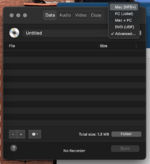
And the advanced options offers even more, including HFS Standard!
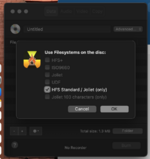
This process worked beautifully! Burning a CD-R via a USB CD burner on my M1 Mini and reading that CD on my Performa 6200CD with 7.6.
I have not burned a CD for System 7 in a long time so I was surprised to discover that "Mac OS Standard" was no longer a format option on my M1 Mini running Monterey… So this is typically where I would root around the basement to find a Tiger bridge machine where I could burn the disk from. But after some searching I found what I have been looking for… Burn
I have not seen this mentioned on many forums so I was surprised that it allowed me to do exactly what I wanted from a M1 Native application. You simply open the application, add the files you want to burn, then most importantly you can select a format. Here are the defaults:
And the advanced options offers even more, including HFS Standard!
This process worked beautifully! Burning a CD-R via a USB CD burner on my M1 Mini and reading that CD on my Performa 6200CD with 7.6.


