• Hello MLAers! We've re-enabled auto-approval for accounts. If you are still waiting on account approval, please check this thread for more information.

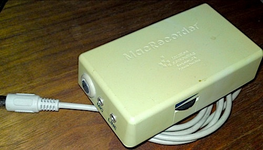
Farallon MacRecorder and Audio Passthrough ?

Hi all. Can anyone share info about taking the audio input from a Farallon MacRecorder and making a visualization "stream" without saving data?
Just looking for another job for a Macintosh Plus, just a visualizer on an open mic, as audio plays letting bars jump.

Thanks for all ideas!
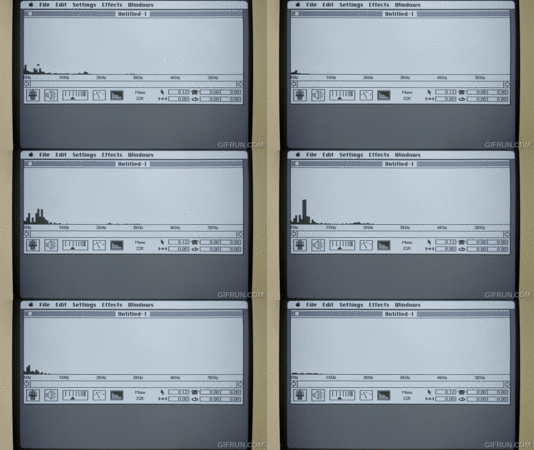
fmc.gif
 
My hope is to take audio input and pipe it through the Mac speaker, but in addition to the non-sexy passthrough of mono audio I want to add the sexy visualization of that audio. If the input is just a simple mic then any noise in the room could be passively shown on the screen like VU meters. It appears that the default operation is to record through the MacRecorder, but instead I want to just have software that streams it through without storage.
 
I'd be interested in this too--I have a MacRecorder I picked up at VCF Midwest a few years ago that I haven't found much use for.
 

Shows it in action recording, which I am sure is the primary purpose, but not necessarily if the bits in the stack can be used for pass through.

Since screen burn in is a thing on the Mac Plus, I am now imagining a fully blank sscreen with a single window (no desktop or menu bar kind of like After Dark blanking) that moves over time while it displays audio-in. If a live oscilloscope kind of view isn’t possible, I wonder what it would take to have the Mac record n-seconds of audio and just display it and then dump the last recording and make a new one, so it would be “audio snapshots” instead of something live.

Since this is about analog-to-digital, I wonder if there is some older Vernier Corp A/D stuff that can be used (I have some in a storage bin with my eMates). I’ll check.

Sometimes I can’t turn my brain off with this stuff.🙂
 

Shows it in action recording, which I am sure is the primary purpose, but not necessarily if the bits in the stack can be used for pass through.

Since screen burn in is a thing on the Mac Plus, I am now imagining a fully blank sscreen with a single window (no desktop or menu bar kind of like After Dark blanking) that moves over time while it displays audio-in. If a live oscilloscope kind of view isn’t possible, I wonder what it would take to have the Mac record n-seconds of audio and just display it and then dump the last recording and make a new one, so it would be “audio snapshots” instead of something live.

Since this is about analog-to-digital, I wonder if there is some older Vernier Corp A/D stuff that can be used (I have some in a storage bin with my eMates). I’ll check.

Sometimes I can’t turn my brain off with this stuff.🙂
 
Back
Top