• Hello MLAers! We've re-enabled auto-approval for accounts. If you are still waiting on account approval, please check this thread for more information.

Falcon F-16 v2.0 in multiplayer....Mac Plus <-> 486 PC!

Mu0n

6502
Last year, I bought the boxed game of Falcon F-16.

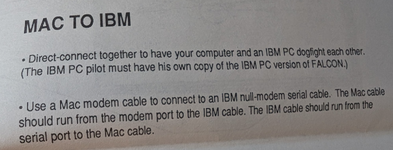
In the supplemental documentation added with v2.0, we can see this paragraph:
1748646100368.png


Goal:
serial link multiplayer game between a vintage Mac and vintage PC using a null-modem link between the two!

Mac side: Falcon F-16 v2.0 (the update that brought multiplayer for this port) running on a Mac Plus
PC side: Falcon (I think you can get away with the original which allows mp out of the box) running on a MSDOS6.22 486 IBM that has a DB9 male serial port.

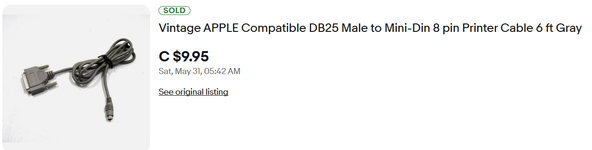
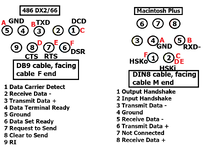
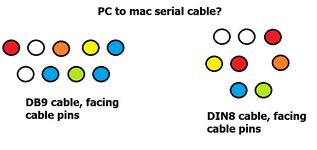
I bought a cable on ebay blindly, it was cheap, and the wiring doesn't look promising. this is the diagram of how the pins are linked together on both ends of the cable
1748646239793.png

I think a potential solution is:

cable 1: Mac DIN8 male to DB25 male regular printer cable
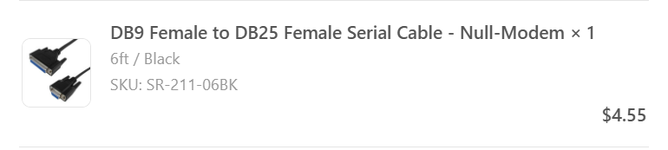
cable 2: PC DB9 female to DB25 female null modem cable <- not easy to find

or perhaps
cable 1: Mac DIN8 male to DB25 male regular printer cable
cable 2: PC DB9 female to DB9 male null modem cable
dongle 1: DB9 female to DB25 femal

I definitely need help from people more knowledgeable about these null-modem solution, bonus points if you've done cross platform connections with RS422 and RS232!
 
What a delightful project - can't wait to see it going! You also need to try Mac - DOS Armor Alley, one of the greatest games.
 
What a delightful project - can't wait to see it going! You also need to try Mac - DOS Armor Alley, one of the greatest games.

thanks for the suggestion, I wasn't aware of it, and it should be easier to pick up with my son as well (aka not have to read 40 pages in the manual)

thanks for that. I think I'll do a 2-prong approach. Irreversibly modify the badly wired cable I have according to your notes, but also figure out a solution that can be bought in the market now.

So I bought these and they are on the way:

1748689954285.png

1748689977071.png
 
Heh... I used to have a bin full of those null modem cables; 20 or so. But the DB25 to Mini-Din, I never found, so I ended up splicing one together myself. Unfortunately, I got rid of all those cables almost 20 years ago now. But from my dim recollection, the pinouts line up with joevt's....
 
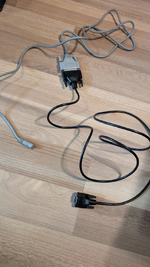
I received my 2 cables in the mail:

1749044534523.png

Here's how the continuity works out between the 2 ends of that 2 cable chain:

1749044551692.png
Again, doesn't look perfect!

I went ahead and tried it:

Mac side: There's not much to do but to launch the game, select "Mac to PC" in the Communications menu

PC side: this version from the eXoDOS collection has .bat files that allow you to play a serial to IP bridged game using their collection's tool, but I used none of it. There are two versions of the game, one called FALCON.EXE and another in a subfolder /tandy/ called TFALCON.EXE. The latter is what seems to be run when you use their multiplayer choice in their interface when you run the game from the collection browser.
Then, there's the COM1 or COM2 choice when inside the game.

Using FALCON.EXE (1200 BPS), launches to a title screen and the options selection screens
COM1: freezes the game after launching from that
COM2: freezes

Using TFALCON.EXE:
freezes right away to a black screen, I never see a title screen


2 things remain to be clarified:

1) are there some extra pins that need to be connected? I'm guessing yes, because the connectivity doesn't clearly show a 2 way connection
2) is there something special needed to be prepared on the PC side so that FALCON runs on a 486 DX2/66? I went super minimal in my config.sys and autoexec.bat devices, no extended, nor expanded memory manager was loaded. This version of the game only uses the PC speaker, so even all the sound blaster stuff is commented out
 
If you figure out how to do this over the internet one day, I’ll play it against you with my SE :).

This is a neat one! Anxious to see how the cable goes.
 
RXD+ on the Mac side probably needs be grounded so that it is not floating and the difference between RXD+ and RXD- is sufficient for a proper signal (RS-422 uses differential signaling).

If HSKo is connected to DSR then HSKi just needs to be DTR but you have it set to DCD, CTS, and RTS.
DCD and CTS are inputs but RTS is an output. I don't know if it makes sense to tie them altogether.
Well, if the app doesn't require flow control then maybe it doesn't matter.
 
Back
Top