



I have a functional Duo Dock (it's the original with optional FPU, and replaced top cover to allow for the newer Duos like my 280c). It has no hard drive inside (no cable is plugged in). I do have a 3com Etherlink III nubus card installed (which works).
When I insert my Duo 280c and power up, I see this screen:
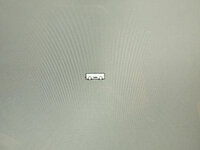
Note it's animated - it has an arrow that appears/disappears pointing down at the iconic representation of the Duo dock. It's stuck on this screen for 10 seconds after which I get the happy Mac icon, followed by the Welcome to Macintosh screen, and then it properly boots up.
I haven't been able to find anything in the manuals about this nor have I found anything on the Internet. Not even sure what search terms to use.
Things I've thought of and checked:
a.) Lid off - the arrow looked like it was pointing at the lid so I checked to see if there's any type of lid sensor but I can't find any, and it does boot after 10 seconds.
b.) Startup device - thought it might be waiting to boot from the duo dock HD (which I don't have installed) so after booting I opened the 'Startup Disk' control panel but it was properly set to the Duo's internal hard drive (ZuluSCSI).
c.) PRAM? - I tried zapping the PRAM but that didn't help. Note that I do have a working PRAM battery installed (this is a brand new battery).
d.) Floppy? - @Fizzbinn was curious whether it was pointing out the floppy drive on the Duo dock. The floppy drive is working properly. To test whether it might be waiting for the floppy, while it was on this icon, I inserted a floppy disk but didn't boot or even attempt to read it... it was paused for 10 seconds on this screen, and then when it continues, it reads the floppy and boots from it.
e.) Security lock - thought it might be something about the security lock but the lock is unlocked right now, and I don't have a key to lock it.
Anyone have any idea what this is?
When I insert my Duo 280c and power up, I see this screen:
Note it's animated - it has an arrow that appears/disappears pointing down at the iconic representation of the Duo dock. It's stuck on this screen for 10 seconds after which I get the happy Mac icon, followed by the Welcome to Macintosh screen, and then it properly boots up.
I haven't been able to find anything in the manuals about this nor have I found anything on the Internet. Not even sure what search terms to use.
Things I've thought of and checked:
a.) Lid off - the arrow looked like it was pointing at the lid so I checked to see if there's any type of lid sensor but I can't find any, and it does boot after 10 seconds.
b.) Startup device - thought it might be waiting to boot from the duo dock HD (which I don't have installed) so after booting I opened the 'Startup Disk' control panel but it was properly set to the Duo's internal hard drive (ZuluSCSI).
c.) PRAM? - I tried zapping the PRAM but that didn't help. Note that I do have a working PRAM battery installed (this is a brand new battery).
d.) Floppy? - @Fizzbinn was curious whether it was pointing out the floppy drive on the Duo dock. The floppy drive is working properly. To test whether it might be waiting for the floppy, while it was on this icon, I inserted a floppy disk but didn't boot or even attempt to read it... it was paused for 10 seconds on this screen, and then when it continues, it reads the floppy and boots from it.
e.) Security lock - thought it might be something about the security lock but the lock is unlocked right now, and I don't have a key to lock it.
Anyone have any idea what this is?








