Duo 280c LED Backlight

aladds

6502
I recently acquired a Duo 280c from a fellow forum member @pizzigri for a project which is (as yet) still temporarily paused, but until that resumes I was just playing with the Duo to make it "as good as possible" - this has involved replacing capacitors, 3D printing new feet (still haven't done some nice rubber bumpers for the lid, but I'll get to it) and lubing the keyboard keys (only to discover that the reason this one is bad is because the back metal plate is warped, so I'll be looking at that separately).

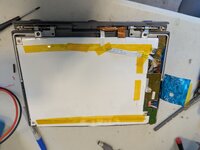
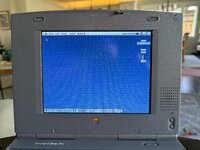
Anyway I was aware of these existing and thought that I'd like to give one of the kits a go. So I ordered one, trimmed the LED board to length, swapped out the CFL tube and powered the board externally. I got this:
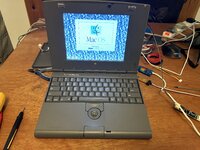
IMG_8779.jpg


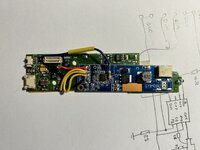
I thought that looked pretty awesome, so I poked around at the inverter board, found 24v to power it, 5v for the enable line and (temporarily) for the backlight brightness (I know there will be a variable voltage for that somewhere on there, I've just not taken the time to find it yet) and after stripping a few now extraneous components from the board I got the new LED driver to fit within the top case.
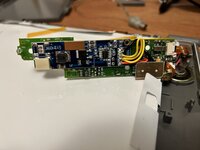
IMG_8833.jpg


I genuinely beleive that this is the best replacement option we have for failed CFLs in all PowerBooks going forwards. Even spinning a new PCB to replace the inverter board completely wouldn't even be particularly difficult.
 
Further investigation tells me that I must be missing something regarding how dimming the screen works on this thing. I belled out the connector on the Inverter board and found the following:
1Sleep LED
2Audio -ve
3Audio Gnd(?)
4Audio +ve
524v
6GND
724v
8Button Board pin 2
924v
10Button Board pin 4
11GND
12Button Board pin 1
13GND
14+5v (off in sleep)
15GND

Presumably it's possible that the "Audio GND" pin I've misunderstood (although it makes the most sense) or some other pin is serving a dual function, but I am pretty certain that the 25v and 5v lines don't change based on screen dimming (tried with both brightness controls and dimming via Powerbook control panel)

It's also possible that it changes the brightness through _current_ control so I'll check that too.
 
How is the color temperature? A strip of WLED's and the CCFL that was in there are, I'm thinking, quite a bit different in color temperature. Do the colors seem to be true and accurate, or do they seem off in any way?
 
Brilliant! I’m looking forward to seeing how you make out on resolving the brightness control.
Looking up the LM1172 it should actually be quite straightforward, but of course knowing Apple they’ll have used a fancy current driver or something so they can have their fancy push buttons. It’s also possible that one of the grounds is different and used for backlight (see the bottom of page 14 in this PDF here)
How is the color temperature? A strip of WLED's and the CCFL that was in there are, I'm thinking, quite a bit different in color temperature. Do the colors seem to be true and accurate, or do they seem off in any way?
Honestly I think it’s better. This CCFL wasn’t actually too faded but some of my other PowerBooks are actually terrible in colour renditioning.
 
Good work! I did something very similar to my iBook clamshell backlight a few years ago, but never quite got the brightness control working perfectly. I'm curious to see what you figure out with the LM1172.

 
Well I was wrong in my table above, the "Audio GND?" pin (pin 3) is in fact exactly what I want...except it's inverted!
4.776v is backlight off, 3.344v is minimum brightness all the way down to 1.390v which is brightest.

But that's fine! The circuit the DF6113 chip (the one the new LEDs came with) supports inverse dimming, although the reference circuit in the datasheet and the board don't really line up. However....

With a somewhat straightforward Mod (10K resistor to pin 5 of the driver chip, direct from pin 3 of the inverter plug dimming works inversely, and perfectly. I could probably make it a little brighter/dimmer if I wanted by adjusting the value of this resistor. And I probably do, since at the lowest brightness level it does flicker. That said I did remove the input capacitor on the board so it fit better in the case. There is space for it, just not where it was, so it would be fine if I found a new home for it. (You can see this in the video)

So yeah, this was much easier than I thought (Caveat: I do have an EE degree)

If this isn't clear enough I can do a proper writeup, but in the meantime have some photos and a nice video of the dimming in action:

IMG_8841.jpg

IMG_8842.jpg

As an aside, I think the ENA/DIM pins might actually be the wrong way around on my boards.
 

Attachments

Good work! I did something very similar to my iBook clamshell backlight a few years ago, but never quite got the brightness control working perfectly. I'm curious to see what you figure out with the LM1172.

Interesting! Did you change the feedback resistors when doing your mod? The datasheet has a current calculation formula and I could imagine that affects the linearity of it.
It also looks like we reached the same conclusion about the inverted controls but solved it in very different ways! I decided to make an "engineering judgement" (informed guess!) that I could probably just use the resistor on pin 5, and happened to be right. That said I didn't look closely at the circuit your board had, so they could have been quite different.

Other than the lowest settings being flickery (which as I say might be due to the admittedly still missing capacitor) I'm happy with how my setup has turned out.

Regarding your linearity issue: how much of the original backlight circuit did you leave in place? I still have the LM1172 on the board, which I am considering removing, but I could imagine it's acting as a load and keeping my output a little more stable...

(Also I love how much space there is inside the Clamshell's screen!!)
 
Interesting! Did you change the feedback resistors when doing your mod? The datasheet has a current calculation formula and I could imagine that affects the linearity of it.
It also looks like we reached the same conclusion about the inverted controls but solved it in very different ways! I decided to make an "engineering judgement" (informed guess!) that I could probably just use the resistor on pin 5, and happened to be right. That said I didn't look closely at the circuit your board had, so they could have been quite different.

Other than the lowest settings being flickery (which as I say might be due to the admittedly still missing capacitor) I'm happy with how my setup has turned out.

Regarding your linearity issue: how much of the original backlight circuit did you leave in place? I still have the LM1172 on the board, which I am considering removing, but I could imagine it's acting as a load and keeping my output a little more stable...

(Also I love how much space there is inside the Clamshell's screen!!)
I didn't use any resistors when I did my mod. I also removed the CCFL driver board entirely, but I don't know if this was the right decision.

It looks like your LED driver board differs slightly from mine, but they are based on the DF6113 IC.

You mentioned that lower brightness settings made your LEDs flicker, and this sounds similar to issues I had with my modification: Something I found odd about my iBook is that when I would turn the brightness down, the backlight would actually get brighter before getting dimmer (flickering throughout). It would then brighten again before finally turning the backlight off entirely. If you have any success adding a capacitor to your LED driver, I'd be interested to hear about it.

I like your idea of using a resistor on pin 5, and I wonder if I can add something similar to my iBook. When the screen gets stuck at the maximum brightness setting, it is painful to look at (it also overheats the LED driver), so I bet adding a resistor would help cut the brightness down a lot. I think I have a spare LED driver PCB lying around somewhere, so this is something I'll definitely tinker with at some point.
 
You mentioned that lower brightness settings made your LEDs flicker, and this sounds similar to issues I had with my modification: Something I found odd about my iBook is that when I would turn the brightness down, the backlight would actually get brighter before getting dimmer (flickering throughout). It would then brighten again before finally turning the backlight off entirely. If you have any success adding a capacitor to your LED driver, I'd be interested to hear about it.
If you look at the second video in my post above, I appreciate that I switch between brightnesses quickly, but it's the same effect as I've seen on other PowerBooks with normal CCFL backlights on a very low setting - the steps up and down are "in order" but the bottom one (or two, depending on the resistor I used) flicker "within" their range.

Yeah I'll look at capacitors!
 
Even spinning a new PCB to replace the inverter board completely wouldn't even be particularly difficult.

Happy to help with this if there's enough interest.

3D printing new feet (still haven't done some nice rubber bumpers for the lid, but I'll get to it)
Slightly O/T but are there STL files for these available somewhere? And what material did you use? Looking to print some of my own.
 
First off, many thanks to the OP here. I also have a Duo 280c that was suffering from a dim display. So, I followed the instructions here and got what at first I thought was a great result - the LED converted screen was bright with vivid colors.

But, then I discovered what for me was a fatal problem. Everything I’d done so far was with the Duo connected to the power adapter. I’d previously rebuilt some Duo battery packs, and when I tried running it on battery the screen dimmed to an unusable low level. The 24v supply coming off of the inverter board dropped to the battery’s 13 point something volts and the brightness dropped way down.

My first attempt to fix this ended in failure - but I’ll recap so noone else wastes time. The LED driver board supports 2 LED strips, so I thought I might be able to increase the brightness by adding a 2nd strip to the bottom of the screen. I’d noticed when putting in the first that there appeared to be room in the plastic frame. I had to do some minor cutting, but was able to install a bottom LED strip. This did help a little, but it also messed with the overall diffusion and the bottom of the screen showed up somewhat brighter than the rest. I considered this a failure.

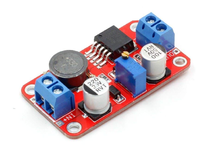
So, because the primary issue was a difference in the input voltage depending on running on battery vs. adapter I figured that I needed make it the same in both modes by using a DC to DC step up converter to power the LED driver board. I found some cheap and small ones on Amazon that looked like they would work:

1779040140577.png
In my 280c I’d previously swapped out the hard drive for a BlueSCSI and there was just enough room left over to add this (after removing the screw terminals). So, I wired up the converter to boost the BlueSCSI’s 5v to 24v. I reviewed some Duo documentation and concluded that the BlueSCSI plus the boost converter would fit within the power envelope of the now-removed SCSI hard drive.

This worked - mostly. I ended up adjusting the boost converter to output 28v and got a brilliant bright and vivid display that was stable between battery power and power adapter.

The challenge came in getting screen dimming to work. I followed OP’s lead by using a resistor between inverter pin 3 and the driver chip’s pin 5. I spent a whole lot of time trying to tune the system. I could easily get full dimming ability - but at the cost of a lower top brightness level. If I raised the boost voltage high, I could get a very bright screen but lost the ability to dim.

At every combination of voltage and resistor value, there always seemed there would be zone at which the screen flickered.

In the end, I opted for a combination that yielded high brightness, but left me with only a single dimming step. For me, that was a boost voltage of 28v and a resistor value of about 16k (I added a small single-turn pot to allow for easy adjustments).

Also, note that because we’re running off of disk power I needed to adjust the power profiles such that the hard drive (BlueSCSI) would never be turned off.

Incidentally, I tried running with and without the LT1172 - it didn’t seem to matter. I also removed the LED driver board’s input capacitor to make things fit. I tried relocating it, but ended up leaving it out. There’s a 100uf output capacitor on the boost board. Adding the 220uf input capacitor changed the flickering behavior - but didn’t eliminate it. It just moved around.

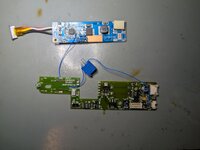
I also removed some components from the inverter board to make room. Here’s where it ended up:
1779040192990.jpeg
I used a flat ribbon cable to run power from the boost converter to the LED driver. I had a six conductor ribbon on hand and used 2 lines for 28v, 2 lines for ground and 2 lines for 5v. If I were to do this again, I’d use a 4 conductor line and skip the 5v - instead pulling it from the inverter board.

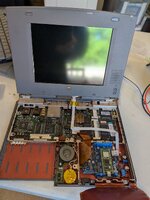
Here’s how it ended up:
1779040231582.jpeg
And here’s how I routed things on the back side (though I ended up adjusting things a bit to allow for the center cover to fit).
1779040273062.jpeg
Overall, I’m very happy with how it all came out. The screen is bright and colors are vivid.
PXL_20260517_165848386.jpg
 
Back
Top