• Hello MLAers! We've re-enabled auto-approval for accounts. If you are still waiting on account approval, please check this thread for more information.

Dove MacSnap video issue

mst3k

6502
Greetings,
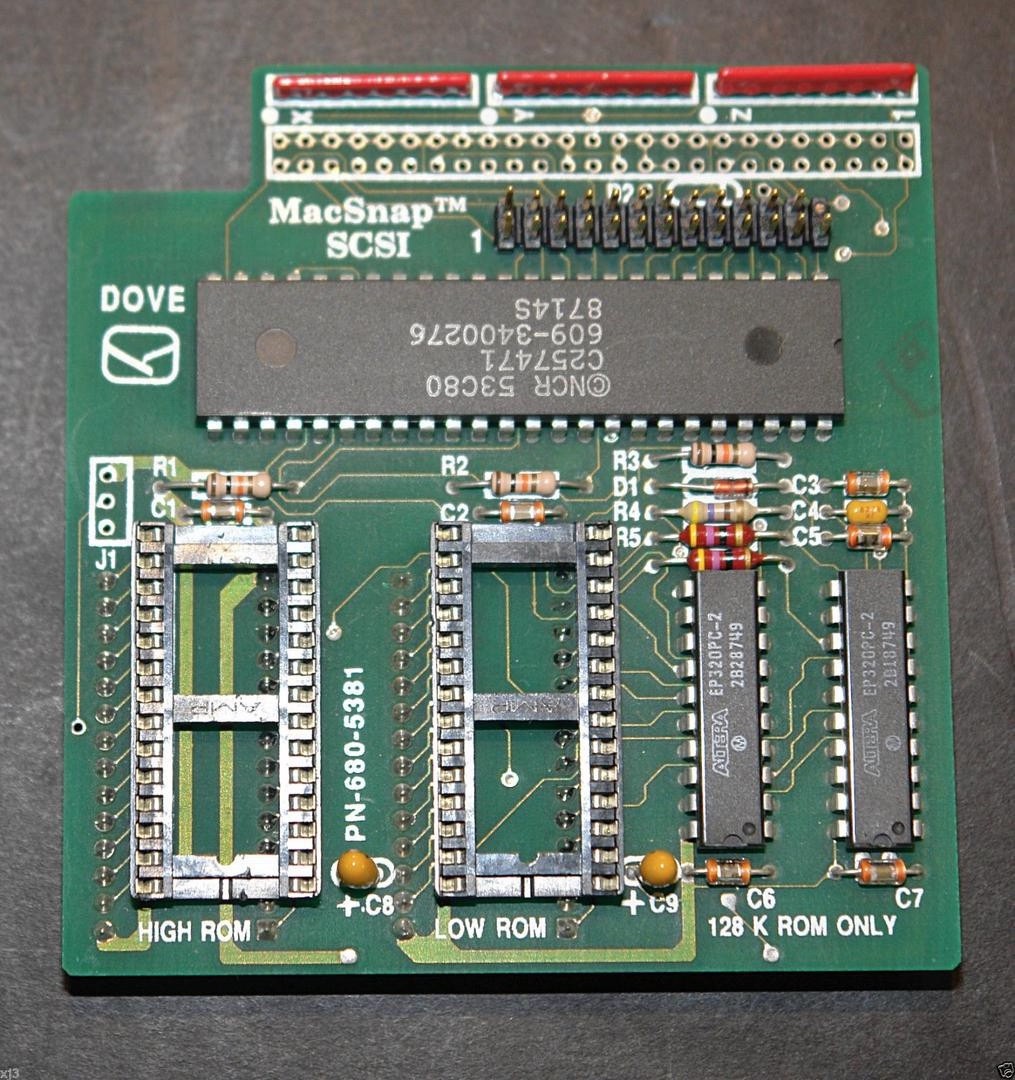
I recently acquired a Mac 512K with a Dove MacSnap SCSI and a Dove Snap 548 memory board.
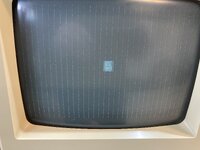
When I booted the machine I got a chime, a happy Mac, a bunch of white pinstripes on black background and then a freeze (see video).
After cleaning, trying multiple boot options (Floppy Emu, Floppy Disks, and even a Blue SCSI on the SCSI port) to no avail, I removed the memory board and the SCSI board. The computer booted fine.
I then reinstalled the memory board, leaving the SCSI board off, and got a nice chime and then a 300200 error which Dead Mac Scrolls ID's as memory error.
I removed the memory board and tried it on a completely different Mac 512K and received the same error message. I think that means I have some RAM issues on the memory board.

Next I installed the SCSI card on it's own without any device attached and got a strong chime and a good boot.
Then I started attaching SCSI devices and nothing worked until I got to my Apple 20SC with an 80mb Quantum drive.
I got a nice chime, a happy Mac and the computer started booting from the external 20SC.
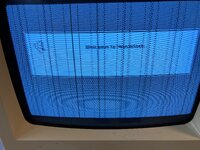
HOWEVER, once it gets to the 'Welcome to Macintosh' screen, everything freezes and I get zipper like lines (see video and pic 0615).
I have tried this on all three of my working Mac 512K's and get the same result.
Mystery solved? A bad MacSnap SCSI? Then why on two occasions did it actually complete the boot to the desktop?
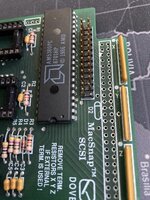
Now, to add to the mystery, there is a broken pin on the SCSI interface on the MacSnap but I've assumed that was intentional since the cable has a block on that pin location (a plastic block, not a broken pin) but maybe that is wrong and that pin is supposed to be there (pic 624)?
Lastly, I've looked at the connections and solder joints with my microscope and there are no obvious issues.
Also, I checked voltages and got -12.23, +5.03v, and +12.15v on the floppy drive.
Any idea where I should go next?
Thanks!
 

Attachments
  • IMG_0615.JPG
    IMG_0615.JPG
    4.8 MB · Views: 8
  • IMG_0612.JPG
    IMG_0612.JPG
    2.4 MB · Views: 10
  • IMG_0624.jpg
    IMG_0624.jpg
    2.1 MB · Views: 10
  • Untitled video.mp4
    Untitled video.mp4
    32.1 MB
Last edited:
Hello,

From having replicated the MacSnap SCSI with the help of a few other members here, I can tell you this thing is very sensitive, either by its design or the old ROM sockets.

First the broken pin isn't an issue, it isn't connected to anything. All of the boards are like this

Original%20%232%20front.jpeg


Second, yeah, your troubleshooting method is good. The MacSnap patches the ROM on the fly, using an "analog" delay line. It means that if the voltage is slightly off, or if the GALs are slightly too fast or too slow, then the ROM patching will fail and can result in lockup, HFS corruption, RAM errors, or the happy Mac on a black screen. It's on a tight margin, either a few mV or ns off and it doesn't work.

Voltage can be slightly off by a few things :
- Analog being tired (you checked that, voltage are fines)
- ROM sockets being slightly corroded or pins misaligned
- SCSI devices attached

The last one is due to how the passive SCSI termination on the board. If the SCSI devices pull too much power (the BlueSCSI v1 is a "good" example of this), the MacSnap board won't be able to provide enough and the voltage on the board will drop so much that the ROM patcher will not be able to operate correctly. Active termination help a lot there, the Iomega Jazz for example do have a good SCSI termination circuit

One way to test this is to measure the voltage at the ROM pins, when the MacSnap is installed (you may need to boot the board outside of the chassis to test this). Having +5V on the floppy drive and 4.6V-ish or lower on the ROM is not unheard of.

Also try contact cleaner on all the visible MacSnap SCSI connections/sockets. By the way, is your HD20 readable on another (non-512ke) Mac ?

The weird thing is that it happens on all of your 512ke so the board might "just" be damaged, but it screams MacSnap SCSI shenanigans for now.
 
Greetings,
Thanks for the great tips and information!

Voltage can be slightly off by a few things :
- Analog being tired (you checked that, voltage are fines)
- ROM sockets being slightly corroded or pins misaligned
- SCSI devices attached

The last one is due to how the passive SCSI termination on the board. If the SCSI devices pull too much power (the BlueSCSI v1 is a "good" example of this), the MacSnap board won't be able to provide enough and the voltage on the board will drop so much that the ROM patcher will not be able to operate correctly. Active termination help a lot there, the Iomega Jazz for example do have a good SCSI termination circuit

One way to test this is to measure the voltage at the ROM pins, when the MacSnap is installed (you may need to boot the board outside of the chassis to test this). Having +5V on the floppy drive and 4.6V-ish or lower on the ROM is not unheard of.

Also try contact cleaner on all the visible MacSnap SCSI connections/sockets. By the way, is your HD20 readable on another (non-512ke) Mac ?

The weird thing is that it happens on all of your 512ke so the board might "just" be damaged, but it screams MacSnap SCSI shenanigans for now.

Let me ask you about the ROMS.

Does the MacSnap SCSI require the 512Ke ROMS? Will it work with either the Mac Plus/512Ke ROMS or the original 512K ROMS?
Also, I'm assuming that the MacSnap SCSI works fine with 512k of RAM? Since the 2mb RAM upgrade was originally in place it occurred to me that maybe there is a missing RAM requirement with only the original 512k RAM in place?

I'll get out my fiberglass brush and rough up those connecting pins on the ROMS and ROM sockets and give them a dose of contact cleaner to see if that helps.

Thanks again for the great info!
 
Does the MacSnap SCSI require the 512Ke ROMS? Will it work with either the Mac Plus/512Ke ROMS or the original 512K ROMS?
Also, I'm assuming that the MacSnap SCSI works fine with 512k of RAM? Since the 2mb RAM upgrade was originally in place it occurred to me that maybe there is a missing RAM requirement with only the original 512k RAM in place?
Yes, you need the MacPlus/512Ke ROM, since SCSI support was not present in the original ROM for the Mac 128K/512K models.

As for RAM requirements, it's unlikely that anything about the new ROM requires more than 512K (since it was present in the 512Ke, after all.)
 
My 512k, original/unmodified, does this if I try to boot with a disk that is corrupted somehow or there is something on it otherwise doesn’t.

Maybe try building fresh System disk?
 
Yes, you need the MacPlus/512Ke ROM, since SCSI support was not present in the original ROM for the Mac 128K/512K models.

As for RAM requirements, it's unlikely that anything about the new ROM requires more than 512K (since it was present in the 512Ke, after all.)
Thank you. I am using the 512Ke ROMS, so I am good to go.

My 512k, original/unmodified, does this if I try to boot with a disk that is corrupted somehow or there is something on it otherwise doesn’t.

Maybe try building fresh System disk
After Demik asked about the health of the external HD and after reading your comment, I went back and checked the external Apple SC with an SE and an SE/30 and guess what... I got the same problem I was having with MacSnap SCSI in the 512K. The machines would hang at the exact same point. So, swapped out the Quantum 80 for an IBM 80, installed 6.08 and tried again. et Voila! I have a working MacSnap SCSI.

Now, on to the MacSnap ram card. It shows error 300200 which points to problems with a pair of memory chips. However, those chips test fine on the logic board when I remove the memory card. Since the MacSnap clamps over the existing chips in those two locations, I'm assuming I have a broken socket, solder joint or pin on the memory card. We shall see!

Thanks for your help!
 
Interesting (weird) side note, my MacSnap SCSI only works if there is a floppy drive attached. It can be either an external floppy drive or an internal floppy drive. It doesn't matter which as long as one is connected. No actual floppy disk is required, just a connected FDD. Without a FDD, it will not find the attached SCSI drive. With a FDD attached, everything works fine. I'd be interested to know if this is an anomaly of this product (?) or if my device has a unique fault.
Thanks
 
Back
Top