• Hello MLAers! We've re-enabled auto-approval for accounts. If you are still waiting on account approval, please check this thread for more information.

Do StuffIt 5.5 archives encode the resource fork safely for transfer to a non-Mac ?

Just to be clear, an ISO file isn't a PC format. It is a CD structure dumped to a file. The Toast image format is fundamentally an ISO file.

Genuine truth as a person who doesn't use modern macs... What on earth is a .cdr? I'm not aware of that being a period correct extension (I mean, no extension is).

But, just to be clear, iso is good :) you can open them in toast and several other programs. There is even System 6 software for isos.

 
@ymk Yes, you're correct, I was arguing in support of your use case. The problem I have with Zip is that people use it in situations where the file needs to be unpacked on the target system, which is difficult to do successfully pre-OS X.
 
Just to be clear, an ISO file isn't a PC format. It is a CD structure dumped to a file. The Toast image format is fundamentally an ISO file.

Genuine truth as a person who doesn't use modern macs... What on earth is a .cdr? I'm not aware of that being a period correct extension (I mean, no extension is).

But, just to be clear, iso is good :) you can open them in toast and several other programs. There is even System 6 software for isos.
To my knowledge, a .cdr is what apple calls a "DVD/CD Master" image. They are made with Disk Utility on any macOS/OS X based system. Essentially an ISO but the Mac version made by Disk Utility. They copy everything, so you can make copies of, say, a System 7.5 install CD and burn a copy that will start a Mac.
 
@ymk Yes, you're correct, I was arguing in support of your use case. The problem I have with Zip is that people use it in situations where the file needs to be unpacked on the target system, which is difficult to do successfully pre-OS X.
This is sometimes what I face. All of my files are downloaded on my iMac, then routed over the network to my OS X 10.4 Mac mini, which then the other target machines can connect to. There are a few times that something is "stealth" placed in a .zip inside another archive that I can't get open after I copy it over the network to, say, my SE :P
 
To my knowledge, a .cdr is what apple calls a "DVD/CD Master" image. They are made with Disk Utility on any macOS/OS X based system. Essentially an ISO but the Mac version made by Disk Utility. They copy everything, so you can make copies of, say, a System 7.5 install CD and burn a copy that will start a Mac.
Note: Do not do this. Disk Utility does not make proper bootable images of MacOS CDs... It ignores the Apple Driver partition.
 
Note: Do not do this. Disk Utility does not make proper bootable images of MacOS CDs... It ignores the Apple Driver partition.
This is why imaging older CDs should be done using Astarte Toast CD-Copy 2.x rather than Disk Utility (or other tools) on a Mac > OS 9. I’ve tried explaining this for years and people still don’t understand.

Lots of iso and cdr images on various sites that are Mac OS 7.1 and higher that are unbootable. It makes new users hate the Mac because they download and burn and nothing works and they give up. I’ve coached many on Reddit about this.

Additionally, something like ImgBurn for Windows might work, but I’ve never tried or verified it myself.

A few months ago Action Retro did a video on Rhapsody and found the ISO files aren’t bootable and went about “fixing” them and re-uploading them. Likely the extractions were improperly done and the boot partition was lost in the process.

I’ve personally cleaned up so many disk images and ISOs on Macintosh Garden that I grew tired of fixing them. To top it off, I get nasty comments from the original uploaders questioning why I was messing with their files, which didn’t work. Trying to explain that the files didn’t work went on deaf ears and offenses were taken. “Don’t touch my stuff!”

I won’t touch your stuff if you’d archive and upload it properly.

/rant
 
Shall I add '
This is why imaging older CDs should be done using Astarte Toast CD-Copy 2.x rather than Disk Utility (or other tools) on a Mac > OS 9. I’ve tried explaining this for years and people still don’t understand.

Lots of iso and cdr images on various sites that are Mac OS 7.1 and higher that are unbootable. It makes new users hate the Mac because they download and burn and nothing works and they give up. I’ve coached many on Reddit about this.

Additionally, something like ImgBurn for Windows might work, but I’ve never tried or verified it myself.

A few months ago Action Retro did a video on Rhapsody and found the ISO files aren’t bootable and went about “fixing” them and re-uploading them. Likely the extractions were improperly done and the boot partition was lost in the process.

I’ve personally cleaned up so many disk images and ISOs on Macintosh Garden that I grew tired of fixing them. To top it off, I get nasty comments from the original uploaders questioning why I was messing with their files, which didn’t work. Trying to explain that the files didn’t work went on deaf ears and offenses were taken. “Don’t touch my stuff!”

I won’t touch your stuff if you’d archive and upload it properly.

/rant
Shall I add 'How to copy bootable CDs on Linux' to my 'How to make new bootable CDs' on my website?
 
I think Toast has the option to not copy empty space when making a .ISO. Just make sure to click the option for Bootable so you don't loose the boot partition.

Also, that was one of the nice things about Disk Copy 6. Despite all the issues with data forks and cross-compatibility, having the option to ignore empty space and compress the file was really nice.
 
having the option to ignore empty space and compress the file was really nice.
This feature / zeroing empty space is absolutely critical to avoid accidentally sharing deleted private data when you share a disk image. Sharing images of your hard disk is dangerous.
 
It would be interesting to run a crc check for bit accuracy between an ISO extracted with Astarte CD Copy, and dd. I’ve been meaning to do this but haven’t yet.
 
Note: Do not do this. Disk Utility does not make proper bootable images of MacOS CDs... It ignores the Apple Driver partition.
I do this with each and every one of my Mac CDs, classic and OS X. They all work perfectly and there is no issue. Disk Utility on OS X does do this properly. Why would you not want to do it?
 
This is why imaging older CDs should be done using Astarte Toast CD-Copy 2.x rather than Disk Utility (or other tools) on a Mac > OS 9. I’ve tried explaining this for years and people still don’t understand.

I don't know how these programs are mangling images. I use cdrdao under Linux for all CD types and platforms.

A data disc image should be a dump of track 1 with 2048 byte sectors; completely OS, filesystem and partition table agnostic.

Archive sites could run some basic checks on the file to determine the image type, archive version, etc and present it to the client before downloading.

For example, it's easy to tell a floppy/volume image isn't raw from its file size alone.
 
This is why imaging older CDs should be done using Astarte Toast CD-Copy 2.x rather than Disk Utility (or other tools) on a Mac > OS 9. I’ve tried explaining this for years and people still don’t understand.
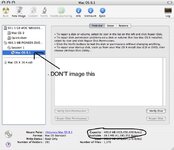
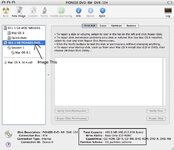
Never had an issue. I've made Mac OS 7.6 and 8.1 discs in this manner in recent memory, and they all start period hardware without issue. The trick is that you have to make an image of the device, and not the disk. See the difference: first you can see the selection of the partition, and in the second you can see the selection of the entire disc itself. If you make an image of the entire disc, it works just fine.

Picture 1.jpg

Picture 2.jpg
 

Never had an issue. I've made Mac OS 7.6 and 8.1 discs in this manner in recent memory, and they all start period hardware without issue. The trick is that you have to make an image of the device, and not the disk. See the difference: first you can see the selection of the partition, and in the second you can see the selection of the entire disc itself. If you make an image of the entire disc, it works just fine.

View attachment 62082

View attachment 62083
I haven't seen the issue mentioned in person, because I don't really OSX... But that looks to be a quicksilver, I think they mean... Slightly newer than 20 year old machines.
 
Back
Top