


Did I kill my iMac G4 1.25 GHz PowerPC? :(

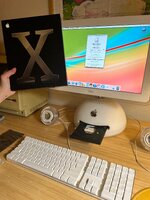
Preview pic (after clean and before OS reinstall):
LRyVmSh.jpeg

I bought this iMac from someone else. I opened the iMac to replace the battery on the mobo and clean it. I also added ram into the extra slot. I put it back together and it was working well (see pic). Since I bought it from someone else, I decided to reinstall the OS with 10.3 discs that I bought new, since that was the OS on it already, I thought it would be fine.

Some stuff went a little wonky during the clean:
  • The heatsink bar that goes over the processor was stuck to the heatsink on the top of the machine and wound up bending. Didn't realize it at first and I tried to put the bottom and top back together with it bent.
  • This caused two things:
    • One RAM clip broke off (it still seats fine and RAM seems undamaged). Before I started OS reinstall, both RAM were being read (see screen).
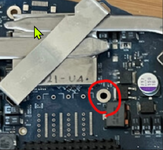
    • Small scratch on one of these round whole on the mobo -- not sure they have a function? (Not my pic, I think it's the one under the metal heatsink bar).
      2026-02-09 10_33_32-000187.png

Anyway, I fixed the heatsink bar and put it back together. It was working well, I even saw extra RAM reading on screen (see pic).

At this point, I started the new OS X install. New shiny discs. Disc 1 went well. When on Disc 2, there was a kernal error 00000001. I should have taken a pic and I regret not doing so. A bunch of text read on the left side of the screen, screen was still on but frozen. Keyboard input did not seem to work. So I did a hard reboot since it was locked up after I waited for a while.

Upon hard reboot is when the real trouble started:
  • Screen is now black, no LED backlight, no picture.
  • Keyboard inputs do not seem to work.
  • Fans are running, there is a start up noise.
  • Disc seems to be spinning from what I can tell.
I have tried (multiple times):
  • PRAM reset
  • PMU button
  • Removing extra RAM with PRAM reset & PMU button
  • Running only with extra RAM without mobo RAM with PRAM reset & PMU button
Future steps:
  • I'd like to get the disc out but I can't open the tray since keyboard input does not work. Is there a manual way to do this?
  • I ordered a mini-VGA to VGA cable to see if an external display will work.
  • If I can get the disc out, I'm wondering if I should insert an earlier OS disc (which one?) Not sure if that would fix the screen issue but maybe would prevent it from bricking again. Any experience here appreciated.
If you have any advice on what to do here in the meanwhile or something I haven't thought of please let me know. I'm really unhappy that such an awesome machine that I just spent quite a bit of money on is now non-functional. Thanks for your time if you do put some thought into this.
 
Did more testing...

Caps lock key does not light up. Mouse LED does.

I manually opened the optical drive to get the disc out.

I tried booting up without the hard drive and optical drive plugged into mobo. Still no picture.

Mobo connections all look fine and I don't see anything unplugged. I didn't take apart the stem/monitor to check the connections, but I also did not do that before. Everything on the bottom half appears to be good. I still have no idea what the issue is but it seems borked.

Some pics of the inside:
And no I don't have any other Macs. I got a mini VGA to VGA adapter so I'll try that when it comes.

I thought maybe there would be an indicator to prevent start-up due to the broken RAM clip but nope. RAM is definitely seated well too...so idk what the problem is. :(
 
Is the bent back heatsink making good contact with the CPU, using fresh thin layer of thermal paste? Was the RAM upgraded during the cleaning process - and does it still go into the slot with a clunk on the broken end - any other signs of damage around there of the RAM pins themselves?
 
It does look like you did in fact kill your iMac G4. If this isn’t what you were aiming to do, you sure did a good impression of someone who wanted to ruin a good computer for no apparent reason.
The only advice I have is, slow down and take your time on repairs. These aging electronics are brittle. Someone with oversized knuckles has no business working inside these machines.
 
Is the bent back heatsink making good contact with the CPU, using fresh thin layer of thermal paste? Was the RAM upgraded during the cleaning process - and does it still go into the slot with a clunk on the broken end - any other signs of damage around there of the RAM pins themselves?
No, the internal RAM was not upgraded. The board itself and the RAM slot look normal, other than having the broken RAM clip. I'm starting to suspect that because the thermal paste turned into a cement and I pulled the top and bottom half apart with some force/the thermal bar bent, it may have done some damage to the board by flexing it. I really can't think of anything else. I bought some new RAM to test but my hopes are not high. Really bummed. I may buy a logic board replacement and swap it out or cut my losses and sell it for parts and purchase something else. I will say this was a good experience and I did learn a lot about this specific model though.
 
I had the same problem with my 1Ghz iMac. The heatsink was not making good contact with the processor and/or the heat pipe wasn't sinking heat into the inner chassis well enough. I was also using two ram sticks that were different speeds, which might have been an issue too but I can't confirm. I was trying to install 10.4 and it kept crashing, until I re-seating everything and re-applied the appropriate creams. Maybe check the CPU top to see if it's chipped? That's what I'd be concerned with. Heat in these machines is pretty crazy.
 
I had the same problem with my 1Ghz iMac. The heatsink was not making good contact with the processor and/or the heat pipe wasn't sinking heat into the inner chassis well enough. I was also using two ram sticks that were different speeds, which might have been an issue too but I can't confirm. I was trying to install 10.4 and it kept crashing, until I re-seating everything and re-applied the appropriate creams. Maybe check the CPU top to see if it's chipped? That's what I'd be concerned with. Heat in these machines is pretty crazy.
Hmm. I will double check. Everything looked normal when I originally cleaned off the old paste though but it's worth trying again.

Did you have an issue where your screen wouldn't come on and instead of a start-up sound you were getting a beep?

Right now it's in a state where the screen won't come on and it no longer has a start-up sound, but a beep instead. Which is likely something with the RAM or board.
 
Back
Top