• Hello Guest! We're hosting a challenge to welcome vintage Intel macs to the MLA during the month of July! See this thread for more information.

Diagnosing Macintosh Classic

It does that much without UA5 being present? Interesting I would not have expected that.

The variation in screen brightness may be down to electrolyte that has seeped into the PCB of the analogue board. It's quite porous and a real pain to deal with. Usually a deep soaking clean is required if this is the case - hot soapy water, or a ultrasonic cleaner if you have one
 
It looks like the "Screen" adjustment is overdriving the flyback. I suggest you adjust the brightness/contrast dials on the analog board. The Service Manual (page 89) has instructions on how to do this; ignore the light meter stuff (unless you have one) and adjust it so the non-lit areas around the sides of the screen (glass, but no image being projected) is as dark as possible.
 
will try the adjusting the dials and if that doesn't help i'll pull the boards out for another cleaning.

Any clues on the sad mac icon and the error code?
 
Nicely done! I suspect cap goo is still present, have you checked the other culprits as noted TDA4605 @ IP1, CNY17G @ QP1, and diodes on the analog board, also clean the CRT adjustment pots and check voltages now showing life.

The Sad Mac: related to the motherboard likely caps or bad RAM; check again for cap goo, double check recap work and reseat the RAM, ROM chips (if socketed), electronic solvent cleaning spray on the sockets/slots helps.
 
Did a bit more work on the board. In particular, I found that UH6 had significant rust and rot. So I removed it from the board and sure enough it was a giant mess under the chip. I cleaned up the spot, a few pads were gone. Then I soldered it back on and jumperwired the pins without pads. Continuity tests showed that each of the pins is connected to where it should be. At the same time, I also put the sound chip back on in the same way.

And the result... was a black and white checkered screen :cry: It feels like I've regressed from the sad mac icon to this.
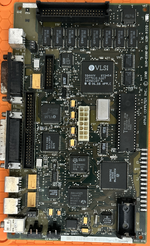
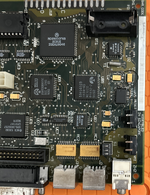
Searching around, the checkered screen seems to indicate issue on the logic board. Lot of people mention the ram. The ram on my board is soldered on, and the chips SEEM OK. I don't see the usual rust and rot I see on other chips pins. I went ahead and cleaned up all the chips anyway, but no go!

Any suggestions on what I should try next? Can the problem still be with the analog board?
 

Attachments

  • logic_front_2.png
    logic_front_2.png
    6.3 MB · Views: 15
  • logic_snd_1.png
    logic_snd_1.png
    6.7 MB · Views: 14
  • logic_uh6_1.png
    logic_uh6_1.png
    1.8 MB · Views: 15
This is usual: I've taken steps forward and then steps back before. There's got to be stuff going on elsewhere, possibly under other chips that you haven't looked at yet. Don't feel bad; it happens. Likely your issue is still on the logic board, but, if you want, try and run a voltage test on the floppy port with the machine on to make sure that the correct voltages are getting to the logic board. If that is good, for now I'd just focus on the logic board.
 
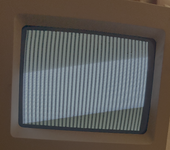
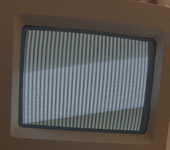
Found the issue causing the checkered screen! the cpu's reset and halt pins were being held low due to a solder bridge under one of the caps i changed. Fixing the problem got rid of the checkered screen but still no mac icon. Instead I get this stripe screen now 🤔
 

Attachments

  • 1781774149074.png
    1781774149074.png
    27.7 MB · Views: 11
  • 1781774174324.png
    1781774174324.png
    27.7 MB · Views: 15
further research points to UH6 still being the problem. I desoldered the chip again to inspect it more carefully from underneath. there was a good bit of rust still present, so i took an xacto knife to gently scrape off the gunk from the pins. In the process, a couple of pins broke off :cry: i have ordered a replacement flipflop in a dip package and will attempt to deadbug it to the vias around the slot. Kind of feeling this is turning into a losing battle.
 
EDIT: Whoops, replied to something on the first page while thinking it was the last post. Ignore this, unless you still have problems with unstable CRT brightness.

My guess is unstable voltage regulation on the analog board PSU. Did you properly remove all of the electrolytic leakage when you recapped it? Especially the optocoupler IC (QP1) needs to be cleaned properly as any conductive electrolyte from nearby caps (which is common) can easily mess up the voltage regulation.
 
New 74LS174 patched in. Continuity at appropriate points checked. Scope shows chip is latching. But still the same vertical bars screen.

There is one thing i'm unsure about:
Pins 12 and 15 on UH6 seem to be not connected, and Pins 13 and 14 are tied to Pin 1. Is this correct or is the schematic i'm looking at wrong? I have soldered the chip according to it.
 
I found a fairly extensive walkthrough of a repair here that might have some extra hints/clues; the attached picture is borrowed from that site. It appears that pins 1, 13, & 14 are all tied together and connected to a VIA under the IC. The VIA should connect to one side of R69 on the opposite side of the board, and pin 17 of the big VLSI chip BBU (UI4) as well as pin 10 of the SCSI chip (UE8) are all connected to that trace (per the schematics). Pins 12 and 15 have no traces coming off of them, so you should be correct to not connect them to anything.
 

Attachments

  • img_2244.jpeg
    img_2244.jpeg
    2.6 MB · Views: 7
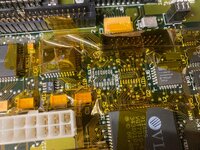
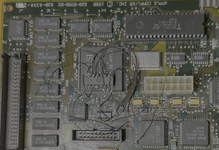
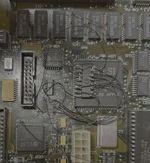
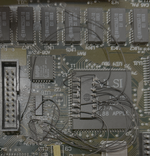
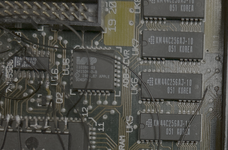
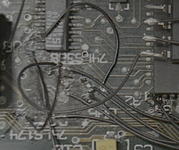
this is a long shot, but attaching some pictures of the crazy deadbug routing on the uh6 chip hoping someone can spot an error. I've done continuity checks and everything seems connected properly. No shorts. Still can't get past the vertical stripes.
 

Attachments

  • db1.png
    db1.png
    4.1 MB · Views: 5
  • db2.png
    db2.png
    9.2 MB · Views: 6
  • db3.png
    db3.png
    6.6 MB · Views: 4
  • db4.png
    db4.png
    2.5 MB · Views: 3
  • db5.png
    db5.png
    613.8 KB · Views: 2
Sorry that you're not quite there -- I just gotta say this thread is really interesting, I have a Mac Classic I'm too attempting to restore, the damage on my logic board doesn't seem to have been as bad as yours, but as this is my first soldering Classic job I did lift a couple of pads removing all the caps -- got some jumper wires in my immediate future.


Hope you figure it all out mate!
 
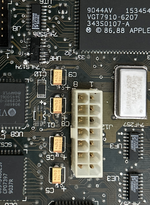
I was looking over older pictures and your current pictures and I just noticed you're missing the Q1 IC above the power/video connector on the board. I looked through some of my old pictures of Classic repairs and the marking on the chip is 9L05A (and labeled on some of my boards as VR1). On page 7 of the Bomarc schematics it's labeled 79L05 (datasheet). It's responsible for producing the board's -5v supply. Although the absence of that chip shouldn't prevent it from booting since the serial ports use negative voltage, it'll also affect the sound circuitry and possibly other stuff on that chip like the reset circuit. Your 79L05 chip was present in your first batch of pictures before you decapped it, so it may have fallen off during the cleaning process.

After I typed all this up I was scrolling back and saw you mentioned missing Q1 a while ago. Oops... but I'll hit send anyway. :) Kinda makes me want to remove it from one of my working boards "just to see what happens."
 
Sorry that you're not quite there -- I just gotta say this thread is really interesting, I have a Mac Classic I'm too attempting to restore, the damage on my logic board doesn't seem to have been as bad as yours, but as this is my first soldering Classic job I did lift a couple of pads removing all the caps -- got some jumper wires in my immediate future.


Hope you figure it all out mate!
thank you for your kind words. And that is precisely the reason to document the steps here, so that others can hopefully find some of them useful or at least entertaining :)
 
I was looking over older pictures and your current pictures and I just noticed you're missing the Q1 IC above the power/video connector on the board. I looked through some of my old pictures of Classic repairs and the marking on the chip is 9L05A (and labeled on some of my boards as VR1). On page 7 of the Bomarc schematics it's labeled 79L05 (datasheet). It's responsible for producing the board's -5v supply. Although the absence of that chip shouldn't prevent it from booting since the serial ports use negative voltage, it'll also affect the sound circuitry and possibly other stuff on that chip like the reset circuit. Your 79L05 chip was present in your first batch of pictures before you decapped it, so it may have fallen off during the cleaning process.

After I typed all this up I was scrolling back and saw you mentioned missing Q1 a while ago. Oops... but I'll hit send anyway. :) Kinda makes me want to remove it from one of my working boards "just to see what happens."
Yes, the original pictures have all the chips on. In that state, the screen didn't even turn on. This is pre- recap work.

During cleaning + recap, Q1 and UA5 came off. I kept them off and finished the recap, powered the system on and got to the sad mac icon screen.

The sad mac icon screen + the error code displayed pointed to RAM issues, and the suggestions were to check around the memory access circuitry for leakage and rust. UH6 was visibly the worst looking chip, so I decided to desolder it and sure enough it was completely rotten from underneath. I tried to clean it up the best I could and solder it on to the pads that were somewhat intact, and jumpwire the other pins. This is when the vertical stripes started. Tried to mess around with the hookup some more and eventually just replaced the chip with a new DIP ic. Still no go and this is where i am today.
 
Back
Top