I finished up a couple of things on the first Macintosh SE today. In an attempt to fix the shimmering video issue, I recapped the analog board, but NOT the power supply. Why not recap the power supply, you ask? Well, this particular machine is flying down to Vegas with me on Sunday (tomorrow) to hand to a friend, and I couldn't tear into the power supply in time. Still, I figured that an analog board recap would be a good idea, so I got it done. No fix, no surprise.
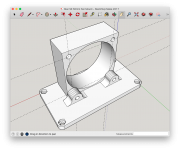
As mentioned before, the squirrel cage fan is VERY noise, so I wanted to provide my friend with a "way out" if he chooses: a 3D printed part that a 50x20mm fan could be attached to, which I'll include with the machine.
Finally, I decided to try to do something about the CRT, which is rotated by a few degrees (somewhere between 5 and 15). I found these instructions on how to do it:
Following those, here's what I did:
- Prepared the Mac on a nonconductive surface with the back removed
- Carefully loosened the phillips screw that clamps the yoke to the neck (red arrow)
- Plugged in and powered on the machine
- Stayed away from the anode cap
- Carefully rotated the yoke, using the spikey plastic ring thingie until things were level (blue arrows)
- Shut down and unplugged the machine
- Snugged up the phillips screw that clamps down the yoke (red arrow)
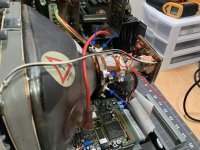
Note, that even though I executed this process and touched things while the CRT was on, I did not die! I am still alive! I think I'll go through and do this on basically all of my machines - they all need adjustment.
Which leads to a question: why
do these machines need adjustment?
I think this is the most plausible explanation I've ever heard.










