• Hello Guest! We're hosting a challenge to welcome vintage Intel macs to the MLA during the month of July! See this thread for more information.
  • We've made some quality of life improvements to the Trading Post. More info here.

Converting Video to Play on Hardware MPEG Cards

I remember you demoing it at the 68KMLA-UK workshop in .. 2023 so that means you'd only had it for about 2 years then. I was very impressed!

Aaah, from the command line I realise you generated MPEG-1 video, which I think is the same as VCD video isn't it?
Yeah, I've been trying various different options through the day, but basically what you're targeting is getting the output file to be close to VCD as possible.
 
Last edited:
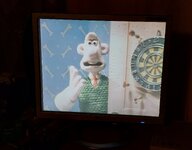
Heh. Plenty good enough:

1000036864.jpg

QuickTime MoviePlayer 2.5 does actually support proper full screen mode. Just have to find something period correct to watch :)
 
Last edited:
So the command I've had the most success with is the following...

Code:
ffmpeg -y -i input.avi -target pal-vcd ./Output.mpg

It copes with various input formats, although some things don't like it. I tried to convert A Grand Day Out and it threw a load of errors (said there was some kind of issue with the input avi file) and the output file had no audio after a certain point. I converted The Wrong Trousers and it didn't throw a single error and the output file plays fine both on modern hardware and the 630.

The Wrong Trousers is about 30 minutes long and is a 316MB file.

ChatGPT made me a little batch converter script in case I want to do a TV series or something. Another useful thing is that I made a little AppleScript Applet that sets the creator and type of files you drop on it. Makes it easier to get MoviePlayer to recognise the files properly without having to faff with ResEdit.

The batch processor. Make sure there is a folder called "Source" with the input files in it and nothing else. Make sure there isn't a folder called "Destination".

Bash:
#!/bin/bash

INPUT_DIR="./Source"
OUTPUT_DIR="./Destination"

mkdir -p "$OUTPUT_DIR"

shopt -s nullglob

for input in "$INPUT_DIR"/*.*; do
    [ -f "$input" ] || continue

    filename=$(basename "$input")
    output="$OUTPUT_DIR/${filename%.*}.mpg"

    echo "Converting: $filename"

    ffmpeg -y -i "$input" -target pal-vcd "$output"
done

echo "Done."

I've attached the AppleScript Applet for changing the type / creator. Just drop the files on it on your 630 and they'll become the right type of file for MoviePlayer and the MPEG card. It lets you drop a load of files all at once.
 

Attachments

Last edited:
Back
Top