• Hello MLAers! We've re-enabled auto-approval for accounts. If you are still waiting on account approval, please check this thread for more information.

Converting 1990s TVOD Mac video files to something current

I'm trying to help a school recover some video files from a bunch of old CDs from the mid-to-late 1990s. The files are type 'MooV' and creator 'TVOD', and they play OK using QuickTime Player from MacOS 9.0. But when I export them to a modern Mac (using an emulated OS 9.0 computer from infinitemac.org), QuickTime Player doesn't recognize the files and won't play them. Any ideas? I wasn't able to learn anything about 'TVOD' videos or what format they're in.
 
Good thought. I'm not much of a video expert. VLC shows both as having 00:00 length, and nothing happens when I try to play them. Possibly the files weren't exported correctly or there's some kind of resource fork confusion happening. I looked at the files in a hex editor to see if there were any obvious file signature. The first bytes are:

Movie#1 0282 5B22 6D64 6174 8484 8381 7E7C 7A78 ["mdat~|zx
Movie#2 18A4 973D 6D64 6174 FE30 FF93 FCBD FD07 ¤=mdatþ0ÿü½ý

EDIT: It looks like the first four bytes are the chunk size, and the second four bytes 'mdat' are the chunk type, where mdat is a type of MP4 data.
 
Last edited:
I'm bit stumped. As far as I can tell they're just standard QuickTime MOOV videos from the 90s. Sure it's an old format, but it's not anything super rare. Yet VLC and Handbrake both refuse to touch it. I also tried re-exporting the videos from the HFS disk image again using Mini vMac this time instead of Infinite Mac, but still no joy.

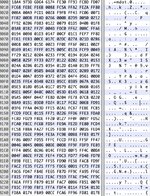
Here's a larger amount from the start of the file, if this header means anything to anybody:

moov.jpg
 
Last edited:
If you send the files, I’ve got a boatload of things to try. TVOD actually is the creator for QuickTime-made files.
 
Here is one of the videos. I've tried half a dozen online video converters, and they all fail with errors like "could not convert" or "no valid video source". I looked at the original video file in situ under System 7 with Mini vMac, and I noticed there's a 23600 byte moov resource, in addition to the data fork. I wonder if there's some critical information in that resource that's being lost when I export the file to my modern Mac.
 

Attachments

The only issue I'm having is with those darned .dsk images...can you send the movie as a .sit or even just a an .img or .dmg image?
 
Total shot in the dark, but could an old abandonware version of Adobe Premiere convert it to something else within the OS 9 environment?
 
Here it is again, compressed with StuffIt Lite 3.5.

Total shot in the dark, but could an old abandonware version of Adobe Premiere convert it to something else within the OS 9 environment?
Yes, if all else fails then I think that approach should work. But I feel like I'm missing something obvious... this shouldn't be so hard.
 

Attachments

Great! Which version did you download, the .sit file? That's great that it worked on 10.14.6, but I still need a path to convert a bunch of these into something that works on current versions of macOS and Windows.
 
One of the resource is a PICT which may contain QuickTime info. It also has a moov with even more QuickTime info.
 
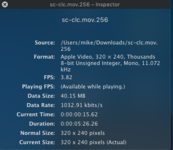
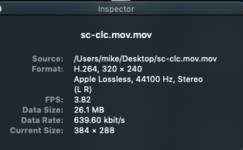
Here is the specs of the sit version.

And the video converted with specs.
 

Attachments

  • Screen Shot 2024-06-03 at 8.49.00 PM.png
    Screen Shot 2024-06-03 at 8.49.00 PM.png
    187.2 KB · Views: 9
  • Screen Shot 2024-06-03 at 8.56.08 PM.png
    Screen Shot 2024-06-03 at 8.56.08 PM.png
    103.7 KB · Views: 9
  • sc-clc.mov.mov.zip
    sc-clc.mov.mov.zip
    24.9 MB · Views: 2
Well, I may have to forfeit my classic Mac collector card over this. I'm guessing that @joevt is correct and the moov resource info is critical for playing back the video. When I transfer the movie to a modern Mac (macOS 13.4 Ventura), I thought that resource forks would be preserved under OSX as long as I used a safe method, like uncompressing the .sit file from post #11. But either that's not true, or else none of the many different video converters I've tried know how to handle this format. I tried VLC, Handbrake, and half a dozen online video converters.

My goal was to export the video file to a modern Mac, and then use a tool to convert the file to a current standard like MP4. But maybe I'm forced to do something more like what @thecroc15 suggested, and use a medium-old Mac for the conversion. It would need to be something old enough so that it can still read this old video format, but new enough that it can convert to MP4 or AVI or something. Unless there is a simpler way.
 
Under 10.6, yes, as above, using QuickTime (registered with a serial from the internet to be the Pro version), you can then export to .mp4. Here is the resulting file. Any version that can run QuickTime 7 should be able to do this as long as you have the serial to make it QuickTime Pro. Alternatively, QuickTime 4 from OS 9 registered with serial will allow for export as an AVI or DV Stream, both old formats, but might be more usable since they do not rely on resources.
 

Attachments

Well, I may have to forfeit my classic Mac collector card over this. I'm guessing that @joevt is correct and the moov resource info is critical for playing back the video.

Yes, the moov resource is necessary: that holds the movie info itself I believe, or something critical to it. Try registering QuickTime 4 on your OS 9 emulated OS, and see if exporting to DV or AVI will help. I'm pretty sure that the tools on modern machines have given up on archaic resource-based formats.
 
Back
Top