• Hello MLAers! We've re-enabled auto-approval for accounts. If you are still waiting on account approval, please check this thread for more information.

Connecting Quadra to Internet

Ok so I want to hook up my Quadra 610 to the internet just for fun and to do some Light Browsing (Yes I know it wont be fast). It currently has an AAUI-15 ethernet port at the rear of the computer. Here is the situation. I have a wireless wpa internet connection throughout my home. I connect my powermac g4 to it using its airport card and os x 10.4.11. From there I want to share its internet through ethernet over to my Quadra. That leaves me with two questions.

1.) I know I will need an adapter that can turn the AAUI-15 port into a modern ethernet port. What is the name for one of these and would this one from eBay work? http://www.ebay.com/itm/Asante-FriendlyNET-AAUI-Mac-to-Ethernet-10Base2-Coaxial-BNC-RJ-45-Fiendly-NET-/280890415886?pt=LH_DefaultDomain_0&hash=item41665f9b0e#ht_519wt_918

2.) Would I then need a crossover cable for this connection or would a regular ethernet cable work?

3. Is this possible? (This one probably should have been first...)

Thanks,

Mithrandir

 
Funny, I wrote an entire article about this....

1.) Yes.

2.) What you are probably going to want to do is share the Ethernet connection from one Mac over Ethernet to the Q610. For this, use a cross-over.

3.) Absolutely.

Web browsing and file sharing at the same time.

d90ed87a.jpg


There might be a way to use a router as a simple pass-through, but a cross-over is the easiest way.

 
I have two Quadras that I connected to the Internet.

I used an AAUI Ethernet adapter, and simply plugged it into my wireless router using a regular Ethernet cable. I gave the machines a static IP address with the TCP/IP control panel (System 7.6). I can browse and download files, and I can do old-school Apple file sharing with my iBook.

Browsing is slow, because rendering web pages is slow. Downloading files, however, is not particularly slow. I have achieved speeds of up to 200K per second with the Quadra 650. The Quadra 700 is slower for some reason.

Don't try browsing modern web sites with lots of animations and stuff, stick to simple ones and it will work reasonably well.

 
You shouldn't need a crossover ethernet cable if you're connecting to a ethernet switch, router or a G3 or newer Mac - these all have auto MDX ports.

For web browsing, I recommend iCab 2.9.9

 
You shouldn't need a crossover ethernet cable if you're connecting to a ethernet switch, router or a G3 or newer Mac - these all have auto MDX ports.
Correction:

"... Most PowerMac G4 and newer Macs - these all have auto MDX ports."

Auto MDX is only a standard feature on 1000baseT (gigabit) Ethernet. *Some* 10/100 Ethernet cards and switches implement auto MDX but not by any stretch all of them. (Most new 10/100 switches do but if you're looking at a several-year-old one chances are good that it doesn't.) The reason you wouldn't under most circumstances need a crossover for a switch or a router's access ports regardless of speed is all but the uplink port are likely to already be wired as standard access ports.

I know, nitpicky.

The other thing to watch out for: Sometimes those old ethernet transceivers can be picky about connecting to any switch/ethernet port that tries to autonegotiate anything faster than 10mbit. There have been times dealing with elderly equipment that I've been forced to stick an old 10mbit hub between the newer switch and the computer to get things working.

 
Ok well lets say the powermac g4 is a 733 mhz Digital Audio and that it will probably be running leopard by the time my ethernet thingy comes. Would the situation above still work, or do I have to have tiger or older as my OS? (Yes I know leopard is not officially supported on lower than 867mhz but since my G4 has the max 1.5GB of ram it runs perfectly fine).

 
Sometimes those old ethernet transceivers can be picky about connecting to any switch/ethernet port that tries to autonegotiate anything faster than 10mbit.
So you are saying that maybe a better way to do this would be to have two regular ethernet cables, and use a 10mbs hub in between them. Correct?

 
Using a slow hub between the two systems negates any possible issues with autonegotiation, yes. It may not be necessary in your case but it helps eliminate a variable.

Also, assuming my rusty memory is correct remember you'll have to use Open Transport rather than "classic" MacTCP to use DHCP. (Which is what OS X's Internet sharing uses. The "Dynamic" setting you see on the MacTCP control panel is a proprietary AppleTalk-related thing.) This probably won't be an issue, depending on what System version you're running on the Quadra. Worse case you can always set a static address anyway.

 
Thank you Gorgonops. =) (Running OS 7.6.1)

In regards to olePidgeon, are you saying I could use my airport express to receive the airport signal and then attach an ethernet cable from that to my quadra? Would that actually work?

 
Is an Airport Express basically a standard wireless router? Because if so, that's exactly what I do to connect my Q650 and Q700 to the Internet.

Daniel

 
The Airport Express can either act like a mini-version of an Airport base station (IE, as a wireless access point or full-fledged router, by dedicating its Ethernet port for network uplink) *or* it can operate like a bridge, connecting as a client to an existing wireless network and allowing you to then connect wired computers directly to it or via a hub.

One thing: I could be mistaken about this, but I was under the impression you had to be using another Apple Airport to host your wireless network for the bridge mode to work. (IE, if you're using any other brand of WAP you're SoL.) Is that true or not? I seem to recall it was at the time I debated buying one to solve a bridging problem. (And thus didn't buy it.)

 
If you do get it connected, use mobile sites like m.facebook.com, m.gmail.com etc. With java turned off it is very usable

(for reading stuff!)

 
Ok update. So i want to share an internet connection from my powermac g4 running 10.5.8 from wifi through an ethernet cable to my quadra 610. I plan on using an adapter that will convert the aaui-15 port on the back of my quarda to a standard one. I will then use two stand ethernet cables connected via a 10mbs ethernet hub in order to connect the two computers. By the way, the quadra is running 7.6.1. I really don't want to spend much more money so these are some of the cheap items i found on eBay. I just want to know if they will work for the task.

Adapter http://www.ebay.com/itm/Farallon-Etherwave-AAUI-Transceiver-Ethernet-10Base-T-RJ45-/160815986058?pt=LH_DefaultDomain_0&hash=item257161358a#ht_500wt_1180

Hub http://www.ebay.com/itm/190596349166?_trksid=p5197.c0.m619#ht_733wt_1180

 
Ok update. So i want to share an internet connection from my powermac g4 running 10.5.8 from wifi through an ethernet cable to my quadra 610. I plan on using an adapter that will convert the aaui-15 port on the back of my quarda to a standard one. I will then use two stand ethernet cables connected via a 10mbs ethernet hub in order to connect the two computers. By the way, the quadra is running 7.6.1. I really don't want to spend much more money so these are some of the cheap items i found on eBay. I just want to know if they will work for the task.
That seems a very complicated setup for something which may be a lot simpler.

Why don't you just connect the Quadra via an ethernet cable to your wireless router? This works with both my Q650 and Q700. I use static IP addresses. If this doesn"t work, then try the more complicated setup.

 
I've been successful connecting my Quadra 700 directly to my cable-modem via a regular Ethernet cable. And also the SE/30, thru a shared connection from my sister's MacBook Pro which was receiving WiFi, this time with a cross-over cable -- I don't think you'll need the hub. Watch a

! ;)
 
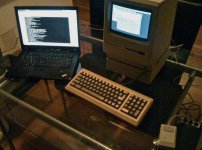
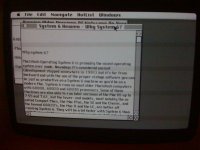
There are a bunch of ways to connect your Macintosh to the internet.. I even connected my Macintosh Plus to the internet with System 6.0.8, MacTCP and MacPPP via serial cable (modem/printer port) to a laptop running linux and pppd - connected to wifi. I "called" my laptop from the Plus, got a local IP from the laptop and could access the web.. :)

IMG_1873.jpg

IMG_1874.jpg

 
That seems a very complicated setup for something which may be a lot simpler.
Why don't you just connect the Quadra via an ethernet cable to your wireless router? This works with both my Q650 and Q700. I use static IP addresses. If this doesn"t work, then try the more complicated setup.
I would try that except my wireless router is upstairs with the house's main computer. The powermac and quadra are downstairs and the powermac is using an airport card. I could use airport express like someone stated earlier, but the two ethernet cables and hub would be only $20, while the alternative would be well over $50.

 
Back
Top