• Hello MLAers! We've re-enabled auto-approval for accounts. If you are still waiting on account approval, please check this thread for more information.

Color Classic - total restoration

Sorry for the delay in getting back.

I found how to upload images directly which I prefer as they will likely live as long as the site, hopefully a long time.

Anyway, I have been spending the last few days, due to other things, only cleaning up plastics, cables, removing old grease on the floppy with fresh one, the logic board has been cleaned up with isopropyl alcohol, the tube cleaned and dusted.

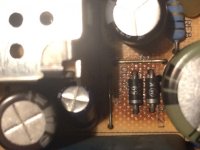
Now, as I was reading the analog board (inspecting it) I came across two locations two locations of particular concern. The computer will not be put back together until this is taken care of.

A lot of heat.JPG

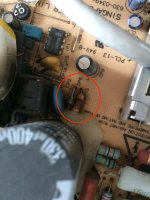
I also found what might be two further parts that are suspicious.

Two more parts that appear damaged.JPG

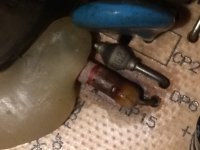
Close up.JPG

 
I don't know what role these play but what I can say is that the tube displayed a slight 'barrel distortion' restricted to the extreme corners, in other words the menubar was stretched at the corners, ditto with the bottom corners of the desktop background; corners were not nicely rounded as they should be. Maybe these components play some role in this distortion. The display seemed otherwise fair, although a little blurry for a 10 inch Trinitron, I mean the Sony Trinitrons were exceptionally good displays so these components if not failed are certainly not operating correctly, at least from appearance one could make this claim.
 
In any event I must replace these and I want to replace every capacitor on the analog board. I understand it can really improve clarity and brightness on the display, I am sure part of the board is the PSU for the main logic board.
 
There is a but in all this. The last time I soldered was about 20 years ago, on an Atari iRobot arcade machine I use to own. I am determined to do this and do it right but it will take me time. I am going through some excellent videos by Pace over on youtube, I encourage everyone to check it out, they are incredibly well put together and available in several languages, it is helping me get a very good grip on all the theories of soldering and board repair and maintenance. These are extremely valuable lesson plans, I hope you find them valuable enough to bookmark them. 

I am considering the most effective solder joint removal tool, solder removal with vacuum because of the benefits. Seeing that there are quite a few components to remove I thought this might be an ideal choice. Any thoughts on this decision? There is a video on this tool from the 80s, again by Pace, but it does look like a great tool. It is very effective with eliminating the re-sweating problem. This video covers this tool and all its applications. 

A problem I can't seem to reliably find a solution for.
As you know, the analog board is fairly well populated and it's seems challenging to match the component on the face of the board with the solder joints on the underside of the board. Are there are good tips someone can offer?
 
I will try to post some photos of my progress up to now.
 
Any advice and insights would be really appreciated.
—Alex
 
Last edited by a moderator:
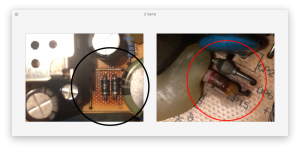
I took a closer look at the image below, (reference link) and found that the same suspect components led to some overheating of the board as can be verified by the darker coloration of the board immediately around it.

This is a close up of the image referenced above and I marked-up the area described in black. Do you notice the board color has assumed a darker color? I believe this is due to too much heat. If it is true, then those same components on the sample board match what is seen happening on my board. Curious…

Close up of Analog board.png

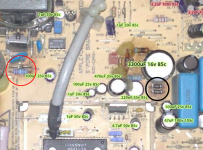
In red I marked-up the components that appear iffy on my board.

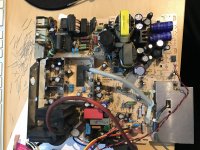
Here is my board again.

Screen Shot.png

 
One more comment:

I found this excellent materials/components list for the Color Classic, it was last checked in 2003. I will do my best to update it, referencing my own board keeping the board revision number as part of that study. The real challenge, for me anyway, is to find these parts on Digikey, Mouser etc. I may need some help on this, I will ask if I need help.

I am leaving a PDF of what is referenced in the link in case.

CC Analogue Board Master Parts List.pdf

—Alex


Attachments

Last edited by a moderator:
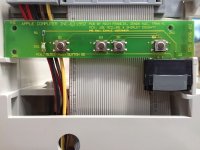
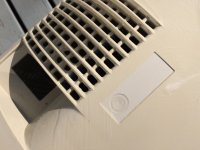
I think most people here with find this interesting. This is the slice board that manages brightness and volume controls from the front facing controls on the Color Classic.

I was surprised to find credit to the designers printed on the slice push button board itself. Also, notice that DS1 is front facing LED (diode). Does anyone know what PCS stands for, credited to Joe and Shirley.

PB SW: Push Button Software.

PCS: Printed Circuit Switch ?

PCB: Printed Circuit Board

IMG_9688.JPG

 
Last edited by a moderator:
The dark spots around DL21/22 are normal. Those just get hot due to the way the circuit is designed. Usually those work normally even if they look burned. Replacements would just get as hot.

Finding correctly sized replacement caps is a bit tough. I tried to go for higher rated ones than the ones used originally and ended up with some caps beeing a little bit too big, but I was able to put everything in place nevertheless - just needs a bit of thought before starting to solder caps down one by one in the crowded sections of the board at least.

It is not super pretty but does the job:

IMG_1185.JPG

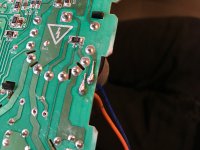
Also be prepared to reattach and strengthen a few pads. The CC A/B seems to be especially prone for loose pads due to excessive heat and mechanical stress on soldered wires and connectors.

I scraped free a little bit of the traces and attached the remains of the legs of the caps I installed earlier bent in shape of the original trace and pad:

IMG_1180.JPG

I had to do this in a few places where sticking the pad back to the board by removing the old solder and applying new solder to the joint did not do the trick.

Note that my board is modified for HiRes hence the difference in some places.

 
The dark spots around DL21/22 are normal. Those just get hot due to the way the circuit is designed. Usually those work normally even if they look burned. Replacements would just get as hot.

Also be prepared to reattach and strengthen a few pads.

I wonder if it really is normal or not? That amount of heat is not a good thing. I wonder if the solder is reaching a plastic state as the temperature hits the ceiling. I should consider the solder mix of tin and led to ensure the solder stays away from plasticity. I have to investigate what those resistors are and understand if these are designed to go that hot.

Did the pads go loose in your case? Did you dwell the solder tip on the solder for more than 2-3 seconds with pressure? From what I understand the solder tip should never be set down with pressure only as much pressure as one would apply to a pencil on paper. Heat along with pressure can loosen pads. I guess you used flux to clean the board before applying fresh solder.

Anyway, I greatly appreciate the images and comments, the time you took is very valuable to me and I sincerely thank you.

 
The pads already have been loose in the first place. Everything has been cleaned and fluxed the proper way.

The stress I talked about coming more from the usual handling than from my soldering i.e. stress on those wires due to movement when handling the innards of the machine and heat from the components itself when operating.

As for the diodes and resistors getting hot and discolouring the board there are already a lot of threads about that out there.

The diodes at 21/22 should keep voltage down to keep sweep in the 512* range as the board was designed with 640*480 in mind already to some extent.

For the resistors you could always go for bigger ones (ie higher wattage rating). They should disperse heat a little better than the original ones. Apple probably went the route to save costs for higher rated ones there and sacrifice some long term durability.
 
the diode overheat IS INFACT NORMAL... 

its is a KNOWN thing and every CC board I have ever encountered or even seen online all do it. 

That is why with the LC520 and newer units, they re-designed the circuitry and did away with them. 

 
The pads already have been loose in the first place. Everything has been cleaned and fluxed the proper way.

The stress I talked about coming more from the usual handling than from my soldering i.e. stress on those wires due to movement when handling the innards of the machine and heat from the components itself when operating.

As for the diodes and resistors getting hot and discolouring the board there are already a lot of threads about that out there.

The diodes at 21/22 should keep voltage down to keep sweep in the 512* range as the board was designed with 640*480 in mind already to some extent.

For the resistors you could always go for bigger ones (ie higher wattage rating). They should disperse heat a little better than the original ones. Apple probably went the route to save costs for higher rated ones there and sacrifice some long term durability.
Hi Boyle and TechKnight

I appreciate the replies.

@Boyle, I see what you mean now. I am not well versed on these older macs although I bought my first Mac, a IIx back in '87 or '88 and have never looked back but I didn't know that all these CC's suffered this fate.

So, the machine remains disassembled and when I have a free moment I will be going through the Analog board, carefully documenting what I want to replace. I don't have a multimeter to measure the caps. I don't know how to use one in fact. Despite this, from what I understand, caps and other components are best read when they are off the board. I will go about replacing all the caps and any resistors and other components that look iffy.

I may need your expertise and experience figuring out how to find good replacements. I promise to do some reading ahead of time and watch some reputable youtube videos before I bother folks here.

In the meantime, thank you for all your help thus far.

—Alex

 
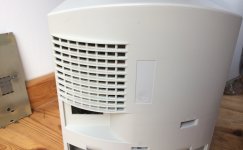
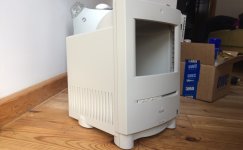
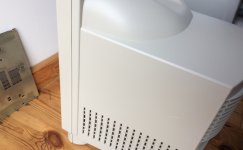
Here are some images of the case cleaned up. I think it needs another go, especially the sides but it is very close to the original color. Some people have claimed that the clastic becomes more brittle. I can't very or deny the claim but from this session, there appears to be no change to the plastic's integrity.

I am wondering if anyone can recommend a good soldering kit as I would like to replace all the caps on the analog board. I've never done this before but I have soldered about 20 years ago. I don't have a huge budget but I would love to bring this mac back to its former glory.

As you can see the back of the machine, where the serial number is normally hosted is still slightly greyer than the rest of the exposed plastics so I will need to run the process for another hour or so until the exposed and unexposed plastics match color. In total, the plastics were exposed for ~5 hours, nearly twice as normal but I account this to the season, early spring when the sunlight is not at peak strength.

To anyone who has not yet gone through the process of restoring the original color I can not impress upon you how the results have such an impact on the plastic's feel and look, it really is a complete makeover and truly satisfying to see a product and it's intended design return back to shape. I highly recommend it.

IMG_9812.jpg

IMG_9813.jpg

IMG_9780.jpg

IMG_9814.jpg

 
Last edited by a moderator:
I use my Hakko F888D iron and its amazing. Heats up within 10 seconds and its only about $100.
I've been watching PACE soldering videos on youtube and they repeatedly mention not leaving the iron on the board for more than 2-3 seconds at a time. Thanks a million for your recommendation.

 
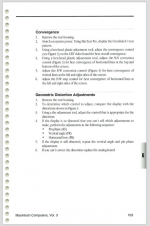
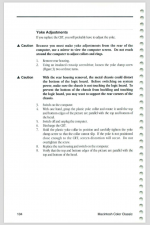
Was there a noticeable difference with the image quality after the recap?

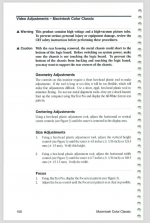
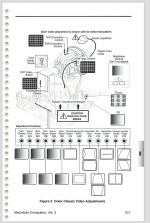
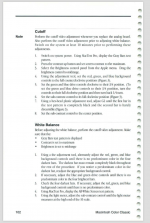
Also, after the recap did you simply reassemble or did you have to adjust the Geomotry, Centering, Size and/or Focus?

The rest of the images are just for reference.

Video Adjustment 1.png

Adjustments.png

Video Adjustment 2.png

Video Adjustment 3.png

Video Adjustment 4.png

 
Last edited by a moderator:
I did not recap a color classic, so I'm not sure if it would affect anything.

I did recap my Apple Color RGB for my IIGS and the only things that's needed adjustment was the vertical hold and size. And that was only because I turned the knobs by accident.

I DID accidentally leave the iron on for one or two caps a little long (5 secs) however it did not luckily harm anything. With analog boards everything is more spaced out than logic boards.

People may disagree with me doing it myself, but if you do it yourself you learn something for the rest of your life. Knowing how to solder. I've always wanted to know how...

Just make sure your not going to do it as your first project! I practiced on some scrap stuff first. No, my real recap job wasn't the best, but hey I need that monitor and it works!

As for the quality, I'm not really sure how good it looked before, but I can say it has a little more deeper and clearer picture now. I think at least.

Overall it's well worth a recap and everything by yourself. I mean, you can spend $100 for a recap (I know those CC ABs are full of caps) or take a while, learn how to solder, and then fix it yourself for the price of an evening and some caps and even the iron, for the same price.

By the way, check out the recapping and soldering thread in the lounge! Tons of good stuff in there.

 
Last edited by a moderator:
I know we're talking about Analog Boards here, but I want to say something about recapping Logic Boards: if you're gonna be replacing SMT components, I think it's essential that you buy/use a pair of SMT tweezers to help you hold the cap in place while you solder, or at least tack down the first side. Without that... well, good luck trying to hold onto a tiny cap while you solder. I hope you don't mind burning your fingers :p

Secondly: My Color Classic has a decent image on it right now, but I will of course eventually want to recap the analog board/perhaps do the VGA mod at the same time... so I assume, then, that the PDF you attached to the thread a few posts back contains the complete list of capacitors to use in the Board? If not (or, if you're feeling generous, even if it does; it's probably good info to have anyway), what's the complete list of caps to replace?

 
People may disagree with me doing it myself, but if you do it yourself you learn something for the rest of your life. Knowing how to solder. I've always wanted to know how...
Great advice, I like the fact that you are being honest, humble and sharing good practice. I sincerely appreciate it!

—Alex

 
I know we're talking about Analog Boards here, but I want to say something about recapping Logic Boards: if you're gonna be replacing SMT components, I think it's essential that you buy/use a pair of SMT tweezers to help you hold the cap in place while you solder, or at least tack down the first side. Without that... well, good luck trying to hold onto a tiny cap while you solder. I hope you don't mind burning your fingers :p
Absolutely, I agree with you. Well at the moment I would like to focus on the analog board but still, I absolutely appreciate the advice. I don't know why but I enjoy watching Louis Rossman on youtube repairing boards. He is very skilled and yes SMTs are tiny and he is very good at getting them in place — lots of flux :) .

In terms of the parts list for the Color Classic analogue board, I found one here: http://colourclassicfaq.com/tech/ccparts.html to which I added a PDF below, it's a long PDF.

CC Analogue Board Master Parts List.pdf


Attachments

Last edited by a moderator:
Back
Top