• Hello MLAers! We've re-enabled auto-approval for accounts. If you are still waiting on account approval, please check this thread for more information.

Color Classic strange booting behavior

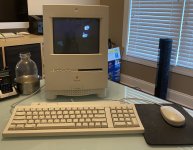
Hello all. Having a bit of strangeness with my Color Classic restoration project. I've had the machine since 2001, and it failed a few years ago so I went on a long term restoration of it. With COVID and being at home so much I have decided to get it going again.

I had the Logic Board and Analog Board recapped by a well known site because of their absurd replacement cost, and my wanting this to be as perfect as possible, but it still never worked once I got it returned. That said, with a new battery and good power, it won't respond to a keyboard press. I have let it sit for days with the power switch on, power switch off, etc and no dice. I can get it doing about half the time though, but it requires one of the following: Leaving it plugged in, unseating and reseating the logic board (about 50% of the time it powers on and gives a raster but goes no further), or more reliably if I unseat and reseat the logic board it will bong, power on, rasterize and get to the flashing question mark. It will also respond to the long mouse button press to eject a disk, and it will seek a disk when inserted looking for an OS.

I've put a new PRAM battery in it - Lithium 3.0V as a test and no dice, I put a battery box with 3 AAs wired up to give 4.5V (measured) and no dice. Shorting the ADB pins to trigger a power on gives no dice as well.

I have cleaned the edge connectors and sockets, and I have given everything a strong once-over. The surface of the logic board has some sticky feeling areas, but all of the caps were replaced with surface caps and the board washed, so I don't think it is anything there - I think it is just flux or some sort of coating.

The last email exchange I have with the person who recapped it was from 2018 - but says "try to slide the main board in and out with the main power switch on, that can cause a force power on. The actual power on/off is controlled by the mainbaord and there is an EGRET IC there , and cap goo spills into that [SIZE=11pt]causing machine to not power on. sometimes i can do a re-cap on these and clean them up, sometimes the traces get degraded and can fail.[/SIZE] " Does anyone have an idea where this EGRET would be?

I am going to do some googling, but does anyone have any ideas where to start? The machine is cosmetically as new - it's been retro brighted, and the display is gorgeous. I have a huge amount of sentimental value with this particular machine, and it would make me very happy to get it going again.


 
Pretty sure the battery is supposed to be a 3.6v half AA lithium. So putting 3.0 may be causing PRAM corruption by being enough to power the circuit but not properly. 4.5v is definitely more than it needs. Not sure though what is a safe range for that circuit. 

Good news though, is that having no battery there is definitely acceptable. In fact, I'd recommend keeping it out all together to not have to worry about it leaking eventually. The CC should maintain PRAM settings when soft-powered off (Special menu or keyboard power key and Shut Down), so long as the rear power switch is left in the on position.

As for the EGRET, not sure about that. Hopefully someone else can provide some insight on that part.

 
The Egret is a common issue on all those boards, and now i remove the chip and clean underneath because is a high failure point and most of the time doesn't work properly with only caps changed.


Awesome on all fronts. I thought the CC needed a battery to be able to use soft power?

thank you for letting me know the location of the Egret... I am going to get my hot air rework station out tomorrow and see if I can get it off and cleaned up. The machine ran like a top all day today after a logic board jumpstart boot - I swapped a scsi2sd card in it and it’s a champ with 7.5.3. 
 

It’s currently in my office slowly pulling the iso for after dark down from my “vintage software Server” (G4 MDD) downstairs via Ethernet... it warms my soul to see it sitting there poking away. 

 
No battery required, only very few models need a battery, and some tricks can be done to jump start the others.

 
Well, I don't think it is the EGRET sadly. I desoldered it and cleaned under/around it and put it back on. I am not the best with a soldering iron or hot air rework station, so it took a few hours. Now, it won't boot at all - so I either burned a trace or cooked the EGRET. I practiced for an hour on an old SCSI card I have this morning so I knew what I was doing, but it's frustrating in the end.

I'd rather not throw away the money I have into this board, but I think I am going to have to throw in the towel and look for another logic board for it and go through all of this again.

Does anyone here recap boards for a fee?

 
A while back I ended up with a CC parts machine (case and monitor destroyed in shipping). It's on my list to recap the motherboard that otherwise looks in good shape, if it tests out okay after I'd be willing to part with it for a reasonable cost to a fellow 68kMLA'er.  (I don't need this spare since I have a LC 520 board in my good CC and will keep its original CC motherboard as a spare)

 
Definitely let me know - and consider it sold if you'd like. I'll even drive down to get it to save the hassle and potential damage of shipping - I drag the boat down to Lake Anna all the time, so heading to Charlottesville is a piece of cake.

Thank you. This is why I love this hobby!

 
That’s fine, of course! I’m actually going to be out of town next week/weekend unexpectedly so it’s gonna be a bit for me as well. 

 
Soldering the Egret is not an easy job for a beginner. 

The board should be pretty clean and pads as solder free as possible. 

The chip must have the same treatment. 

Had myself some failures in the past, but removing the chip and soldering back solved the issue. 

Pretty sure the board and chip are ok. 

 
Soldering the Egret is not an easy job for a beginner. 

The board should be pretty clean and pads as solder free as possible. 

The chip must have the same treatment. 

Had myself some failures in the past, but removing the chip and soldering back solved the issue. 

Pretty sure the board and chip are ok. 
Hmm, that may be part of it - my solder seemed to be too large of a gauge and I had a hard time not getting it across pads - so I was trying to reflow what is there. Whenever I would attempt to remount the chip it never seemed to sit right on the pads. I don't have the best dexterity and seemed to bump the thing off all of the time - I tried pasting it down into place with flux, but it did not help much.

I bought a better soldering iron, tweezers and some smaller gauge solder this week and am going to give it a go at some point this week, but I still think I would like to have a second board on hand in case this goes sideways. Worst case, I will hunt for another dead CC and work to get it going as well!

 
my best advise is to solder down only one leg first, then another one to be sure the chip is sitting at the right place.

Then using hot air around with flux to get all the legs firmly in place.

 
my best advise is to solder down only one leg first, then another one to be sure the chip is sitting at the right place.

Then using hot air around with flux to get all the legs firmly in place.
Hot air rather than an actual soldering iron? Interesting... seems like it would be easier for me if that is the case (since I shake a bit).

 
If you already have a hot air station, pick up some low temperature solder paste. Clean the pads thoroughly on the board by wiping them with your iron tip covered with solder wick. Squirt a line of paste down each row of pads, drop the chip on, and heat away. The paste will be repelled from the solder mask between pads and there’s no fine motor skills required.
 

That or look into drag soldering, no need to try to hit each leg individually. Plenty of YouTube videos on both techniques. 

 
If you already have a hot air station, pick up some low temperature solder paste. Clean the pads thoroughly on the board by wiping them with your iron tip covered with solder wick. Squirt a line of paste down each row of pads, drop the chip on, and heat away. The paste will be repelled from the solder mask between pads and there’s no fine motor skills required.
 

That or look into drag soldering, no need to try to hit each leg individually. Plenty of YouTube videos on both techniques. 
... I have never heard of this sorcery until this (paste... I have seen drag soldering). 
 

I watched some YouTube videos and just ordered the paste. I have a rework station already... I am excited now! I have a few other things (LC power supplies, an incoming Centris 610) that need recapping and this may be just the ticket

for me. Thank you!

 
So tonight after a lot of YouTubing, I decided to put my new soldering iron (smaller tip and temp control) to the test and cleaned up the board with some flux and copper wick. My solder paste arrives tomorrow and I want to give that a go. 
 

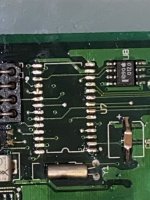
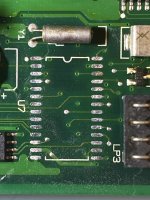
Does this look like a good place to start? My technique isn’t the greatest... before and after pics attached. 

9D912F6C-6F71-44E0-970C-B78D3489878B.jpeg

39271ECF-4163-4E5A-9D88-8885B54B9E24.jpeg

 
So the solder paste came today. That stuff is insane - I felt like a pro. I got the chip soldered back on - and the machine now boots (which it did not after my ill fated attempt at soldering before). That’s the good news. 
 

The bad news is that soft power is still not working. I’m gonna leave it connected and powered down tonight and see if that makes a difference. 

A0064CB9-F6AF-4AB1-AAC6-1ABC109DF9F1.jpeg

 
Back
Top