



One key didn't work on my M0110 which came with my newly acquired Lisa/Macintosh. I seemed that the spring of that key was broken. The keyboard itself was very dirty. I decided to clean and repair it. Never done it before.
Not too complicated, but a job for a afternoon.
First I unscrewed the 5 screw on the back of the keyboard. That you have three parts. Top and bottom of plastic and the mechanical/electronic keyboard. I pulled of the keys and washed them with top and bottom in some water and washing powder (Biotex). Then I cleaned the keyboard with a soft brush.
Take care about the space bar. It has a large spring and steel bar. Take notion how it is attached.
I repaired the broken key with half of a spring of a balpen. I cut it in two and replaced it. Now the key was working fine.
Everything looked OK, but one key didn't work. The s.
What is a keyboard without a s? From my Apple II keyboard I remembered that you must push it hard and many time to get it back to live. This didn't help. Spraying some WD-40 helped! The s key is working fine again.
I publish some pictures before and after......
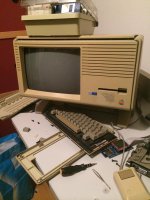
Tried to fix one key
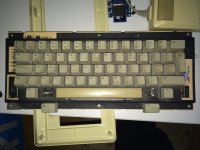
See how dirty the keys are......
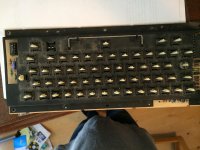
Dirt inside
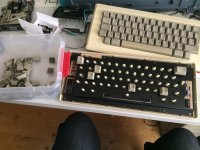
Putting the keys back after washing them
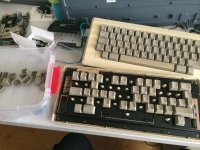
Almost finished
The finished keyboard:
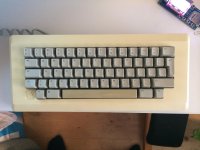
Not too complicated, but a job for a afternoon.
First I unscrewed the 5 screw on the back of the keyboard. That you have three parts. Top and bottom of plastic and the mechanical/electronic keyboard. I pulled of the keys and washed them with top and bottom in some water and washing powder (Biotex). Then I cleaned the keyboard with a soft brush.
Take care about the space bar. It has a large spring and steel bar. Take notion how it is attached.
I repaired the broken key with half of a spring of a balpen. I cut it in two and replaced it. Now the key was working fine.
Everything looked OK, but one key didn't work. The s.
What is a keyboard without a s? From my Apple II keyboard I remembered that you must push it hard and many time to get it back to live. This didn't help. Spraying some WD-40 helped! The s key is working fine again.
I publish some pictures before and after......
Tried to fix one key
See how dirty the keys are......
Dirt inside
Putting the keys back after washing them
Almost finished
The finished keyboard:





