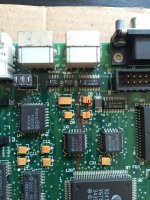
It's been recapped fairly well I think. (I checked polarity and everything already). I always clear the gunk in hot soapy water with a toothbrush, after removing the old water towers of course.
This time there was a stain that proved to be quite stubborn as you can see... (around C8 and C9) I've never repaired bad traces before but some look quite eaten to me. The board appears to be in perfect condition otherwise (i.e. there's no damage elsewhere)
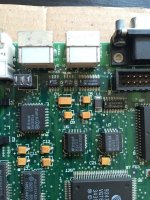
I don't have the trusty 1987 MMU with me at the moment, and I'm going on holiday later today so I won't be able to fix this thing right away but I need your guys opinion. I think the problem lays within this zone.
Oh and here's what happens when I switch it on.
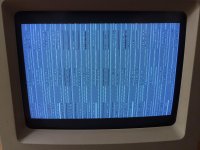
It chimes like it should, but then 1 second after, it plays the death chime... Adding/removing RAM seems to slow/accelerate the screen garbling effect. It starts with a few lines, then progressively adds more corrupt lines. Some are static, some keep changing.
That looks to me like corrupt VRAM or UE8 on the SE/30, but what could be causing that on a Classic II logic board?
Any help appreciated.
Thanks!
This time there was a stain that proved to be quite stubborn as you can see... (around C8 and C9) I've never repaired bad traces before but some look quite eaten to me. The board appears to be in perfect condition otherwise (i.e. there's no damage elsewhere)
I don't have the trusty 1987 MMU with me at the moment, and I'm going on holiday later today so I won't be able to fix this thing right away but I need your guys opinion. I think the problem lays within this zone.
Oh and here's what happens when I switch it on.
It chimes like it should, but then 1 second after, it plays the death chime... Adding/removing RAM seems to slow/accelerate the screen garbling effect. It starts with a few lines, then progressively adds more corrupt lines. Some are static, some keep changing.
That looks to me like corrupt VRAM or UE8 on the SE/30, but what could be causing that on a Classic II logic board?
Any help appreciated.
Thanks!