• Hello MLAers! We've re-enabled auto-approval for accounts. If you are still waiting on account approval, please check this thread for more information.

Cheap and simple ADB to USB converter

I have a follow-up question: how do you map the "Power" key on an ADB keyboard? I'm using an Apple Keyboard II (M0487), and the button is actually referred to as "Reset."

 
I have a follow-up question: how do you map the "Power" key on an ADB keyboard? I'm using an Apple Keyboard II (M0487), and the button is actually referred to as "Reset."

I don't know about the ADB to USB converter, but regarding the Power key:

Early Apple USB keyboards have a power button. I can connect my Apple USB Keyboard from the B&W G3 to my Mac Pro 2008 running Monterey. If I press the power button on the keyboard for awhile, it will cause my display to sleep. If I press Control-Power, it will show the "Restart Sleep Cancel Shutdown" dialog. I suppose you would want the ADB keyboard's reset button to do the same thing?

When connected to my B&W G3, the Apple USB Keyboard's Power button can turn on the Power Mac. If I hold Command-Option-O-F, then it will go into Open Firmware. If I press the Power button again, it will shutdown.
 
@ronan I see the PCB files on your github but didn't notice a license i.e. CC-BY-SA or GPL.

I have easily a dozen kits (sans pro micro) available. Because several people have asked for these, and because I am -definitely- getting 1099'd by eBay/PayPal this year, I moved my remaining PCBs and parts to eBay. This also keeps me honest in giving a portion of my open source item sales to charity. I've left your name on the PCB and in the listing and credited you appropriately, please let me know if there's any issue at all with me selling these like that.
 
This might be a really dumb question, so bear with me: how hard would it be to reverse this? In other words go modern USB keyboard/mouse to ADB port on Mac? I'm not so concerned about the keyboard side of things, as there are good reasons to use a genuine ADB keyboard. But the old ball mice are horrible, and a modern optical USB mouse is so much better. Having a cheap device to make that connection would be awesome. (Wombats are pricey, especially if you have multiple Macs like we all do.)
Did you end up finding anything? I have the same thoughts, I prefer an ADB keyboard, but using a ball mouse is not great.
 
Did you end up finding anything? I have the same thoughts, I prefer an ADB keyboard, but using a ball mouse is not great.
USB is a couple of orders more complex to implement so it requires a significantly more expensive microcontroller.
EDIT: Look at the USB wombat: https://shop.bigmessowires.com/products/usb-wombat

Better option is to find a USB mouse that also does PS/2. I believe I saw some adapters out there that do PS/2 to ADB already, so that'd be your best bet for a modern mouse on a mac.
 
Last edited:
Did you end up finding anything? I have the same thoughts, I prefer an ADB keyboard, but using a ball mouse is not great.
you need something that can run as USBHost, hardware wise a lot of arduino style boards can do it. probably something like the SAMD based stuff.. most of the teensy boards support running as USBHost too.

the main possible issue is going to be if theres a good USBHID driver available or not.
otherwise you would need to write your own Generic USBHID keyboard and/or mouse driver if there isnt some code out there you can reuse.

USBHost libraries are kinda common now, but implementing the rest of the code is where the challenge would be.
 
@Chopsticks Yeah, I was wondering if any new adapters had come about in the bast few years. I tested an adapter bbraun made based on an STM32 dev board a long time ago so I have been interested in finding a simple and small microcontroller board with USB host capability to tinker with that runs off 5V and just needs an ADB socket attached to it.
 
while i havent used it from everything ive read the BMOW wombat is a fantastic device, but being able to go USB>ADB and ADB>USB in the same device while supporting keyobards and mice increases complexity alot. its a product im my long....long list of things to buy for my vintage mac's.

however depending on you programming skills theres alot of code out there for DIY USB keyboards, and the ADB protocol is both well documented and also has a decent amount of adaptable code out there too.

in theory (though without having looked at any code in depth in a long time) you should be able to implement a 'custom' USB keyboard interface relatively easily. id probably start with implementing and tinkering with some code that allows you to modify say the scan codes used to remap perhaps the function keys or something to output different scan codes i.e to make the Function keys send a change volume or something.
that would get you versed enough in how it all works.

next i would look at how ADB to USB code works and how the mapping is done in some on those open source ADB>USB projects floating around on the net. strip out whats not needed to get a better understanging on how its working.

from there you could mesh them together to get a USB>ADB setup running.

keep in mind its likely more complex to actually write the code then how ive explained the process of doing so. and also keep in mind a keyboard and a mouse work quite different. converting a mouse is another topic again.

depending on you skillset and also what time you have to dedicate to learning/writing/designing it, you still may be better of buying the Wombat... again its a great device. but if learning and tinkering is more valuable to you then the hours/weeks/months etc needed to DIY it then theres a huge amount of much more talented people then me here on the forum whom im sure whould be happy to pass on or answer any specific questions you have should you go down that route. Trust me here, both the skills and knoweldge the members here have is immensive impressive
 
Last edited:
@ronan I see the PCB files on your github but didn't notice a license i.e. CC-BY-SA or GPL.

I have easily a dozen kits (sans pro micro) available. Because several people have asked for these, and because I am -definitely- getting 1099'd by eBay/PayPal this year, I moved my remaining PCBs and parts to eBay. This also keeps me honest in giving a portion of my open source item sales to charity. I've left your name on the PCB and in the listing and credited you appropriately, please let me know if there's any issue at all with me selling these like that.
Sorry for the long delay. You can do what you want with the files, even a commercial usage. Try to mention me somewhere if possible.
 
@ronan I see the PCB files on your github but didn't notice a license i.e. CC-BY-SA or GPL.

I have easily a dozen kits (sans pro micro) available. Because several people have asked for these, and because I am -definitely- getting 1099'd by eBay/PayPal this year, I moved my remaining PCBs and parts to eBay. This also keeps me honest in giving a portion of my open source item sales to charity. I've left your name on the PCB and in the listing and credited you appropriately, please let me know if there's any issue at all with me selling these like that.
Hey there! Would you be able to send over a link to your ebay if you still have any available?
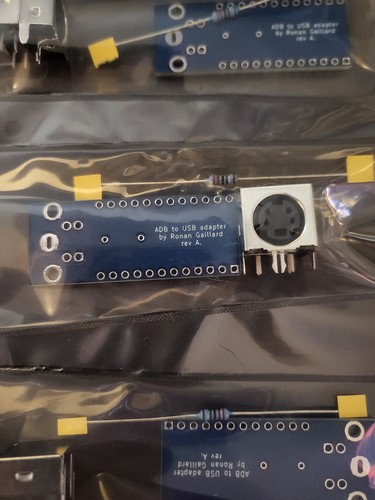
 
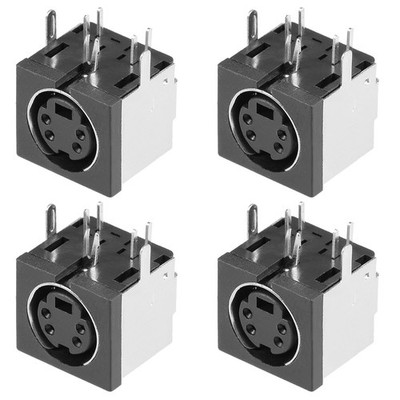
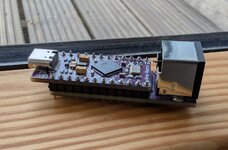
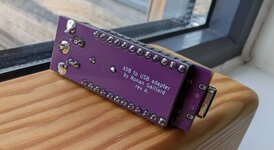
I ordered 5 units of Ronan's board from JLCPCB for about £2.50 (incredible!) and I can confirm it works perfectly with a USB-C Pro Micro clone with the name Tenstar Robot printed on the underside. I got mine in the UK on eBay for £8.50, but I see that they're available on Ali Express for under half the price. I clipped the header pins down a bit and filed them to dull the sharp edges. I used a 3.3K resistor because I had one on my desk. I got S-Video sockets from eBay and can confirm these fit fine:

This Pro Micro clone lacks a reset button, but shorting RST to GND for a couple of seconds and releasing will get it into flash mode. The bootloader was already fine for QMK to flash the payload directly.

I've had a poke about at the QMK firmware and I can see it assumes an ANSI layout (no ISO layout is defined), and then in macOS you can define that it's an ISO board. If you've cleared the Keyboard Assistant wizard away, you can get it back by navigating to System Settings > Keyboard > Change Keyboard Type (at the very bottom).

For an ISO AEK/AEK II this results in a single key not mapped which is the top left one (section mark/+-) but that's pretty unused. Once connected, modern macOS treats it as a contemporary layout, so € is Option-2, and backtick ` is on the key next to Z, neither of which is printed on the 90s key caps. The only slight inconvenience is that although keyboards/converter/adb_usb/adb.h mentions several different handlers (for ISO vs ANSI, AEK vs M0116, and for AEK to have discrete right-hand modifier keys) they do not appear to be referenced at all in the code. Perhaps they were intended to be added later. Having the modifier keys each treated as a single key doesn't have much practical disadvantage I suppose, though it would restrict if you wanted to make custom layers.

I tried compiling with keyboard/converter/adb_usb/matrix.c edited to force ISO, but all this does is move backtick from next to Z up to the top left key next to 1, and that key next to Z becomes unmapped. I prefer the default, since that aligns with a modern Apple A1843 keyboard (ISO).

Despite also attempting a build with ADB mouse support enabled (uncommenting the line in keyboards/converter/adb_usb/rules.mk), mouse support didn't work for me. Not an issue for me, since I cannot go back from Magic Trackpad.
 

Attachments

  • PXL_20250617_092331893~2.jpg
    PXL_20250617_092331893~2.jpg
    177.2 KB · Views: 9
  • PXL_20250617_092357019~2.jpg
    PXL_20250617_092357019~2.jpg
    188.4 KB · Views: 9
Last edited:
Just built this! $4.43 for 5 PCBs at JLCPCB with shipping, 28.28€ for 5 Arduino Pro Micro clones with a USB-C port from AliExpress. Still waiting on Mini-DIN connectors, I stupidly assumed I'd get them from a local electronics store but they don't stock the 4 pin variant anymore, so had to wait until I had other things I needed from AliExpress to get those (10 for 4.70€). Already had 1k resistors around.

That's roughly $8 per adaptor (or $8.5 if we assume I have no use for the 5 extra Mini-DIN connectors).

Even if you go by the full price of $42.46, when taking shipping to Europe into consideration, that still comes out cheaper than $138.27 for BMOW's Wombat (albeit less flexible), $47.49 for tinkerBOY's ADB v2 via Etsy or $45.00 for drakware's ADB2USB. Even then, it's not a fair comparison as I'm sure I will have other uses for the Pro Micros, which makes up for most of the cost of the whole thing. Plus it was rather fun to put together!

Something that would be interesting is to route the ADB pin 2 (PSW) to any digital port on the Arduino. It's not needed for normal keyboard operation, since when the power key is pressed, the corresponding keycode is sent via the normal ADB DATA pin 3. But a nice characteristic of having the pin 2 routed is that when the power key is pressed, pin 2 is pulled low. With this, I modified the bundled LUFA-based qmk-dfu bootloader that's part of the QMK repo to make the Arduino boot into the bootloader if the power key is held during power on, then replaced the stock caterina bootloader on my Pro Micro with this version. It would be extremely hard to try to parse ADB commands in bootloader code, but checking if a pin is low is very easy.

This bootloader mod makes it much easier to get into the bootloader, my Pro Micro doesn't have a reset button and shorting the GND and VCC pins was rather annoying. I can put up the fork if anyone's interested, I highly doubt it would be accepted into QMK upstream.

I have no KiCad or PCB design experience, however, I did all this on a breadboard with jumper wires directly into the keyboard, without the PCB. May run a bodge wire on the PCB version, although flashing the bootloader via ISP after assembling this is pretty hard.

An annoying thing that I'm not sure if anyone else ran into: when plugged directly into my M4 MacBook Pro, the keyboard always works fine, even when waking up from sleep. However, when plugged into a powered hub, the keyboard stops responding when the Mac goes to sleep for a long time. The Mac sees the adaptor, but the keyboard stays fully unresponsible until I power cycle it (sometimes it even has all three num/caps/scroll lock LEDs on when I come back!). NO_SUSPEND_POWER_DOWN = yes doesn't seem to make any difference. I even closed the J1 jumper (and now get very close to 5V on the VCC pin), but that made no difference.
 
Last edited:
Back
Top