• Hello MLAers! We've re-enabled auto-approval for accounts. If you are still waiting on account approval, please check this thread for more information.

Broken Hard Drive

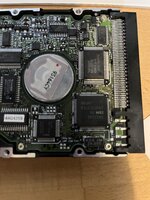
I'm a menace and an idiot. I'm sorry, but it's true. I have a hard drive, from the early nineties, that was used in a store demo Mac in the UK (back then they were called Apple Centres). It worked, I moved it into another Mac, I used the wrong screw, and I popped the oscillator on the circuitboard. It had loads of demo software on it, all locked down with At Ease so that customers couldn't wreck it. I want to get it back!

The oscillator is a KDS 2M 24.000, which I guess is a 24MHz oscillator - but it appears to have 4 pins. I haven't seen a 4 pin oscillator before, and I can't find the part online at all. What part can I replace it with? Any suggestions?

(I have tried looking for a drive with the same controller board, an IBM WDS L80, but they're all selling for stupid money online.)
 
I'm a menace and an idiot. I'm sorry, but it's true. I have a hard drive, from the early nineties, that was used in a store demo Mac in the UK (back then they were called Apple Centres). It worked, I moved it into another Mac, I used the wrong screw, and I popped the oscillator on the circuitboard. It had loads of demo software on it, all locked down with At Ease so that customers couldn't wreck it. I want to get it back!

The oscillator is a KDS 2M 24.000, which I guess is a 24MHz oscillator - but it appears to have 4 pins. I haven't seen a 4 pin oscillator before, and I can't find the part online at all. What part can I replace it with? Any suggestions?

(I have tried looking for a drive with the same controller board, an IBM WDS L80, but they're all selling for stupid money online.)

Do you have some photos please?

Where are you located approximately?
 
Take off the oscillator entirely if you're able to. Then check which pins have traces running to them. It's not unlikely that only two pads are in use. Find a fitting oscillator of the right frequency, either four pin with the right orientation (check the datasheets), or a two pin that you can bodge between the two active pads.

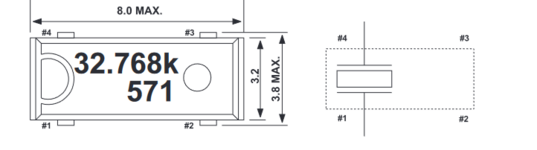
EDIT: On an IBM DCHS drive with a similar 40MHz oscillator (same package), it appears the pinout is the same as this one for an Epson 32KHz oscillator:

Schermafbeelding 2023-09-09 165710.png

Check if this is the same for yours. If so, getting a crystal between pin #1 and #4 is sufficient to get the drive going again, if you can't find one in this package. Doesn't need to be pretty, just functional.
 
Last edited:
Take off the oscillator entirely if you're able to. Then check which pins have traces running to them. It's not unlikely that only two pads are in use. Find a fitting oscillator of the right frequency, either four pin with the right orientation (check the datasheets), or a two pin that you can bodge between the two active pads.

EDIT: On an IBM DCHS drive with a similar 40MHz oscillator (same package), it appears the pinout is the same as this one for an Epson 32KHz oscillator:

View attachment 61789

Check if this is the same for yours. If so, getting a crystal between pin #1 and #4 is sufficient to get the drive going again, if you can't find one in this package. Doesn't need to be pretty, just functional.
Thank you for this advice. I'll give it a go.
 
Thank you - that's brilliant. I still can't see where to buy the matching part, but no matter. I'll find something compatible I hope.

And thank you for your work for the community. I have my floppy emulator next to me right now - and it's a brilliant piece of kit.
 
Back
Top