• Hello MLAers! We've re-enabled auto-approval for accounts. If you are still waiting on account approval, please check this thread for more information.

BlueSCSI HDD Speed ...

franklyn

6502
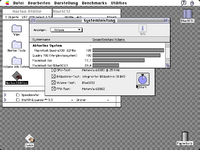
I have a Desktop v2 BlueSCSI as a replacement HDD with/in my Macintosh IIsi because of the network capability. I use a 4GB SD card with a 1.9GB HDD image on it. Set up with FWB Harddisk Toolkit. The BlueSCSI only reaches half the speed of my old 500MB Fujitsu SCSI Harddrive.

I hope future firmware versions make the BlueSCSI faster. A ZuluSCSI is faster but because of the lack of network capability it is out of the question for me.
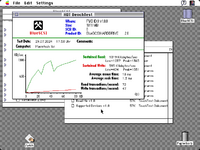
 
Write is very bad ...

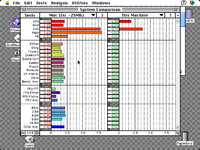
Norton say half of the real SCSI Harddrive speed, Speedometer say the same ...


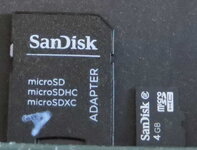
I use a SanDisk 4GB mircoSD HC card
 

Attachments

  • Bild6.PNG
    Bild6.PNG
    13 KB · Views: 53
  • Bild7.PNG
    Bild7.PNG
    12.3 KB · Views: 29
  • Bild8.PNG
    Bild8.PNG
    14.3 KB · Views: 44
Can you try to swap the SD cards around ? During early TashTwenty testing we noticed that some cards had really bad write latency, which could result in bad write performance in some cases
 
If you're using a bluescsi.ini config file on the SD card, make sure you don't have the debug mode turned on. That could add some slowness.

Other than that, yeah could definitely be the SD card or the SCSI driver.
 
Check the log on the SD card for any indication of fragmentation. I had one SD card full of images that sped up significantly after a reformat and re-copy of the drive images.
 
Check the log on the SD card for any indication of fragmentation. I had one SD card full of images that sped up significantly after a reformat and re-copy of the drive images.
Definitely this. I always do a full format (no quick) of my SD cards before I put image files on the so that my image files aren't fragmented
 
I buy new ones and will Test again ...

But on my Atari Falcon the same 4GB card in a 25 D-Sub v2 BlueSCSI is faster than on a IIsi. Drive C:\ is a IDE CF card and Drive G:\ is the BlueSCSI. The Atari Falcon has a LOGIC58C80 SCSI-1 Chip so 1800k - 2000k is max transferrate with SCSI ...

---------------------------------------
XFERRATE v1.1 starting
Testing drive C:
Rwabs() transfer rate: 2700 kb/sec
XHDI transfer rate: 2690 kb/sec
Testing drive G:
Rwabs() transfer rate: 1780-1750 kb/sec
XHDI transfer rate: 1780-1760 kb/sec
XFERRATE exiting with code 0
 
I use now a 32GB SanDisk Extreme with the same files on it from the 4GB SD card.


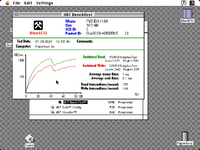
Almost no difference except for the write values which are twice as high now, that's good but it could be much better ...?
 

Attachments

  • Bild9.PNG
    Bild9.PNG
    12.3 KB · Views: 29
Back
Top