

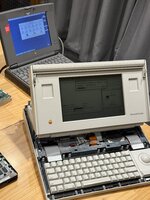
I was having disk drive problems with this backlit Portable that I’ve finally solved - the HDSEL trace was broken between the 6522 VIA pin 16 and 74AC244 latch pin 2. Capacitor leakage was the original cause.
While disassembling and reassembling a dozen times during this repair, and around the time that I replaced all three 74AC244 latch chips (after swapping them around had fixed the disk drive problem and created other RAM problems), the backlight stopped working. It had been operational even though the machine had not been starting up (failed hard drive); the floppy disk-request screen had been backlit.
I didn’t worry too much as I knew that once the replacement hard drive was set up and booting, the Portable Control Panel V1.3 could be installed, and I had seen in the past how that brought the backlight to life.
Not this time. I pulled the logic board out again and checked every ‘dodgy-looking’ through-hole that I could find near capacitors. All are connected. I opened the display housing and replaced the electrolytic caps on the inverter board (which tested OK anyway). I did some half-hearted detective work testing from the inverter board cable to discover the handful of pins in the logic board socket that are connected to the inverter board. I hoped to trace these, but it got difficult really fast to see from one side of the logic board to the other, traces under chips etc.
I can only find schematics for the non-backlit Portable, which were fine for diagnosing the disk drive, but not so useful for the backlight.
Could someone please give me a trail to follow in tracing why this backlight doesn’t come on - eg. “Pin X of chip Y should have a signal” - I wonder if it is to do with the power manager chip, in which case perhaps studying a Powerbook 100 schematic will help me, if the same pins are used?
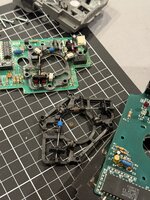
On a brighter note, I found the blue rollers from a faulty PowerBook 1xx trackball are an ideal replacement for those distorted sticky amber-coloured things in the Portable’s trackball. Funny how some ‘wins’ are so simple and others like the disk drive just spiral into complexity and disappointment when something else stops working
Cheers for any (back)light you can shed on this for me please…
While disassembling and reassembling a dozen times during this repair, and around the time that I replaced all three 74AC244 latch chips (after swapping them around had fixed the disk drive problem and created other RAM problems), the backlight stopped working. It had been operational even though the machine had not been starting up (failed hard drive); the floppy disk-request screen had been backlit.
I didn’t worry too much as I knew that once the replacement hard drive was set up and booting, the Portable Control Panel V1.3 could be installed, and I had seen in the past how that brought the backlight to life.
Not this time. I pulled the logic board out again and checked every ‘dodgy-looking’ through-hole that I could find near capacitors. All are connected. I opened the display housing and replaced the electrolytic caps on the inverter board (which tested OK anyway). I did some half-hearted detective work testing from the inverter board cable to discover the handful of pins in the logic board socket that are connected to the inverter board. I hoped to trace these, but it got difficult really fast to see from one side of the logic board to the other, traces under chips etc.
I can only find schematics for the non-backlit Portable, which were fine for diagnosing the disk drive, but not so useful for the backlight.
Could someone please give me a trail to follow in tracing why this backlight doesn’t come on - eg. “Pin X of chip Y should have a signal” - I wonder if it is to do with the power manager chip, in which case perhaps studying a Powerbook 100 schematic will help me, if the same pins are used?
On a brighter note, I found the blue rollers from a faulty PowerBook 1xx trackball are an ideal replacement for those distorted sticky amber-coloured things in the Portable’s trackball. Funny how some ‘wins’ are so simple and others like the disk drive just spiral into complexity and disappointment when something else stops working
Cheers for any (back)light you can shed on this for me please…
Attachments
Last edited:
