• Hello Guest! We're hosting a challenge to welcome vintage Intel macs to the MLA during the month of July! See this thread for more information.
  • We've made some quality of life improvements to the Trading Post. More info here.

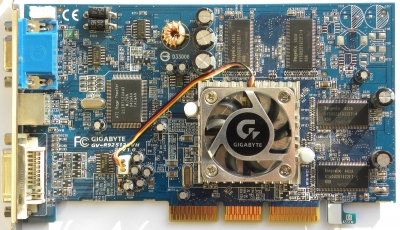
ATI Radeon 9250 PCI cards, converting from 64-bit to 128-bit and other details

@herd that's really cool, thanks! I've gotten a lot of good video card info from VOGONS. It's a great resource.

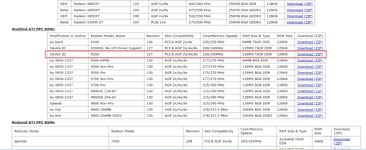
An eBay seller offered me a good price on a PCI Radeon 9200 SE. I haven't gone for it (yet). Based on the little research I've done, I expect the 9200 SE will have a device ID of 0x5964, which I don't think is supported by Mac OS at all. The 9200 and 9250 are 0x5961 and 0x5960 respectively. The different device ID is why the 9250 required a modified extension for OS 9 acceleration.

Does anyone know whether the device ID on these cards is set by the ROM? I've seen that on other ATI cards, for example a Radeon 9800 Non-Pro. Its device ID is 0x4E49, but if you flash it with a 9800 Pro ROM, it becomes 0x4E48 and is identical to a 9800 Pro in every way.

Maybe I should do a little experimenting with the device ID on the 9250 before jumping on the 9200 SE.
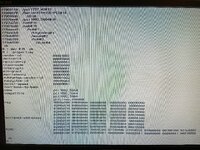
 
I had some time last night so I tried changing the device ID in the ROM to 0x5964 on a card that would otherwise be 0x5960. This was the result (viewed with an NVIDIA AGP card):
IMG_20260204_003513_325.jpg

As one might expect, it didn't work. My conclusion is either that 0x5960 is set in the hardware in a way I don't understand, or I just don't know what I'm doing.

I also checked the Radeon 8500 kext in Leopard and it supports 0x5960, 0x5961, 0x5962, and 0x5963, but not 0x5964. So a Radeon 9200 SE is a card that would need a modified ROM and modified drivers in both OS 9 and OS X. Since regular 9200s and 9250s already exist in the roughly the same price range with the same or better performance, my conclusion is that a 9200 SE is not worth my time. A determined person could make one work, though.
 
I had some time last night so I tried changing the device ID in the ROM to 0x5964 on a card that would otherwise be 0x5960. This was the result (viewed with an NVIDIA AGP card):
View attachment 95254

As one might expect, it didn't work. My conclusion is either that 0x5960 is set in the hardware in a way I don't understand, or I just don't know what I'm doing.

I also checked the Radeon 8500 kext in Leopard and it supports 0x5960, 0x5961, 0x5962, and 0x5963, but not 0x5964. So a Radeon 9200 SE is a card that would need a modified ROM and modified drivers in both OS 9 and OS X. Since regular 9200s and 9250s already exist in the roughly the same price range with the same or better performance, my conclusion is that a 9200 SE is not worth my time. A determined person could make one work, though.
Maybe you will find (sort of) an answer here:
 
VidCard arrived today and it drives the 1920x1200 panel just fine over DVI, thanks, obsolete! Swapped the cables just to see and the first one you sent me does as well when hooked up to the HPZR24w. New one's back to only 1920x1080 when hooked up to the Dell 1440p, so it's time to dig out the long VGA cable to see if it will do better than the 2048x1152 limit of the 32MB card. With double the VRAM it might even do 1440p?🤞

Macintosh Portrait Display is the only one I've used in that orientation. Have vague recollection of software that'll do the trick, but that was back in the 7.5 day. How the heck do you get a display into portrait mode under 9.2.2? :unsure:
 
Macintosh Portrait Display is the only one I've used in that orientation. Have vague recollection of software that'll do the trick, but that was back in the 7.5 day. How the heck do you get a display into portrait mode under 9.2.2? :unsure:
I'm not sure. I think it would be worth opening another thread if you can't figure it out. Honestly, most of the fun for me in stuff like this is getting the hardware working; once I do, I tend to lose interest and move on to the next thing I want to try to get working...
 
Yep, makes sense, I'll probably post to OS9Lives, that's where I found reference to MacPortrait, which is from the 7.1 days and has a list of resolutions to match, nothing current apparently. Looks like @Bolle worked it over to bring it up to 9.x compatibility, so that'll be great on the older gear with lower resolutions.

Signing off here. Nice work, brother.;)
 
Card #1 is the black Sapphire board, which is referred to as the ATI reference design on The Mac Elite and elsewhere.
View attachment 93749
Hey, this is really cool work! I thought about making this mod to one of mine a while back but it never made it to the top of my project stack.

Is there any chance you have a dump of the original PC ROM on the black card? I've lost mine in a move and I want to convert one back to a PC card for use in another project.
 
Hey, this is really cool work! I thought about making this mod to one of mine a while back but it never made it to the top of my project stack.

Is there any chance you have a dump of the original PC ROM on the black card? I've lost mine in a move and I want to convert one back to a PC card for use in another project.
Thanks! I just checked that card and its ROM chip is an ST 25P05V6, which means I did not pull off the original ROM chip and replace it, but rather overwrote the PC ROM with the full Mac ROM. So the PC ROM is gone; sorry about that. I have not been very careful about archiving vintage PC stuff, but perhaps I should be.

The 25P05V6 chips, despite being marked as 512kbit, will take 1Mbit of data about 90% of the time. The other 10% of the time, writing beyond 512kbit seems to kill the chip, which is probably why they were marked as 512kbit to begin with. Seems like they are actually from a 1Mbit lot with a high defect rate.

There's a good chance that one of the ROMs here will work for you (see the Bios link near the bottom of the page):

Or perhaps this one:
 
Thanks for the reply! That's actually wild about the ROM chip size, I did not know that. I've always just flashed a fresh chip dangling in a clip with flashrom and then soldered it to my cards.

I actually ended up finding what I think was the original PC ROM chip for the black PCI card (It has the string "RV280" in it at least). I downloaded a few of the ROMs for other cards as well as the ones linked above and they all look quite different, specifically containing strings about "AGP". That might not matter (unless the retroweb BIOS is just wrong), but its clear the PC VBIOS I have here is quite different in contents. Therefore, I'm attaching the ROM I found here in case anyone else needs it in the future. I'll try to find a better place to upload it later, but for now while I'm thinking about it and responding...
 

Attachments

Well, I can't delete posts, but the ROM I found is incorrect. It is actually the "R9250_127_reduced.rom" modded Mac BIOS I found. I guess I had tried that one years ago before de-soldering and replacing it. That is why it looked different though. Funny enough, It is actually detected as the correct card in a PC, but can't display anything. I ended up finding a BIOS on TechPowerUp that worked on it. The BIOS I found was for a 9200SE with 200MHz core and 166MHz memory clocks. Any of the versions with a 250MHz core and 200MHz memory resulted in a garbled display. I also had to pad the BIOS out to 64k get flashrom to flash it, so I'm uploading the modified version that actually worked to turn my card back into PC compatible here.
 

Attachments

Hey all.

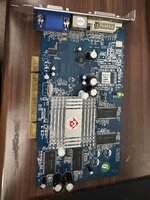
I am a relative newb to this site and to Mac modding. I have already completed a successful mod on my Athena Sil3112 SATA controller card with which I am driving a 250GB NAND SSD and a SuperDrive from a Mac Pro. I was turned onto modding an ATI Radeon 9250 Diamond Stealth PCI 256MB video card to upgrade my system. I am attaching pics below to illustrate my process so far which also may shed light on why I am having trouble getting it to work. I have read through this thread, but I'm having trouble transposing what to do for this card. Thank you in advance for your patience.

Here is the card:
Diamon Stealth ATI Radeon 9250.JPG

Here is the system it's going into:

Power Macintosh 9600/300
Sonnet Crescendo G4 800MHz CPU upgrade card installed (Sonnet system enabler installed)
New PRAM battery installed
768MB RAM
Original 8MB Apple "Twin Turbo" 128 video card installed (my emphasis and quotes)
Seasonic 620W PSU installed via K Kuba (Satanic) PSU mod
Adaptec DuoConnect USB/FW card installed w/ extensions and USB enabled
Modded Athena Sil3112 SATA controller card
250GB NAND SSD
Apple DVD RW SuperDrive from a Mac Pro
Apple Extended II keyboard
Apple Multiple Scan 15

Process of mod:

1. I removed the ATMEL 25F512AN from the video card using hot air station.
2. I pulled the 128K ROM file from the MacElite site (rev 127) for the card listed as ATI 9250.
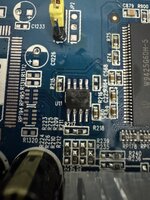
3. Using an XGecu T48 and programming software, I flashed and verified the 128k ROM onto the ST 25P10VP replacement chip.
ST25P10VPflowed.JPG
4. I flowed the ST into the space where the ATMEL chip was located. Since there was no alignment dot on the new ST chip. I took an educated guess that it would be on the lower left of the printed surface reading right side-up.
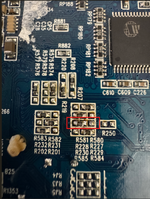
R229R230moved.png
5. Since this is not the "reference" 9250 card or the "mad dog" card discussed previously, I had to guess at which resistor to move for the mod. There is a note on the Mac Elite page for "other cards" to move the resistor from R229 to R230, so that's what I did.
6. I downloaded and installed the hacked ATI drivers and extensions from Macintosh Garden and installed them first before performing a controlled shutdown.
7. I inserted the 9250 while leaving the twin turbo 8MB card installed with video cable attached. I did this to see if the Mac would see the 9250 and if the ROM would display correctly in system profiler after boot.
8. Rebooted. Monitor would not sync, nothing displayed. Could not get Mac to reset PRAM using CMD+OPT+P+R.
9. Rebooted using CTL+CMD+PWR. Same result as above. Shut down using physical PWR button on case.
10. Removed 9250
11. Rebooted. Mac boots normally to desktop. Shut down normally.
12. Re-inserted 9250 card and attached VGA cable to lcd vga monitor. Removed Twin Turbo card
13. Rebooted. Nothing displayed. Can not reset PRAM as before.

I have not cleaned the card PCB afterwards with iso, although I can if you think it's matters.

I obviously haven't been able to get to the desktop yet. I don't have the experience to tell me why that is, even though I have been as assiduous as I can be about following the steps this mod requires. Maybe someone here has a thought? I would appreciate any feedback.

Thanks,

Joel
 
Welcome @synclavier! Ah, another different 9250 board layout, but it appears to use the reference design component labels, which is nice. I can verify that you have the ROM chip on the right way (ST chips have a slightly wider chamfer on the side with pin 1) and your soldering looks great. I don't like to install chips with hot air if I can help it (except BGAs, where there's no other choice) because a soldering iron is gentler, but I doubt that's the problem. Those old 8-pin SOICs are pretty tough. I don't think cleaning off the flux matters at all here either.

Check your card against the table I posted here. I can see in your last picture above that you have a resistor at R219; you may want to try moving it to R220. That said, I have never experienced the issues you're describing. In my experience, a card with a Mac ROM but the resistors in the incorrect positions will display garbled video. I've never tried pairing a TwinTurbo and a Radeon 9250 in the same machine, and I don't have a 9600 to test with, either. Hopefully someone else can help with that. I think I might have read something about issues with Radeon cards and G4 upgrades, but I don't remember the specifics.

I hate to ask, but did you test the card in a PC before flashing it?
 
Thank you. I can certainly move R219 to R220. I did not test the card previously before install, although the PO said it was working before he pulled it, FWIW. There's a chance the card is dead or messed up, but all other things being equal, it should work. I understand the Pin 3 and 11 Kapton tape fix is for AGP cards, so wouldn't apply to me. Just cleaned and reinstalled the card and rebooted, no fix. I will keep trying. Thanks again!

Just to confirm, this is the correct ROM to be flashed for this card, correct? This is what I used:
MEDLROMS.png
 
Back
Top