• Hello MLAers! We've re-enabled auto-approval for accounts. If you are still waiting on account approval, please check this thread for more information.

ATA bus speed, QS G4?

dv-

6502
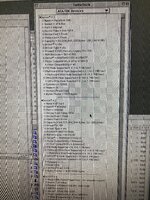
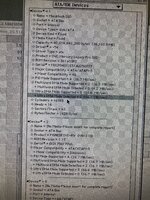
So I’m wondering why my QS G4 is running its internal SSD at the slowest possible speed?

I checked with and without the CF card adapter I use as a secondary drive. In both cases the drives seem to be stuck in 16.7MB/sec mode even though I know the SSD is definitely capable of faster. (I used it in a thinkpad for several years and it worked at the 66 MB/sec setting there.)

I’m not sure what the CF adapter might limit things to but I thought they were just a ”dumb” pass through for the cards. (Mines a DMA 7 capable one, advertises 120MB/sec.)

Both drives are in “cable select” mode.

Cable is an 80-conductor cable, original to the Mac probably. Everything works reliably I just wouldn’t mind more speed, especially for OS X.
 

Attachments

  • IMG_2949.jpeg
    IMG_2949.jpeg
    6.5 MB · Views: 17
  • IMG_2948.jpeg
    IMG_2948.jpeg
    5.9 MB · Views: 17
Which bus are you using?
The ultra ata bus (connector by the PCI slot.)

Oh and I’m also using some cheap 40->44 pin ide adapters. (SSD & CF device both use the laptop style connector.) Might that make a difference somehow?
 
That is strange; it should be faster. The other bus should also be faster than 16MB/s. What does it do there? Cables can cause problems sometimes, otherwise it may just be some sort of incompatibility. Is the drive (or boot partition) less than 128GB?

68kmla.org/bb/index.php?threads/quicksilver-g4-ata-bus-problems.48048/
 
Yeah, it’s a 40GB SSD.

Read the linked thread there. I guess I could try a new cable next. Thanks!
 
I googled "How does ATA detect 80 conductor cable?". The answer seems reasonable.
ATA detects 80-conductor cables by looking for the grounding of the /PDIAG:/CBLID signal on pin #34 of the interface connector that attaches to the motherboard. The older 40-conductor cable does not have this pin grounded.

80-conductor cables are required for Ultra DMA modes above mode 2, which support faster transfer speeds. 80-conductor cables also have different connectors than 40-conductor cables, with more ground conductors connected to the ground pins. 80-conductor cables usually come with three differently colored connectors, while 40-conductor cables are usually uniformly colored.
 
New cable didn’t do anything. Bummer.

I’m going to try a couple different ATA devices and see if I can find one that works at the advertised speed, I guess. I think I have an old HDD or two around here somewhere. That wouldn’t solve the problem, exactly, but it would at least be a data point.
 
My recommendation, since this is a desktop, try testing a modern SATA SSD with a SATA-to-PATA adapter. Its entirely possible the cheapo SD adapter doesn't properly support UDMA modes. As for CF adapter cards, many also have problems going into UDMA mode due wiring issues on the adapters. The proper adapters aren't 100% "straight through" and need additional passives on the adapter to use UDMA mode.
 
Well, I tried a Sata device with an adapter, but I think the adapter I got is defective. Drive hangs during file copies, etc. it is recognized and I can format it. But it’s limited to 16.7MB/sec.

I dug out an old ATA hard drive (a barracuda 7200.7 that supposedly supports higher speeds) and even set as master alone on the bus, it’s still stuck at that same 16MB/sec.

What could be going on here? Hmm.
 
Last edited:
Perhaps the controller is on the way out? A cheap PCI SATA card should actually preform better if you have the open slots to support it.
 
You can either get a super cheap SIL card that, hopefully, has a large enough ROM to do the following
Or one the preflashed ones on eBay for a little more
 
You can either get a super cheap SIL card that, hopefully, has a large enough ROM to do the following
Or one the preflashed ones on eBay for a little more
Yeah I just ordered what I assume is a flashed one. 4 port, $50.

I have a SCSI card in the G4 and I can boot from it, but it only supports 20MB/sec so… meh.
 
Is it possible for CPU upgrades to screw with the ATA controller? It’s an OWC 1.4GHz upgrade, the only nonstock part really. (Except for the ram upgrade.)
 
I don't see how the CPU would be related, but it would be easy enough to jumper it to a lower speed to test. Is the CPU pegged doing something else, like spotlight indexing maybe? The ATA controller is on the PCI bus; do you have any other PCI cards plugged in? How are you measuring the transfer speed? For example, if you time how long it takes to duplicate a large file you would be measuring read and write speed combined.
 
Yeah I just ordered what I assume is a flashed one. 4 port, $50.

I'm curious how this goes. I thought the 3114 (4-port) ones had known issues with the Quicksilver G4s, but maybe I was reading old information. I went with modding an Adaptec card.

As a data point for the issue in the thread, before I got the SATA card, I had the same OWC SATA SSD connected using a StarTech adapter and was getting >30MB/sec real transfer rates pulling files from my local file server using Ethernet and it was stable. I didn't check to see what the system was reporting the DMA mode as in TattleTech though. Now I'm curious...
 
I did a quick test on an AGP using a random 80GB 2.5" laptop drive. I got 12-13MB/s on the "IDE" bus and 30-40MB/s on the "ULTRA ATA" bus. A quicksilver should be at least this fast.
 
I don't see how the CPU would be related, but it would be easy enough to jumper it to a lower speed to test. Is the CPU pegged doing something else, like spotlight indexing maybe? The ATA controller is on the PCI bus; do you have any other PCI cards plugged in? How are you measuring the transfer speed? For example, if you time how long it takes to duplicate a large file you would be measuring read and write speed combined.

It's sitting idle otherwise. I have an Adaptec SCSI card installed, but nothing attached to it usually. (I use it to copy stuff to/from a ZuluSCSI, but usually it's just idle.) I can never remember the exact model number, but it's the same one that was sold as a preinstalled option when you ordered from Apple back in the day. 2930 or something? It's been completely plug-and-play, no extra drivers needed.

I hadn't benchmarked the disks, I was just looking at the reported ATA mode in Tattletech and that tells me something is off. But a file copy runs at about 12MB/sec, which makes sense if the bus is running at 16.7MB/sec max.

Sounds like you are stuck in PIO mode 4 which maxes out at 16.7Mbs (ATA 2).

Yup. Like I said upthread, I've got a new cable in there, reset open firmware, tried different drives, etc. So it does seem like the controller is borked. Part of me wonders if there's a visible fault, like a shorted pin or something. I should probably bust out the magnifying glass.

So we'll see how the SATA card works when it shows up. :-(
 
I'm curious how this goes. I thought the 3114 (4-port) ones had known issues with the Quicksilver G4s, but maybe I was reading old information. I went with modding an Adaptec card.

As a data point for the issue in the thread, before I got the SATA card, I had the same OWC SATA SSD connected using a StarTech adapter and was getting >30MB/sec real transfer rates pulling files from my local file server using Ethernet and it was stable. I didn't check to see what the system was reporting the DMA mode as in TattleTech though. Now I'm curious...
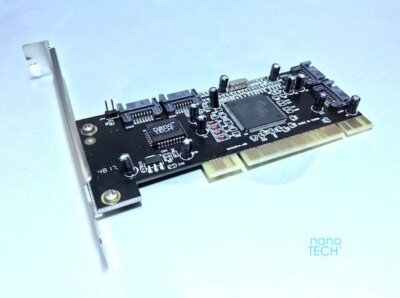
I ordered this one. It doesn't say what brand it is, but says it will work with a G4.

We'll see. If it doesn't, I guess I can complain.


*shrug*
 
Back
Top