AOX DoubleTime 16 - Info needed

Hello guys.

I bought a SE and it came with this card and also 4mb RAM upgrade.

I tried to get more info about it (mainly about the extra video port) but I only found a leaflet about its main characteristics.

Do anyone have it? Manual?

Cheers

 
Got a picture of the card?

Drivers for some accelerator/video combos were interchangeable. Seeing what this actually looks like might give a hint to what software might work with it.

 
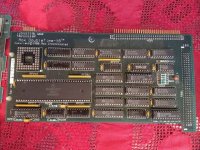
Sorry, I thought yesterday I answered your post with the picture I took while cleaning it up. But here it is.

The only info I have are these:

DoubleTime-16™ Accelerator Features: • easy installation • math coprocessor support 
• 16 MHz 68000 chip 
• twice the speed of an SE 
• 100 % compatible 
• port for large screen monitor

So the pinout would be nice to know how to attach a external large screen monitor.

aox-doubletime.jpg

 
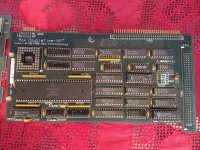
The photo isn't hi-res enough to read the labels on some of the chips, but those might be VRAM chips to the right of the 68000. However I'm not sure whether the rest of the circuitry to drive an external display exists on this board. In particular there's no sign of another crystal or oscillator, which means it's an open question whether there's any pixel clock source.

It's possible that either H201 or H202 is designed to connect to some expansion board that provides the rest of the video circuitry. If you have a scope you might probe some of those pins to see if you can find any evidence of a sync and video signal. It will certainly be TTL level so would need level shifting for a modern display at minimum.

 
I really do think this card is missing an expansion board to make the connection available at the back of the mac.

Hope this one is better.

aox-doubletime-hires.jpg

 
Last edited by a moderator:
It's possible that the 12 pin H202 header could be for video - I've seen it before - but it seems like the card alone isn't capable of it. MacWorld didn't make any mention of it in their review, and neither did InfoWorld in their brief mentions of it.

Users on an old forum mentioned a video connection, but that was as far as it went.

Additionally they mentioned a software version (v2.32), as well as issues using the card with System 7 (possibly not related to the software version I mentioned prior).

 
The SE is running System 7.0.1 if I am not mistaken. I will do some more testing with other systems and probe the H202 pins. But it really seems it needs an extra expansion card connected to this or the other header to have the external video.

 
Last edited by a moderator:
Well I'm guessing it only happens if you have the extension installed, additionally most users were reporting that it completely broke AppleTalk, so you might test that as well, although you probably still need the extension.

 
Last edited by a moderator:
Hi Guys,

now I had time to use this Mac SE and noticed it is too slow.

I ran speedometer 3.06 and just got the base score (1.00).

With or without the AoX Card.

May it need an extension to work?

And why is the SE too slow?

Cheers.

 
Aox DoubleTime-16
are extremely rare, as the card often required an additional proprietary expansion board or specific cabling to utilize its video output.
However, community research on similar vintage Macintosh SE accelerators (like those from Mobius, which shared designs with Aox) suggests that these external monitor ports typically carried monochrome TTL-level signals.

Estimated Video Pinout
If your card uses a standard 15-pin (DB-15) Macintosh-style video connector, the signals typically follow the Apple monochrome standard:

Pin SignalDescription
1Ground (Shield)Chassis ground
2RED(Unused or tied to monochrome signal)
3C-SYNC / H-SYNCCombined or Horizontal Sync
4MON-ID 1Monitor ID bit 0
5GREENMain monochrome video signal
7MON-ID 2Monitor ID bit 1
9BLUE(Unused or tied to monochrome signal)
11GroundLogic ground
12V-SYNCVertical Sync signal
15C-SYNCAlternate Composite Sync location

Technical Considerations
  • Signal Type: The output is almost certainly TTL level, meaning it cannot be connected directly to a modern VGA or HDMI monitor without a level shifter or a specialized converter like the RGBtoHDMI.
  • Internal Headers: If you are looking at headers on the board itself (often labeled H201 or H202), these are usually raw taps for Sync and Video signals intended for an optional daughterboard.
  • Software: Most of these cards require a specific control panel or extension (like the Mobius Display driver) to activate the external video port.
 
Back
Top