• Hello MLAers! We've re-enabled auto-approval for accounts. If you are still waiting on account approval, please check this thread for more information.

Am I too dumb to burn a pre-OSX CD?

I burned 3 different bootable 8.5 CDs from the ISO file I extracted and uploaded.

One using Toast on Mac OS 9. Another using a MacBook Pro, MacOS 11.7 and Finder built-in burn, and one using ImgBurn on Windows 10.

All are 80min/700MB CDRs. I burned them at maximum possible speed just to add some possibility of failure. They all boot, and all are HFS Standard volumes.

The ISO that I extracted has a few more bytes (about 1MB) more than the one on Macintosh Garden. Likely the boot driver and partition is missing on the MG English ISO.
 
Then I got out my Linux notebook out and tried the same (yes I have hfsutils installed), downloaded the OS 8.5 again.
You don't need hfsutils to burn a HFS image from linux, you're just burning raw data to a CD.

You keep telling us what OS you're using, but not what disk image or burning software, and no mention of settings.

Just follow these instructions.

1. Delete all copies of the disk images from your Mavericks computer
2. Download this : https://mega.nz/folder/gSEVVSIK#e0oHPp74M7MwxJEIL5CrMw
3. Burn it using the Finder. Not any other program. Just the Finder. Don't mount it. Don't open it. Just burn it with the Finder. As slow as it will allow.
4. Boot your 6400 from it by holding the 'c' key while starting the computer with the disk in the drive.

Screenshot every step of the process and share the screenshots. Every step, not some of them, all of them. You are doing something wrong. We're 81 replies into this thread and other users have successfully burnt at least 5 bootable CDs and told you how, and you're still failing. Seriously.
 
Last edited:
If only there was some way to upvote that string of images on the previous page from our friend MrFahrenheit here. You gave me a healthy rewind back to 2003 and 56k!

I highly doubt the SSD / CompactFlash storage is a culprit here. A UDMA/Fixed Disk Mode enabled CF card will not have compatibility problems, and since they're usually SLC Flash, they can handle abuse a bit better than MLC Flash does.

A Linux machine wouldn't have changed the burn process. dd on OS X or Linux is going to function the same regardless of the operating system. The only time I've had issues with dd is for specific operations outside of what this post is about (specifically, I had to limit the block size to 1MB when I was fooling around with a Nook Simple Touch rooting operation).

(Oh, and ugh, besides the one time where I got of= outputing to the wrong /dev/ path and overwrote the first 50-ish MB of hard disk space before I realized what happened.)

Worst case scenario here, you just...load up an emulator and have it install Mac OS onto a temporary volume. Then you can pack it all up into a self extracting file, get it out of the virtual disk, shuffle it over the network, unpack it, bless the system folder and party.
 
Last edited:
I also want to see screenshots. Otherwise I won‘t believe you. There is zero reason that your CDs are formatted Mac OS Extended if you carefully follow our instructions and advice.

I more and more believe that you just drag files over and think this would bless a System Folder like on a floppy disk. This is not true for CDs. You need the invisible driver partitions on the CD to be bootable.
 
I more and more believe that you just drag files over and think this would bless a System Folder like on a floppy disk. This is not true for CDs. You need the invisible driver partitions on the CD to be bootable.
Or a troll wasting our time :)
 
I also want to see screenshots. Otherwise I won‘t believe you. There is zero reason that your CDs are formatted Mac OS Extended if you carefully follow our instructions and advice.

I more and more believe that you just drag files over and think this would bless a System Folder like on a floppy disk. This is not true for CDs. You need the invisible driver partitions on the CD to be bootable.
Which is exactly why a lot of “ISO images” on sites like the Macintosh garden or Macintosh suppository are bad - the uploader inserted a CD and chose to image the mounted volume, and not the actual full CDROM device itself.
 
Which is exactly why a lot of “ISO images” on sites like the Macintosh garden or Macintosh suppository are bad - the uploader inserted a CD and chose to image the mounted volume, and not the actual full CDROM device itself.
Yeah, I've heard of people unsitting System folders on windows and dragging the files to a DOS floppy disk, but that's a worst case and probably not what we have here.

I suspect there are multiple issues, made worse by the lack of clarity / screenshots / details of what files and settings. While also only replying to some questions and not others making it impossible to close out possible issues.

With the outside chance it is a troll using an AI to produce "plausable" answers to us that lack substance.
 
At this point I only have two semi-useful things to say:

1: You’re doing something wrong, because it works for everyone else.

2: At this point, you may as well just have one of us mail you a disc. It will make this easier.
 
Which is exactly why a lot of “ISO images” on sites like the Macintosh garden or Macintosh suppository are bad - the uploader inserted a CD and chose to image the mounted volume, and not the actual full CDROM device itself.
I went through this issue not too long ago and have a stack of non-bootable discs to show for it. Eventually someone pointed me to some images posted to help out BlueSCSI users and those worked.
Another thing I have noticed over the years is that with my particular PCs and drives, burning at higher speeds has always worked better than burning at a slower speed when trying to use the discs with older machines. Despite everyone being horrified at this concept, it works for me.
 
Another thing I have noticed over the years is that with my particular PCs and drives, burning at higher speeds has always worked better than burning at a slower speed when trying to use the discs with older machines. Despite everyone being horrified at this concept, it works for me.
Which in a way echos my experience. I’ve never understood that. Each and every disc I’ve ever burned has always been at “Maximum Possible” for whatever drive I’ve used, and they have all worked just fine.
 
I am with you in that I wasn't successful burning 8.5 or 8.6 ISOs that would actually boot the machine. But I think it's actually the image, because 8.1 and 9.1 will boot from a ZuluSCSI on my PM 6500/225, but 8.5 and 8.6 will not. So it's not just the CDs I burn, it's the images themselves. I got a bunch of ISOs from an archive.org link, and it seems like the OSes released from 1997 to 1999 just won't boot for me.

I "solved" it by making a new hard drive image on said ZuluSCSI and installing an OS to it, then using that to mount the ISO I want to install. It's annoying but it works.

It very well could be as MrFahrenheit said that the ISOs I've downloaded are just missing the bootable part.
 
i have found that a bunch of 8.5/8.6 images online are seemingly badly imaged and won't boot things properly. haven't done much verification of them though
 
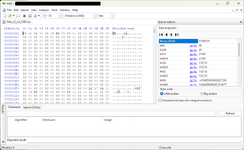
I believe someone on Macintosh Garden said something to the effect that you can check if a disc should be bootable or not. Open the disc image with a hex editor or advanced text editor, like Notepad++. Hex editor would be better though. Check the first two bytes of the file: if it says ER you should be OK. If it's something else, it's probably not going to work.
 

Attachments

  • bootableCD.png
    bootableCD.png
    64.9 KB · Views: 12
Again, I extracted 8.5 and 8.6 ISOs from my own Apple retail cds, burned them 3 different ways to 3 different CDRs, each, and all of them were fully bootable and worked.

The images are ones that I uploaded to Macintosh Garden and I also downloaded the ones I uploaded and tried them, and they worked after being uploaded and downloaded again.

Obviously there will be issues with bad images that others have extracted. Ignore those images. Grab the ones I uploaded. 🙄

 
Again, I extracted 8.5 and 8.6 ISOs from my own Apple retail cds, burned them 3 different ways to 3 different CDRs, each, and all of them were fully bootable and worked.

The images are ones that I uploaded to Macintosh Garden and I also downloaded the ones I uploaded and tried them, and they worked after being uploaded and downloaded again.

Obviously there will be issues with bad images that others have extracted. Ignore those images. Grab the ones I uploaded. 🙄

There's multiple threads on MG on this very topic :)

The other thing at play is that Apple used two different drivers on its bootable CDs. Depending on the driver, you may have issues booting from a non-Apple CD player, and you may have issues booting from particular hardware. There's a driver from System 7.6 that seems to work to boot all CDs on all players on all hardware that supports the OS being booted -- I believe this driver is on the Legacy recovery CD.

Someone made an app at one point that would take an HFS CD image and automatically add or fix the boot partition on it, using the universal driver, but I've lost track of where that is.
 
There's multiple threads on MG on this very topic :)

The other thing at play is that Apple used two different drivers on its bootable CDs. Depending on the driver, you may have issues booting from a non-Apple CD player, and you may have issues booting from particular hardware. There's a driver from System 7.6 that seems to work to boot all CDs on all players on all hardware that supports the OS being booted -- I believe this driver is on the Legacy recovery CD.

Someone made an app at one point that would take an HFS CD image and automatically add or fix the boot partition on it, using the universal driver, but I've lost track of where that is.

Phipli, who is no longer a member here, was the one who made a tool for scanning and adding the driver to ISO images.
 
Back
Top