

• Hello MLAers! We've re-enabled auto-approval for accounts. If you are still waiting on account approval, please check this thread for more information.

802.11b PCI Cards or AirPort solutions for desktop Macs under OS9 (or less)

Trash80toHP_Mini

NIGHT STALKER
68040
Playing with WiFi after all this time and I'm looking for some oddball stuff, but first the most simple one:

I need a baseline unit for my Quicksilver, will this one do? I could probably pull one out of the 12"Parts4, but they're inexpensive enough to go takeout and wait for delivery rather than cooking at home. [}:)]

Apple Airport (M7600LL/E) 802.11b Wireless Adapter
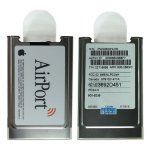
AirPortCard-0.jpg

For kicks, I may also try it out in this contraption which has been reported to work off the shelf in the Beige G3 under 9.2.2 over at OS9lives.

Cisco Aironet 350 Series 2.4GHz 11Mbps Wireless LAN PCI Adapter
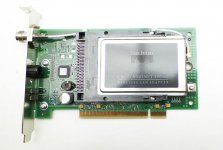
aironet_pci.jpg
 

I have a BroadCom Mini PCI card on the way from China, but haven't found drivers or support. Does anyone know  of a Mini PCI WiFi (NOT PCIe!) card that might be supported?
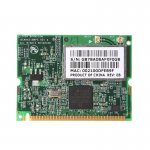
BroadCom-MiniPCI-WiFi.jpg

Mini PCI is pretty cool stuff, he predecessor of PCIe?
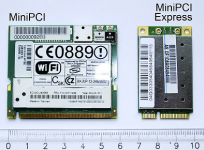
MiniPCI-MiniPCIe.png

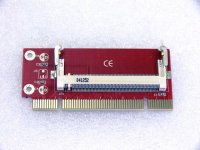
I have a couple of these PCI to Mini PCI adapters on the way for testing. I figure the combo might just fit where no card has dared to go. It'd be better if I could find the TypeI/II vertical slot connectors for Mini PCI, but this will have to do I guess.
miniPCIbig.jpg

I've read that OS9 is limited to b hardware, is this true in all cases? I guess researching brands/chipsets with drivers for OS9 is the way to go, then download, then buy, then pray?

Anyway, please let me know if tha model airport card is compatible with Quicksilver and chime in with any and all uggestions, PLEASE!


 
I've used several Broadcom-based PCI cards in G4's. (Same chipset as the Apple "extreme" card.)

I used to get them at Best Buy.. They were sold under the Dynex brand name.

They worked without additional drivers with OSX/Classic. I don't believe I ever tried them with straight OS9.

I'd go with an Apple Airport card if you want it work for sure with OS9.

The Apple Airport card will work in the Quicksilver.

iirc, the Cisco Aironet cards also have OS9 drivers.

Of course the Lucent/Orinoco PCI cards will work too.

A cheap source for those is from dead grey Airport base stations.

Pretty sure any OS9 wifi support is going to be "B" only.

Actually, theoretically, you can use any PCI wifi card in the Quicksilver. (Provided there are drivers.)

You just can't close the door with with most of them because the antennas stick out too far. :)

 
Last edited by a moderator:
I've used several Broadcom-based PCI cards in G4's. (Same chipset as the Apple "extreme" card.)

I used to get them at Best Buy.. They were sold under the Dynex brand name.

They worked without additional drivers with OSX/Classic. I don't believe I ever tried them with straight OS9.
I wish you'd test that! [;)] I've not seen any OS9 drivers listed for anything BroadCom thus far.

Gotta be Native9 as my target machines are old world Alchemy/Gossamer architectures. Wish-I-were doesn't tread that far back AFAIK. I've had great luck with my Orinoco PCMCIA cards in NuBus architecture PPC PowerBooks. Didn't know Orinoco made PCI cards. You've given me some good tips for searching, thanks!

I can't wait to see if the PCMCIA bridge on the Aironet card is the same one JB is curious about when it gets here THU.


In Classic Mode, Mac OS X handles the networking.

For wireless on a G4, your best bet is almost certainly going to be the regular Airport card. The model listed should work fine.

Mini PCI is the predecessor to Mini PCIe (and  M.2) but only in the same sense that regular PCI is the predecessor to PCI Express. They're slots meant for similar things at different times.

I wouldn't hold your breath trying to find a Mini PCI wireless adapter that'll work in OS 9. Or Mini PCI anything that works in Mac OS 9, for that matter. Most of that hardware is optimized for PCs because it never shipped for Macs. (The Airport Extreme would have been an obvious choice for that form factor, but I don't think Apple went that way until a bit later.)

 
Thanks, c. I just ordered one. I think I've got an ole NetGear hub that'll work  .  .  .  if it still works.

For the Mini PCI I'm hoping to find the near cousin of a full PCI card that has OS9 drivers. It's a very handy little form factor and straight up PCI in a small package. PCIe is a horror show by comparison. Does anything PCIe work at all for OS9 and earlier but SSDs bridged to IDE?

 
I wish you'd test that! [;)] I've not seen any OS9 drivers listed for anything BroadCom thus far.

 Didn't know Orinoco made PCI cards. You've given me some good tips for searching, thanks!
I only have a Sawtooth G4 at the moment that I think has one of the Dynex Broadcom cards in it but unfortunately it's not up and running now.

As Cory mentioned all the networking is handled by OSX with Classic so yeah, I doubt the card would work with OS9.

Out of the box the Dynex card only ever had Windows drivers.

And my comment about Orinoco PCI cards was a typo, I meant PCMCIA although I guess it's possible they made PCI cards.

 
Actually, theoretically, you can use any PCI wifi card in the Quicksilver. (Provided there are drivers.)

You just can't close the door with with most of them because the antennas stick out too far. :)
and here also I meant PCMCIA wifi card.  I shouldn't post so late at night...

....or so early in the morning.

... or mid afternoon.

...and never, never at dusk!

anyway, :)

 
One possible thought:

For a few years, wifi client bridges were a popular way to get game consoles online. Slightly larger ones for both bridging and for range extension continue to be popular, and they're commonly available at electronics and office supply stores. Here's an example of a small modern one: https://www.amazon.com/dp/B00TQEX8BO/ref=psdc_300189_t1_B000066JQU although there are others that should be slightly more common.

These should be hanging around inexpensively, and I know some routers (especially anything that can run third party/open source firmware such as DD-WRT and Tomato) can be used as client bridges. This may be an easier route to go than bothering with Wifi. Especially for newer/faster machines. Anything with 10/100 or Gigabit that can use most of that speed will probably be better served by an 802.11N or 802.11AC bridge acting as a client to your regular router than an 802.11 B card.

As a bonus, you can group a few machines nearby into a single client if you use routers as bridges, and you'll get better speed and almost certainly better coverage, plus better security. Once the bridges are configured and connected, they shouldn't need any further configuration, either, so you can swap out, say, a Power Macintosh G4 plugged into a bridge for a Color Classic or an Amiga or a Sun.

My house/apartment isn't very big so I ended up just stringing a 100-foot network cable from the back to the front, but where that's not an option, wifi bridging is probably the next best option.

 
WiFi client bridges are an excellent way to use more modern routers.  My iBook G3 will not connect to any of my modern routers.  I have to use an older router for that.  However, something like a bridge is perfect and better speed to.

Check out this swiss army knife of a mini router.  Does everything including blinding you with its case color:

http://a.co/9rxTE1J

 
The older router thing with WiFi for the 'Books and wires for the rest was what I was thinking about the last time I came down with the nasty networking bug. But now my graphics workstation  QS/9.2.2 and the hacks are in a different room than the collection. Sounds like this repeater thing may be the way to get from A to B?

I'm not (very) worried about somebody hacking into my Retro-Network. Security through obscurity for 9.2.2 - 6.0.8 on 15-20 year old machines ought to be good enough. I can't imagine anyone wanting to mess with, much less make use of such hardware that's quarantined from Internet access anyway.

Cory, has wardriving come back into vogue, but for nefarious purposes?

 
It's less about "nefarious wardrivers" and more that WEP is so ridiculously easy to crack, a literally trivial amount of cpu horsepower is able to do it. Seven years ago in a class, another student demonstrated it using I forget which, either their moderate cell phone (from seven years ago) or a laptop they could have found on the street for free.

If your wireless network isn't online and no important data is on any of the machines, it probably doesn't matter, but if your'e using it for internet access or for any kind of "real work" at all, then I'd say go with bridges that can handle WPA2.

The other thing is many actual routers can operate entirely in client mode, so you can just have a number of machines in another room all joined to a wifi network together.

Repeaters do something a little different, and this isn't that, but the two ideas could be used together. (And, some repeaters can be used just as clients, I think.)

For me, and for many, this solution would be more convenient (although I mentioned I just strung a long ethernet cable across my apartment with a switch at each end and that really does work better anyway) because my main appletalk/appleshare server is on my regular Internet network.

 
Yep, I've got one, count 'em, ONE computer, the Win10 NoteBook connected to the WWW that's quarantined by connections being made only over sneakernet to my Neolithic QS/9.2.2 workstation and then on to the PaleoMacs. NOT worried! [;)]

Could run PhoneNet and be totally secure. as the lines aren't connected to the world either. Is anyone running Ethernet over moldering in-home TelCo infrastructure?

 
Is anyone running Ethernet over moldering in-home TelCo infrastructure?
Speaking from experience it's at least sometimes possible to run Ethernet over some pretty skank wiring. If your house has unused *4-wire* (two pairs) CAT3-grade wiring already in the walls that's no longer connected to service it's at least in principle possible to convert it, although technically it's only good for 10base-T speed. (This said, I've done 100base-T with it *over very short distances*. GigE would be a no-go, it needs four pairs.) Assuming all the wiring is point-to-point to a junction box (which isn't a guarantee, I've seen plenty of really ugly instances of houses having phone jacks split/daisy chained at points other than the service termination) you could replace the RJ-11 jacks with *properly wired* RJ45, press plugs onto the junction box ends, and plug the whole mess into an Ethernet switch.

Of course, in many houses the wall wiring is only two conductor (tip-ring), so conversion would be off the table.

I second/third/whatever the suggestion of investing in a wifi bridge. (Or a pair of powerline adapters, they seem to work okay as well and are an option for when you're far enough away from the access point that reception is an issue.) As noted, there are (so far as I'm aware of) no OS 9 native solutions that support encryption (I don't count WEP), and even if you had the original Airport card for a Quicksilver and were willing to settle for running OS X with Classic we've reached the point that many WiFi routers don't support WPA1/TKIP. Also:

12"Parts4
Are you talking about a 12" G4 Powerbook? Note that they do *not* have a compatible Airport card. So far as I'm aware all versions of the 12" G4 had AirPort Extreme, which is a MiniPCI card in a candy shell, not hacked PCMCIA like the original Airport card (and the slot in your desktop G4.)

 
Back
Top