Hi...
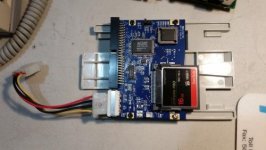
I have a CF card for a hard drive in my Color Classic II. I have the CF card partitioned into 4 hard drives, each a little under 4GBs large. I have installed 7.6 from a apple branded CD on drive #1 and drive # 2. I do no have any OS installed on drive # 3 and # 4. I can move software to drives # 2, 3 and 4. I just can't get the computer to boot to drive # 2.
I can boot to drive #1. When I go to control panel, and to start up disk, I can see my 4 hard drives. I select drive # 2. Then I reboot. No matter what I do, I always boot to drive # 1.
I had this problem in the past. So I switched software that I was using to partition and format my CF card. I switch to Lido 7.5.6. It seemed to work great. I built 4 partitions, and then I installed 7.6 on two of the partitions. I have yet to build up the drives with any other software. And I still have the same problem. I go to start up disk, choose drive # 2 and reboot. It boots to drive # 1.
I have looked at drive # 2 and it seems to be identical to drive # 1. I have booted to the Norton emergency disk and ran a scan on drive # 2 and it could not find any thing wrong. Disk first aid says the drive is fine.
Do I need to do some kind of special magic to boot to another partition?
I can't fugue out what to try next. Suggestions welcome.
Thanks
mraroid
I have a CF card for a hard drive in my Color Classic II. I have the CF card partitioned into 4 hard drives, each a little under 4GBs large. I have installed 7.6 from a apple branded CD on drive #1 and drive # 2. I do no have any OS installed on drive # 3 and # 4. I can move software to drives # 2, 3 and 4. I just can't get the computer to boot to drive # 2.
I can boot to drive #1. When I go to control panel, and to start up disk, I can see my 4 hard drives. I select drive # 2. Then I reboot. No matter what I do, I always boot to drive # 1.
I had this problem in the past. So I switched software that I was using to partition and format my CF card. I switch to Lido 7.5.6. It seemed to work great. I built 4 partitions, and then I installed 7.6 on two of the partitions. I have yet to build up the drives with any other software. And I still have the same problem. I go to start up disk, choose drive # 2 and reboot. It boots to drive # 1.
I have looked at drive # 2 and it seems to be identical to drive # 1. I have booted to the Norton emergency disk and ran a scan on drive # 2 and it could not find any thing wrong. Disk first aid says the drive is fine.
Do I need to do some kind of special magic to boot to another partition?
I can't fugue out what to try next. Suggestions welcome.
Thanks
mraroid