• Hello MLAers! We've re-enabled auto-approval for accounts. If you are still waiting on account approval, please check this thread for more information.

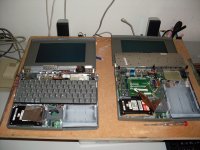
6 PowerBook 100's.... but not one works!

mactjaap

68000
powerbook100.jpg.c12a636ab0ad53f22b2567e0be9e7d28.jpg


I have 6 PowerBook 100's.... All not functioning.

This weekend I tried to make out of all these one which would work....

No succes!! xx(

I tried to combine hard disks and motherboards without any succes.

I heared disk spinning but then stop agian, etc....

Who knows how to handle this bette??. I cannot imagine that out of 6 not one will work!

I also looked at my power. But that gives 7.5 volts as it should.

Where should I start!

hd.jpg.bb0ab4087176dbefa1da0d7a3362d0d5.jpg


IF you have:

PB SCSI <-> DB25 or Centronics 50 Cable

A pair of terminators (one of them pass-through)

SCSI CD-ROM Drive

Boot CD (preferably) OS 7.0.1 and use 7.1 or 7.6 if you don't have 7.0.1.

ADB KBD/Mouse

THEN hook 'em all up and let the testin' begin! }:)

Doing this will be taking most of the wild cards out of play for your troubleshooting sessions.

If you STILL can't get a Combo100 to boot, unhook the KBD, Trackball, HDDs and any modems or RAM upgrades present. Repeat testing, or alternatively, give it a whirl that way right from the start! :approve:

 
OK!

I have a PB SCSI adapter and a 50 to 25 cable.

I could hook it up to a Daynaport SCSI LINK 3 (as a kind of in between adapter to hook all the cables in....not directly to use) and add a external HD with System 7.1 on it. The disk is terminated and now works on a Plus.

Like this:

P100 (PB-SCSI to 50 with female)----------(25 SCSI male)---[DaynaPORT]---(25 SCSI)---------(50 SCSI)------[sC-HD20 with 7.1]

No CD rom unfortunatly. Keybord and mouse no problem.

Will this work also???

 
Sounds like a plan! The instructions say to put an additional Pass-Through Terminator on the end of the PB SCSI Cable, if you have any problems with what you've set up, try that.

Make sure your 7.1 System is installed: For ANY Macintosh! If not, re-install it that way before proceeding.

Use an ADB KBD/Mouse and you're good to go from what I can tell.

The secret to troubleshooting is to eliminate as many variables as possible, isolating your initial testing to "known good" external peripherals, unhooking everything but the Logic Board, LCD and connector ribbon cable between them OUGHT to net you at least one working MLB/Cable/LCD trio to begin scrounging about for working examples of the built in "peripherals" of the BabyPB!

Good luck, trooper! [:D] ]'>

 
Just checking in to see if you've had a chance to try your new testing set up as yet? :?:

I'll bet you're waiting for the weekend, so let me know how if, or how, it works out! :quadra:

 
Just a side note:

ive noticed the PB100 photos you have, there are aluminum electrolytics in there. couple of them whcih dont look too shiny on thier pins anymore.

Might want to investigate.

 
Ok!

I start with this coming weekend.

@techknight

I'm not sure which parts you mean....

Could you add an arrow on the Pictures?

 
As I remember of my PB100 didn't start if there was no main battery inside, even if it was dead, also check the clock batteries, whic can be replaced

 
Interesting point, I'll test mine later to see how those two factors affect the process of troubleshooting. ISTR that those "clock batteries" kept the System Ram alive when BabyPB was shut down and poweredup (the process that normally blows out RAM's contents. IIRC, the PB100 was the first Mac to have a nonvolitile RAMDisk capability.

 
OK!

I start testing NOW....

First one...no luck!

Screen lits up...and I hear the startup sound... but nothing happens...

Keybord and trackball are detached and external attched...and a pass true SCSI terminator is in place.

Also a battery in the PB....

Next!

 
GRRRRRRRRRRRRRRRR!!!!!!!!!!!!

Absolute and total failure.

2 are dead as a dodo.... and four will lit up a litle...but nothing happens...

Only thing I can think of now is a power failure in both of my adapters... but I guess I'm running out of options!

xx( xx( xx( xx( xx( xx(

 
The best thing to do in situations like this, is do one thing at a time.

Take the machine that appears "the most alive" and work with that.

 
GRRRRRRRRRRRRRRRR!!!!!!!!!!!!
Absolute and total failure.

2 are dead as a dodo.... and four will lit up a litle...but nothing happens...

Only thing I can think of now is a power failure in both of my adapters... but I guess I'm running out of options!

xx( xx( xx( xx( xx( xx(
I would suggest taking the main battery from the one that lights up and put it into the 2 dead ones. Perhaps they have completely dead batteries. It might work!

 
@technight

Thanks for the excelent advice added to the picture! If these parts are broken..then I understand that everything will fail!

I didn't do much with a soldering iron but maybe this is a good start. The PowerBook are lost anyway.... If will see if they all are bad on al the boards.

 
if the solder joints on the SMD electrolytics look tarnished, as they do in the pictures, they are bad and will need replaced.

If you dont want to tackle this, there may be someone in the forum who would for a small fee

 
BIG SUCCES!!!!!! 8-)

One of my PowerBook 100 is back from the grave!

Nothing worked but I couldn't give up....

I know from some electrical parts that they work better if the temprature is right ...so I got my wifes hairdrayer and heated the MB a little bit... And...yes! I had a blinking floppy.

Now I'm testing HD's and found one to work!

YES YES YES!!!

Will post some pictures later.

Booting from the external SCSI disk didn't work. I got a walking SCSI sign with number 6 and sometimes number 1 in my screen. This stayed also so if I detached the HD but left the adapter in the PowerBook.

 
Back
Top