550MHz G4 PowerBook (Pismo vs Titanium)

A 7448 should work fine (or better) anywhere that a 7447 can, but I don't know where to get them. New 7447 chips are for sale on ebay.

Amazingly, documents like this are available, even today:

www.nxp.com/docs/en/application-note/AN1812.pdf

In there you can see that pin-compatible chips are not necessarily interchangeable. The Pismo is the only G3 machine I have for testing, and it seems to be a transitional example because it has correct configuration connections in place to easily take a G3 or G4 in 60x or MPX bus mode. I would guess that earlier G3's potentially have more problems. I think a 7447 working in a G3 machine that can be tested in either bus mode would be a step towards upgrading earlier versions that did not already anticipate G4 chips.

Your idea about putting a G3 into a Gigabit Ethernet might be another way to test things. I suspect it would work and firmware patchers exist for these machines. So testing a 7447 in 60x mode installed on 7400 pads in a Gigabit Ethernet could show the feasibility of doing something similar for earlier machines.

 
If the titanium is basically a Pismo why is it so much more unreliable and problematic?
Are they? The only logic-related fault I'm aware of on Titaniums is, on 867/1000s, the L3 failing - and that happens to AlBooks as well, so...

Construction is crappy, but so is the Pismo's.
 
Are they? The only logic-related fault I'm aware of on Titaniums is, on 867/1000s, the L3 failing - and that happens to AlBooks as well, so...

Construction is crappy, but so is the Pismo's.
If the titanium is basically a Pismo why is it so much more unreliable and problematic?
I have half a dozen of each of the four generations of TiBooks. They are all largely problem free, except for five of the six second generation TiBooks (VGA+gigabit, 550 and 667MHz).

In addition to the terrible appearance from 3/4 of the paint flaking off the frame, they either won’t boot reliably (or at all), or crash so frequently as to be unusable.

I don’t know what cost-cutting measures led to such an awful generation, but they seemed to have sorted them out for the next two.
 
In addition to the terrible appearance from 3/4 of the paint flaking off the frame, they either won’t boot reliably (or at all), or crash so frequently as to be unusable.
All of mine (400, 550, 867, 1000) have bad paint. The 400 and 550 have bad hinges and bad polarizer too, are in pieces and might end up scrapped. The 1000 has bad L3. That said, they all boot fine.
 
I think some of the reported L3 issues are firmware or power-saving related. Maybe some of the firmware experts could figure out the details of what it's doing, but I think the later Titaniums would turn off L3 when on battery, or when in "reduced" performance mode. The CPU speed and voltage could also change on the fly (and this was before DFS). I read one account where you had to have a good battery and external power plugged in to get full speed from the machine.

I've also read that Sonnet did 7457 upgrades on these, so running their patcher might sort out some of the firmware weirdness on stock computers too? Or maybe their firmware mods for the upgrade were only available in-house...
 
I've also read that Sonnet did 7457 upgrades on these, so running their patcher might sort out some of the firmware weirdness on stock computers too? Or maybe their firmware mods for the upgrade were only available in-house...
for what its worth, I think the commonly available Sonnet Firmware patcher does support the GigE TiBook that they offered a 7457 Mail in upgrade service on, as a long time ago I was poking around the Sonnet firmware patcher and I noticed mention of 4.2.9 firmware, which is the TiBook GigE :)
 
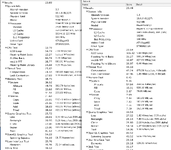
I've been using the Pismo for a while now with the 1GHz 750G CPU installed. It's pretty snappy, but I thinkfor some things the 550MHz 7410 that I had before was better. To list the main Pros of each from what I've seen..

G3: fast clock, fast on-chip 1MB cache
G4: 3x faster RAM, altivec

So which is the better upgrade? If the original CPU is good then 750G is just more of a good thing, but some software runs better on the G4, or might even require it. I've noticed some OpenGL problems on the G3, that might be related to the drivers expecting a G4.

PismoCPUs.png
 
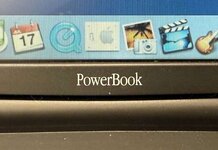
I've been using the Pismo some more, and I think it may be the only PowerBook. The earlier ones were "PowerBook G3" and the later ones were "PowerBook G4." Maybe they didn't know which it would be until the last minute.

PowerBook.jpg
 
I think by the time they were launching the Pismo, having a G3 wasn't much to brag about anymore. They had just launched the Power Mac G4 a year earlier, and probably didn't want to market the Pismo under a name that sounded last-gen.
 
I think by the time they were launching the Pismo, having a G3 wasn't much to brag about anymore. They had just launched the Power Mac G4 a year earlier, and probably didn't want to market the Pismo under a name that sounded last-gen.
Hmmm, you say this, but I remember being part of the 2002 Manchester Commonwealth Games choir and seeing the BBC use a Pismo (or another G3 PowerBook) to edit our takes for Songs of Praise. Quite odd really: it was shot outside (1 cam) and the G3 was under a small gazebo frantically being used to stitch it all together.

But this was the ever frugal BBC, the previous year the editor was probably using a BBC model B; a couple of Betamax decks & a hand assembled edit list ;-) !
 
Hmmm, you say this, but I remember being part of the 2002 Manchester Commonwealth Games choir and seeing the BBC use a Pismo (or another G3 PowerBook) to edit our takes for Songs of Praise. Quite odd really: it was shot outside (1 cam) and the G3 was under a small gazebo frantically being used to stitch it all together.

But this was the ever frugal BBC, the previous year the editor was probably using a BBC model B; a couple of Betamax decks & a hand assembled edit list ;-) !
One of my Beige G3's was used for editing BBC Radio 4 programs. It had a DigiDesign AudioMedia III and a Sonnet 1GHz G4 in it... And ProTools files of a radio program about the Beetles
 
IIRC, you need to run the Pismo in something like closed lid clamshell mode(?) to unify the VRAM in order to get a max 1600x1200x24bit out onto an external screen. Never got the kid's TI up and running, how does it compare to the Pismo in terms of VRAM, video subsystem and what it can throw on internal/external displays?

How do the TI and AL compare in terms of graphics subsystem. Kiddo's 12" ALBook is set up as my 9.2.2 Illustrator workstation until I get the MDD/FW400 up and running. PowerBook 3,5 1GHz is rocking 1280x845@24bit natively and running a 1080p screen at 24bit as well.

For me, it's all about screen real estate for graphics and spreadsheet work, Pismo never really cut it in that department.

Me LOVES hand me ups!
 
One of my Beige G3's was used for editing BBC Radio 4 programs. It had a DigiDesign AudioMedia III and a Sonnet 1GHz G4 in it... And ProTools files of a radio program about the Beetles
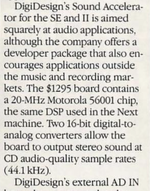
It's interesting how computers that were once awesome media editing systems are later inadequate for even the simplest of tasks. ProTools itself started out as DigiDesign's Sound Designer for, I guess, the Mac 512; with which you could edit sounds from early Sampling keyboards rather like a Fairlight (which ran on a 6800, 8-bit CPU with a mere 128kB of sample memory [16kB per voice] and, I understand, no more than 64kB of System RAM).

Admittedly, it took a decade for it to become a decent standalone DAW, significantly later than the Fairlight III and Synclavier.
 
Admittedly, it took a decade for it to become a decent standalone DAW
Hard disk speeds. CD quality stereo is about 10MB/minute. You need 150kB/second write speeds, which sounds easy enough, but it CAN NOT DROP under that, especially if you don't have a big buffer. Some disks used to do housekeeping and it would cause dropped samples and ruin a recording.

Early straight to disk DigiDesign systems sometimes had SCSI onboard the card (not the port on the back - that just happens to use a SCSI-2 style connector). As well as all sorts of expensive fun like DSPs.
 
Hard disk speeds. CD quality stereo is about 10MB/minute. You need 150kB/second write speeds, which sounds easy enough, but it CAN NOT DROP under that, especially if you don't have a big buffer. Some disks used to do housekeeping and it would cause dropped samples and ruin a recording.

Early straight to disk DigiDesign systems sometimes had SCSI onboard the card (not the port on the back - that just happens to use a SCSI-2 style connector). As well as all sorts of expensive fun like DSPs.
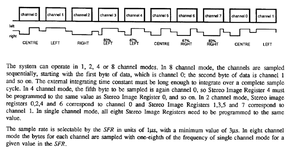
Yes, it's the bandwidth that governs it, particularly bandwidth to disks. Then on top of that one needs numerous DSPs (in DigiDesign's case, Motorola 56001 series). But DSPs themselves are basically high-bandwidth CPUs. And one needs the corresponding memory bandwidth.

44.1kSamples/s x 16-bit x stereo is 176.4kB/s. If we have 16 tracks, that's 2.8MB/s. So, if one wanted simply to achieve that in the 1980s you'd probably need a couple of SCSI drives per track operating in parallel and 32 SCSI drives. So, maybe the earliest Mac that could do that would be a Mac II (or IIx) upon which you fill the 6 slots with: 1x video card; 4x SCSI cards each with 2x external SCSI ports each controlling 2x SCSI drives and an audio in/out card. Then you'd need a Master keyboard MIDI'd up by the serial port. NuBus had a 10MHz bus with a typical 20MB/s bandwidth, so I think that takes care of the bandwidth, but if I was designing it I'd probably stick DSPs on the SCSI cards for pre-processing and DSPs on the audio cards too for mixing and post-processing. And I'd scrap using HFS on the SCSI drives; instead I'd just use raw tracks and sectors for maximum performance.

But in any case it already looks (a) very expensive and (b) very much like an early DigiDesign system.

Because this kind of bandwidth is easily available today, we forget what a struggle it was to achieve that in the late 1980s and early 1990s. I guess people imagine that because an Amiga could manage 4x 8-bit sampled audio in hardware or that because the Ensoniq Mirage in 1985 could manage 8x 8-bit sampled audio, that it couldn't have been too hard. And for short, crunchy sampling that's true. You just can't create production audio that way.

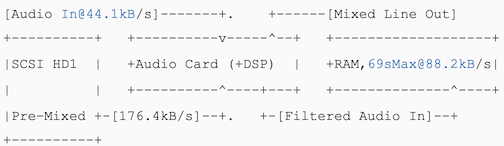
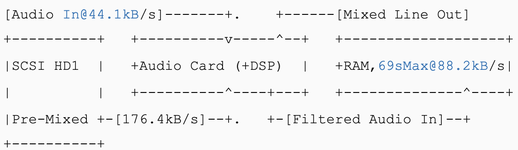
However.. if one is willing to compromise on real-time behaviour you can get the bandwidth down a lot by doing the digital equivalent of 'bouncing' tracks and then we only need 176.4kB/s. Here, all the original tracks are stored on disks. Then, let's say you want to edit a section of audio between t1 and t2. So, you pre-process that audio in non-real time, writing it back to a temporary stereo track. Then you could play that section of audio while you add or punch in your new recording track, which you stick in RAM. So, a Mac II in the 1980s could only support 8MB of RAM and perhaps only 6MB might be free for audio (800kB System 6 + 1.2MB for resident app). So, that's 35s. But if you stretch your definition of stereo, you could store mono tracks and panning separately (e.g. as MIDI data), then you'd get 70s. Or you could stick 8MB on a NuBus card and use that directly (162s, 2:42 minutes) and that's probably enough for most audio. Also, if your output audio is only 16-bits and you have up to 16 tracks then one could be a bit naughty and only store 12-bit audio per track, or 16/log2(tracks) bits. Then you get 33% more, so our 70s becomes 93s and our 2:42 becomes 3:35, which is a short-ish single.

But I digress a little ;) !
 
If we have 16 tracks, that's 2.8MB/s. So, if one wanted simply to achieve that in the 1980s you'd probably need a couple of SCSI drives per track operating in parallel and 32 SCSI drives. So, maybe the earliest Mac that could do that would be a Mac II (or IIx) upon which you fill the 6 slots with: 1x video card; 4x SCSI cards each with 2x external SCSI ports each controlling 2x SCSI drives and an audio in/out card. Then you'd need a Master keyboard MIDI'd up by the serial port. NuBus had a 10MHz bus with a typical 20MB/s bandwidth, so I think that takes care of the bandwidth, but if I was designing it I'd probably stick DSPs on the SCSI cards for pre-processing and DSPs on the audio cards too for mixing and post-processing. And I'd scrap using HFS on the SCSI drives; instead I'd just use raw tracks and sectors for maximum performance.
Hum, that sounds a little much for the Mac II era. The external ProTools boxes are usuall 4 channel max on the older stuff. I would anticipate that if you wanted 16 tracks you'd be either building it up in multiple passes, or using tape as your recording medium and transfering to the computer only for specific editing... Unless you were really high end and had multiple computers synced.
 
Back
Top