
Travel adaptor didn't work either. I swear it turned on for a split second but then decided to stop. Hm. Any advice?

-
 Hello Guest! We're hosting a challenge to welcome vintage Intel macs to the MLA during the month of July! See this thread for more information.
 -
We've made some quality of life improvements to the Trading Post. More info here.
You are using an out of date browser. It may not display this or other websites correctly.
You should upgrade or use an alternative browser.
You should upgrade or use an alternative browser.
512k Mac Power Cable?
- Thread starter vickersvimy
- Start date


Can you post a photo of the travel adapter showing its specifications? If it's not a converter or transformer it would have supplied the Mac with 230v mains power, potentially damaging the Mac or blowing a fuse inside. That might explain the "split second" power on.
Last edited by a moderator:
I'm pretty sure the fuse did blow since I assumed it had turned on from a sound I heard coming from it. So I have a feeling that I'll have to get a proper transformer. No PRAM battery either which is a pain.Can you post a photo of the travel adapter showing its specifications? If it's not a converter or transformer it would have supplied the Mac with 230v mains power, potentially damaging the Mac or blowing a fuse inside. That might explain the "split second" power on.
If the Mac is damaged is it fixable?


Normally the fuse is supposed to prevent further damage to the analog board and its CRT as well as the logic board. Sometimes power surges damage everything.
But if you didn't smell any smoke coming from the cabinet, it's probably just the fuse. And it's an easy fix. I don't know the specs but I think the fuse itself won't be damaged enough, you'll be able to read what's written on it.
Do you have the tools to take the back cover off?
But if you didn't smell any smoke coming from the cabinet, it's probably just the fuse. And it's an easy fix. I don't know the specs but I think the fuse itself won't be damaged enough, you'll be able to read what's written on it.
Do you have the tools to take the back cover off?
The fuse in the Mac or in the adaptor?Normally the fuse is supposed to prevent further damage to the analog board and its CRT as well as the logic board. Sometimes power surges damage everything.
But if you didn't smell any smoke coming from the cabinet, it's probably just the fuse. And it's an easy fix. I don't know the specs but I think the fuse itself won't be damaged enough, you'll be able to read what's written on it.
Do you have the tools to take the back cover off?
Mac
Let's get it going first. The 512k doesn't need a battery at all to startup (unlike the Mac II). It's only there to maintain proper date & time. And it's probably dead anyway. Take it off before it starts dribbling on the contacts.Also should I buy a PRAM battery for it?
What you should do first is test your transformer. Do you have a Multimeter?
plug your US cable to it and it to the wall. Switch it on. Set the Multimeter accordingly to the output voltage (here 110V). Insert the prongs inside the two holes of the power cable (technically that's Mac side). You multimeter should read 110V. If not you'll know that the step-down transformer is faulty.
If it does indicate 110V, then the transformer is good. Something is wrong inside the Mac.
On the Analog board, (that's the board that acts as the power supply and CRT circuitry), you have a fuse. That's the board you could have replaced to convert it to 220V. It's the vertical one, to the left of the cabinet when looking from the front. It looks like this.
To take the cover off, you need a very long Torx T15 screwdriver. There are 5 screws in total. 2 in the handle, 2 near the ports and one hidden behind the battery cover. Once you're in there you must be careful not to touch the anode cap or the flyback transformer. These can contain up to 30,000 volts!
Since you have a 512k and not a very late Mac Plus, this flyback transformer does not have a bleeder built-in so it won't drain the volts from the CRT. It's better to leave it unplugged for at least a week before tinkering with it.
The fuse is labeled F1 and is towards the right hand side of the board, at the same height as the speaker. It's near the power socket. It's probably burnt.
Luckily it didn't come with a PRAM battery. Battery compartment seems pretty clean too.Let's get it going first. The 512k doesn't need a battery at all to startup (unlike the Mac II). It's only there to maintain proper date & time. And it's probably dead anyway. Take it off before it starts dribbling on the contacts.
Unfortunately I don't have a Multimeter. I think that the transformer is broken though as no other applications would work with it either.What you should do first is test your transformer. Do you have a Multimeter?
plug your US cable to it and it to the wall. Switch it on. Set the Multimeter accordingly to the output voltage (here 110V). Insert the prongs inside the two holes of the power cable (technically that's Mac side). You multimeter should read 110V. If not you'll know that the step-down transformer is faulty.
If it does indicate 110V, then the transformer is good. Something is wrong inside the Mac.
Thanks :beige: I'll try it if changing the converter won't work. Hopefully it is just the transformer as that'll make it easier.On the Analog board, (that's the board that acts as the power supply and CRT circuitry), you have a fuse. That's the board you could have replaced to convert it to 220V. It's the vertical one, to the left of the cabinet when looking from the front. It looks like this.
To take the cover off, you need a very long Torx T15 screwdriver. There are 5 screws in total. 2 in the handle, 2 near the ports and one hidden behind the battery cover. Once you're in there you must be careful not to touch the anode cap or the flyback transformer. These can contain up to 30,000 volts!
Since you have a 512k and not a very late Mac Plus, this flyback transformer does not have a bleeder built-in so it won't drain the volts from the CRT. It's better to leave it unplugged for at least a week before tinkering with it.
The fuse is labeled F1 and is towards the right hand side of the board, at the same height as the speaker. It's near the power socket. It's probably burnt.
I definitely recommend getting a multimeter as it will make troubleshooting much easier. A very basic unit that has AC and DC voltage, ohms/continuity would prove useful and should be very affordable. I can't believe how cheap this one is: https://www.amazon.co.uk/gp/aw/d/B01D8306V8
With the Mac unplugged and the power switch on, you could measure ohms across the hot and neutral prongs on the power cord. (The two rectangular blades, not the round grounding pin) If there's any continuity, the mains fuse inside the Mac isn't blown.
With the Mac unplugged and the power switch on, you could measure ohms across the hot and neutral prongs on the power cord. (The two rectangular blades, not the round grounding pin) If there's any continuity, the mains fuse inside the Mac isn't blown.
Last edited by a moderator:

Agreed... if you're going to be doing hardware troubleshooting and repair inside the Mac, a basic multimeter is practically a must-have.
So looks like the converter thingamajig wasn't the problem. Will try and check if the fuse in the Mac is fine etc. Also, the kettle lead from the Mac doesn't seem to fit all the way in, it seems to slightly hang out. Could the power cable be the problem?
Last edited by a moderator:
If the fuse isn't the problem then is it just broken? I haven't checked it yet but if that is the case would it be repairable?
Last edited by a moderator:
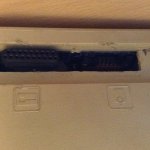
By the way, how the heck would I fix this back part? Whoever had it last decided to remove the mouse port...
Similar threads

- Replies
- 0
- Views
- 94


