
-
 Hello Guest! We're hosting a challenge to welcome vintage Intel macs to the MLA during the month of July! See this thread for more information.
 -
We've made some quality of life improvements to the Trading Post. More info here.
You are using an out of date browser. It may not display this or other websites correctly.
You should upgrade or use an alternative browser.
You should upgrade or use an alternative browser.
512k Hyperdrive Gamble on eBay
- Thread starter snuci
- Start date

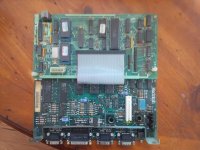
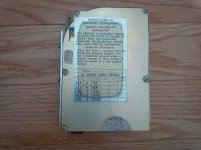
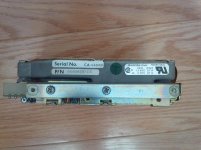

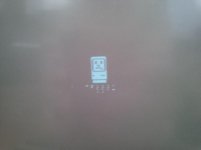
Okay, turns out this was a bad power cable. It does boot up but I got a sad mac. The problem is that I also have a very dim screen which could be caused by the brightness knob being in line with the battery damage. There's also some noise that comes out of the speaker. Hard drive spins up at least. I think I'll have to work on this a little more.
The other package that came in was... another HyperDrive. This one I bought on Craigslist prior to the eBay one. I actually messaged JDW about this because it looked earlier from the "less than stellar" pictures posted. More info to come.
The other package that came in was... another HyperDrive. This one I bought on Craigslist prior to the eBay one. I actually messaged JDW about this because it looked earlier from the "less than stellar" pictures posted. More info to come.
Last edited by a moderator:


So, here's Macintosh 512k HyperDrive 10 (unit #2). This one is in fantastic shape internally. I only needed to open up to check it and didn't take it apart. It is one of the early ones like JDW has except mine has both front and rear stickers.
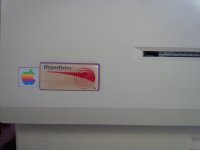
Front Nameplate:
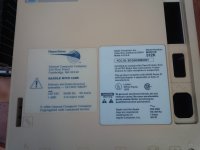
Rear Nameplate:
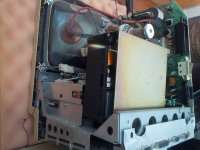
Back bucket removed:
Booted from hard drive (floppy was stuck and went to ? then booted from Hard drive)
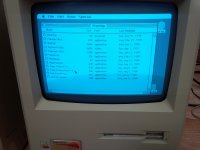
I could confirm that the drawer that was open was a HyperDrive drawer and not the floppy.
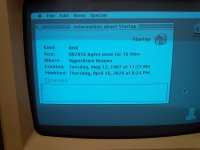
Doing a "Shutdown" just boots it again so at some point you just have to turn the switch off while at the desktop. The floppy did boot once and the HyperDrive was not there because the driver did not load.
Needless to say, I'm happy with unit#2 and have a project with unit#1.
Front Nameplate:
Rear Nameplate:
Back bucket removed:
Booted from hard drive (floppy was stuck and went to ? then booted from Hard drive)
I could confirm that the drawer that was open was a HyperDrive drawer and not the floppy.
Doing a "Shutdown" just boots it again so at some point you just have to turn the switch off while at the desktop. The floppy did boot once and the HyperDrive was not there because the driver did not load.
Needless to say, I'm happy with unit#2 and have a project with unit#1.

Re: the Miniscribe; it seems to use the very-common-for-20MB-MFM-drives 615/17/4 geometry. (It's sad that I still remember that was PC/AT BIOS drive type #2.) The most common drive with those specs is the Seagate ST-225 but obviously an actual ST-225 won't fit in the case, being a 5 1/4 inch drive; however it would seem in theory at least you could substitute a few other drives, like the Segate ST-124 or ST-4026, without having to modify the driver/formatting software.
Granted, it's not like *any* MFM drives, let alone specific 3.5 inch ones, are exactly easy to find in working order anymore, but the fact that it's a common geometry makes it slightly less hopeless.
Granted, it's not like *any* MFM drives, let alone specific 3.5 inch ones, are exactly easy to find in working order anymore, but the fact that it's a common geometry makes it slightly less hopeless.


As far as I have read, this HyperDrive upgrade was for 128k and 512k Macs only. The 128k version included memory to increase it to 512k plus the 512k hard drive upgrade. The Mac Plus, having a SCSI port would not need this so GCC came up with the external HyperDrive FX/20 for that model and up.Does the Hyperdrive work on any model from 128k to Plus? Or are they specific to a 128k, 512k, or Plus?
Sorry to confuse matters with two units in one thread. The Unit#2 had a different drive in it. I would assume it's an MMI 10MB drive (like JDW has in his) as opposed to the unit#1 having the 20MB MiniScribe drive. In any case, it is weird that they still included the faceplate in the 10MB version. I would assume that drive part itself would have cost s small fortune so they didn't bother touching it when it came from the manufacturer. Nobody was ever supposed to see it anywayIn unit#2, I find it cool/funny/odd that the miniscribe is installed with the faceplate for a black faced PC or something similar.

I've seen internal "HardCard" setups for PCs that had a plastic faceplate on them so it's not particularly odd. On some of those drives the plate is actually riveted on. I'm sure the manufacturer would be happy to sell plate-less ones to an OEM but they might cost more than just getting standard beplated ones through a distributor.

I actually think it's cool. It even has the integrated LED's and all. I like seeing those old beasts as they all remind me of my ancient XT clone, and when my uncle gave us a CD-rom kit for it (we didn't bother with that) but it came with at least 10 different faceplates, black, tan, gray, etc. and matching drive blanks (I'm guessing if you replace a full height floppy).
also, snuci, make sure you back up that Hyperdrive driver on #2 so you don't have to look for one later if that drive doesn't last or you want to format it.
also, snuci, make sure you back up that Hyperdrive driver on #2 so you don't have to look for one later if that drive doesn't last or you want to format it.

I would grab some disks and back up that hyperdrive, so WHEN the drive fails you dont loose the drivers!
Last edited by a moderator:
Thanks for the reminder to back it up. It's great advise. Th computer came with the original system floppies and an old school Ten Disk floppy box with floppies including the HyperDrive drivers and a backup of the drive. To be sure I have it, I will back it up and see if I can make a boot disk with the HyperDrive driver on it. A later rev of the HyperDrive installer looks like it's at the Mac Driver Museum at http://www.vintageapple.org/macdrivers/disk.shtml under GCC Technologies just in case as well.


Took apart the HyperDrive 20 (unit #1) and cleaned it up a bit more. I fired it up and got the startup bong and a flashing ? icon. Progress! While the drive spins, it's not booting from the hard drive and the floppy drive won't in a disk so I'll have to clean up the floppy drive first.
I won't be able to get to it until tomorrow but I wonder if I need any special software to try to reformat the drive. Would anyone have any idea on where I might find the drive formatting software? My other HyperDrive doesn't have it, I don't think.
Thanks for any help.
I won't be able to get to it until tomorrow but I wonder if I need any special software to try to reformat the drive. Would anyone have any idea on where I might find the drive formatting software? My other HyperDrive doesn't have it, I don't think.
Thanks for any help.
Similar threads


- Replies
- 2
- Views
- 1K


- Replies
- 3
- Views
- 454


