


• Hello MLAers! We've re-enabled auto-approval for accounts. If you are still waiting on account approval, please check this thread for more information.

4Mb RAM on SE Superdrive and System 7.0.1

Hello everyone, I have a SE Superdrive, 4mb RAM, 40mb HD and System T1-7.0.1
Everything works fine but, In your opinion, is it normal that at startup the maximum available RAM is 3100Kb (System 987kb)?
Is there a way to increase it by freeing up space?
I read that 7.0.1 is too 'heavy' and it would be better to have a 6.x.
Can I downgrade? Will I improve the performance of my MAC?
Be patient, I'm a PC guy!
ThanksIMG_2764.jpg
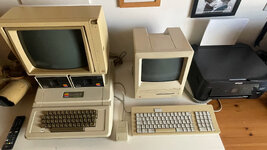
 
Hello!

That sounds about right to me, purely on handwave. System 7 is indeed a bit heavy for these machines, in my opinion, and I run 6 on mine.

You an absolutely up and down-grade as you want to, or even dual-boot using software like System Picker. You will however lose quite a lot of features; System 7 was a major feature upgrade, which is why it uses so much more RAM than previous iterations of the System.

Do you currently have a way of getting files on and off your Mac?
 
On the garden somewhere there's a collection of internationalised System 6 versions in one big archive. I realise that's not very helpful without a link but it does exist. If you can't find it, I can post my copy of it...
 
On the garden somewhere there's a collection of internationalised System 6 versions in one big archive. I realise that's not very helpful without a link but it does exist. If you can't find it, I can post my copy of it...
Trivial question: even I have an Italian version of the keyboard and the System 7 in Italian, can I install an English version while continuing to use the same keyboard? Is there a way to change the keyboard layout from the operating system? I guess so...
 
Thanks, I'll try with a System 6!
Every so often I keep trying System 6, but I find it a bit clunky compared with System 7. Having said that I've just been trying it on miniVMac just now and it seems to be better than I remembered. Somehow I had thought that System 6 didn't switch applications simply by clicking on a different application's window, but it does. Also, I used to find the way clicking on the MultiFinder icon at the top right cycled through applications worse than System 7's Application menu on the right where you could select any one of the available applications without having to cycle through them. However, System 6's Apple menu has the list of open applications too.

System 6 doesn't support Virtual Memory, but that doesn't matter on a 68000 Mac as it has no MMU. System 6 looks a lot flatter on a Colour Mac, but that doesn't matter on a 1bpp Mac. I think then, the only things I'd miss are peer-to-peer Personal File Sharing over AppleTalk and file Aliases (short-cuts, aka links). I used them a lot on System 7 so that I could keep applications where they belonged, in their own application folder while also having direct access to them via a Desktop alias. I would also miss BeHierarchic. I suspect @cheesestraws might know of ways to provide Aliases on System 6 and BeHierarchic too!

Then I'll have far less of an excuse not to downgrade ;-) .
 
There were entire conversion packs back in the day to make System 6 look like System 7. Bad news is, they were less stable and more memory consuming than just upgrading to System 7. Good news is, you could pick and choose the features you wanted to use and ignore the rest.
 
It is a bit clunky compared with System 7. That's why it uses a lot less RAM and CPU cycles ;-).
LOL! Perhaps "clunky" was a bit unfair of me. System 6 isn't clunky in the same way that I find Atari ST TOS clunky, or Windows 3.1 (and to an extent Windows 95) clunky, or Sun OS 4 clunky. In these GUIs you have to make a special effort to make it do what you intend. For example, on TOS you need to be careful not to stray into the menu bar or menus start popping down all over the place. Or when you resize a window you have to hold the button in the resize box until the dotted lines appear. Or on Win 3.1 you're having to carefully grab the edges of windows to resize them or wrestle with the obsession with recursively nested windows.

System 6 isn't like that, it's intuitive for what it does. I think perhaps a better phrase might be austere. On a BW Mac (or even on an LC) it's close enough to the look and feel of System 7 to keep fooling me into thinking it has all its features, so I keep smacking against features it doesn't have or expect them in the wrong place. Find File is a bit clunky though and the Multifinder icon isn't as cute as the one on System 7.
 
In my experience there is not much aside from networking that justifies the System 7 performance hit on a 68000. StickyClick and a couple other extensions make System 6 pretty nice to use.

When I had LC & LCII machines hanging around I would usually run 6.0.8L on those too. Makes them feel like a rocket ship.
 
LOL! Perhaps "clunky" was a bit unfair of me.

I think "clunkier" is fairly reasonable - there are lots of things that are less polished in 6 than 7. But polishing is one of those 80/20 things where 20 percent of the effect requires 80 percent of the work and other resources. So by that same token it is less resource hungry.
 
Back
Top
