• Hello MLAers! We've re-enabled auto-approval for accounts. If you are still waiting on account approval, please check this thread for more information.

3 floppy drives that write, but don't read.

olePigeon

68040
I have 3 floppy drives that will write to a floppy, but can't read a floppy.  I can initialize disks, but it will always fail when to goes to verify.

Any idea what's going on?  How I can troubleshoot it?  I've tried scrubbing the heads with alcohol and a qtip.  On one of them I got it to read once.  It'd read 800k floppies, but when I stick in a 1.4MB floppy, it'd ask to format it as single sided or double sided.  It's a Sony 2MB drive (says so on the sticker.)

Thanks

 
Last edited by a moderator:
The formatting process is fairly blind until verification. So don' assume that its really formatting. It may be trashing the floppy.

What machine? What drives?

 
SE/30.  Standard Sony 2MB drives that ship with them.  I'm going through a bunch of floppy drives and testing them.  I've restored 3 or 4, but I almost have equally as many that don't work.  Was hoping to get them working.  They're all from that huge lot I'm storing from a couple years ago.  I'm working my way through the machines, and I've decided to concentrate on just floppy drives at the moment.

 
Last edited by a moderator:
Thats a little odd with the 2MB ones. I have very few bad ones. 800k on the other hand always need adjustments and are problematic. If you are testing them on the same system, I would be wary of a bad burns filter or something. One that is maybe a little sensitive and throwing off your results.

 
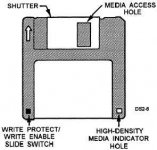
Hmmmm! Does the IIci ask you if it's single or double sided too? If so, the DD/HD density index switch on the drives is likely stuck in the engaged position and the drive reports everything is double density (800k double sided, 400k single sided) to the system. The 1.4MB disks probably aren't taking to the wrong formatting, giving you the error. This would explain why the drives are reading 800k disks okay.

 
Why, yes it does!  Any idea where the switch is?  Maybe how I can manually toggle it?  Is it one of the pegs near the front of the floppy drive?

 
Last edited by a moderator:
Looking at the front of the drive, it's the right hand peg. The left switch picks up the write protect tab position.

14091_262_1.jpg

 
Last edited by a moderator:
Haha this just reminded me of using a LiteBrite peg to fix the broken interlock switch on my childhood CD player.

 
I dunno.  Something's still not right.  I stick a known good 800K disk in it, and it says it's damaged and needs to be formatted.  I stick a 1.4MB floppy and it thinks it's an 800K floppy and asks to format it.

 
Check the heads. They should be slightly domed with no gap showing, with a tiny flat spot at the gap.  

if they are worn flat, and the head gap is starting to open up, theres your problem.

 
Last edited by a moderator:
Back
Top