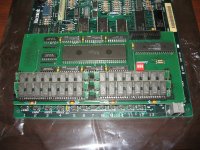
I have a 128K Macintosh that I have had since new. Some time in the late 1980s I had it modified--added RAM (expanded to 512K ?) and added SCSI--I think. I haven't used it since the early 1990s and it has been in storage since then.
After reading postings in this forum about compact Macs, I realized it might have battery and capacitor leakage problems that should be addressed.
So yesterday I pulled it out of storage to begin the inspection process.
The battery was luckily leak-free but measured only 2.2v--so that has been discarded.
For the motherboard inspection, I disconnected the floppy drive ribbon cable and the wire bundle from the analog board. Then I attempted to slide out the motherboard but ran into obstructions due to a secondary circuit board that sits about 1/2" above the motherboard. I can't get a real clear view of this secondary circuit board but I can see that it has some RAM in slots and a connector for a ribbon cable that runs out to another connector that mounts over the battery compartment--this is for the SCSI connection--I think.
Because of the motherboard's extra height due to the secondary circuit board with the RAM and SCSI connector protruding above that, the RAM and SCSI connector contact the converging plane of sheet metal frame that sits above it. First of all, I removed the SCSI ribbon cable from the secondary circuit board. Then I was able to deflect the secondary circuit board just enough to overcome the contact with the board-mounted SCSI connector and slide the motherboard out a little farther. Then the RAM contacted the same part of the frame. Again, I was able to deflect the circuit board enough to clear the contact and slide out the motherboard a little more.
But now both the RAM and the SCSI connector seem to be contacting the converging frame, preventing the motherboard from sliding out any farther. Things seem wedged in pretty tight right now. I'm not sure I can safely deflect this circuit board anymore.
If this was a common modification to the 128K, maybe someone here has seen this problem before.
Is there a better way to ease this motherboard out of the frame or does it just take brute force?
Thanks
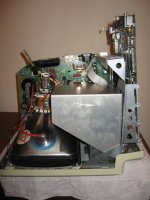
After reading postings in this forum about compact Macs, I realized it might have battery and capacitor leakage problems that should be addressed.
So yesterday I pulled it out of storage to begin the inspection process.
The battery was luckily leak-free but measured only 2.2v--so that has been discarded.
For the motherboard inspection, I disconnected the floppy drive ribbon cable and the wire bundle from the analog board. Then I attempted to slide out the motherboard but ran into obstructions due to a secondary circuit board that sits about 1/2" above the motherboard. I can't get a real clear view of this secondary circuit board but I can see that it has some RAM in slots and a connector for a ribbon cable that runs out to another connector that mounts over the battery compartment--this is for the SCSI connection--I think.
Because of the motherboard's extra height due to the secondary circuit board with the RAM and SCSI connector protruding above that, the RAM and SCSI connector contact the converging plane of sheet metal frame that sits above it. First of all, I removed the SCSI ribbon cable from the secondary circuit board. Then I was able to deflect the secondary circuit board just enough to overcome the contact with the board-mounted SCSI connector and slide the motherboard out a little farther. Then the RAM contacted the same part of the frame. Again, I was able to deflect the circuit board enough to clear the contact and slide out the motherboard a little more.
But now both the RAM and the SCSI connector seem to be contacting the converging frame, preventing the motherboard from sliding out any farther. Things seem wedged in pretty tight right now. I'm not sure I can safely deflect this circuit board anymore.
If this was a common modification to the 128K, maybe someone here has seen this problem before.
Is there a better way to ease this motherboard out of the frame or does it just take brute force?
Thanks